Punchh API Security Guidelines
Summary
These guidelines are intended to clarify onboarding procedures for all partners and customers that Punchh integrates with. The guidelines are mainly targeted at ensuring consistency across all partners to maintain an effective security posture and high availability of the Punchh API endpoints.
Due to the nature of hosting public infrastructure, attacks on the Punchh infrastructure do occur from time to time but there are steps we can take to reduce our exposure or block access by using whitelisting or other techniques. This document will outline our recommendations for reducing exposure to cyber attacks and delineate responsibility for certain security matters.
This document applies to:
1. New partners and customers looking to integrate Punchh APIs for the first time
2. Partners and customers using mobile apps or websites that consume Punchh mobile or online ordering APIs
These guidelines do not apply to POS (Point of Sale) integrations.
Getting Started
Any third party interested in consuming or integrating mobile apps or websites with Punchh services should follow these steps to get started.
1. Read What API Endpoints Should I Be Using? to determine which endpoints to base your integration on.
2. Determine the security controls and settings that are appropriate to your integration and deploy these on any public facing infrastructure.
3. If operating infrastructure, ensure that the true client IP is passed through to Punchh (refer to Punchh Web & API Integration Endpoints).
4. Test your integration and simulate a security incident using our sandbox environment.
What API Endpoints Should I Be Using?
There are two distinct architectures for third-parties looking to integrate Punchh API services, and we offer different sets of endpoints to cater for these use cases.
Direct Access
This method is used by partners who operate a mobile app for their brands, which makes direct connections to Punchh API services. The brand does not generally operate any infrastructure, or there is no other infrastructure involved in the guest interactions with Punchh APIs.
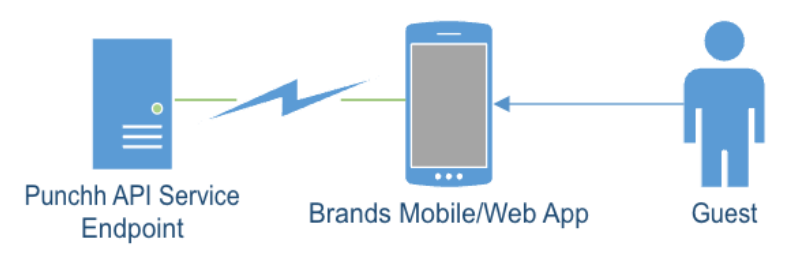
Punchh APIs direct-access topology
Since the partner is not operating any infrastructure, partners may leverage the existing endpoints where the security controls and rate limits already assume direct client connections to Punchh APIs.
You will need to use Punchh base URIs when making APIs calls to the Punchh server in sandbox and production environments. If you do not know which environment to use, contact your Punchh representative.
Indirect Access
This method is used by larger partners or more established brands who generally will already be operating infrastructure and are already operating their own API services. In this method, the guest's interaction is with the brand/partner’s own infrastructure, and Punchh acts as a downstream producer, providing loyalty services for the mobile/web app when requested.
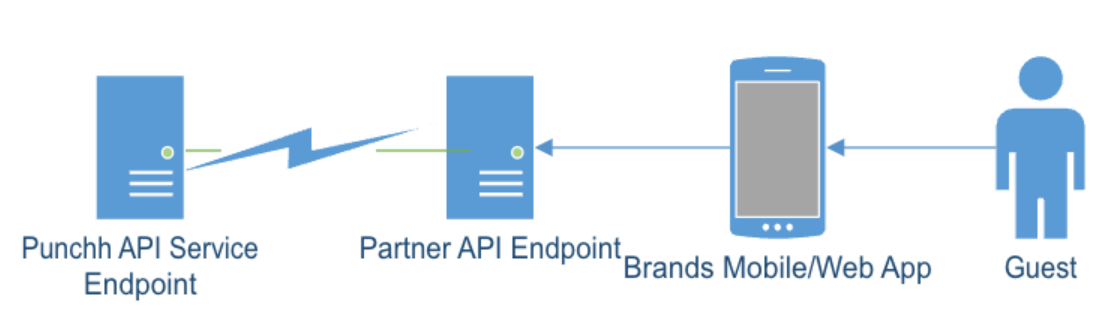
Punchh APIs indirect-access topology
In this method, there is no direct interaction between the guest's device and the Punchh API services, and the partner/brand operates as a proxy or middleware between the two. In this architecture, we need to make special security provisions that work around the limitations imposed by firewalls and legacy security controls whose default blocking behavior will shut down the partner's connection to Punchh entirely if abuse is detected.
In this architecture, partners are onboarded onto our dedicated partner endpoints, as these have security controls and rate limits that are designed for aggregated connections.
You will need to use Punchh base URIs when making APIs calls to the Punchh server in sandbox and production environments. If you do not know which environment to use, contact your Punchh representative.
Partners Operating Infrastructure (Indirect Access)
In the case where a partner already operates a web property, online store or similar and wishes to add Punchh loyalty services to their service offerings, the partner will generally make use of our online ordering or mobile APIs. Alternatively, the partner may maintain its own API that directs loyalty-related services towards Punchh.
In this use case, the partner's infrastructure will be the public-facing node in the integration architecture, and operates as a proxy between the actual mobile app user and Punchh APIs.
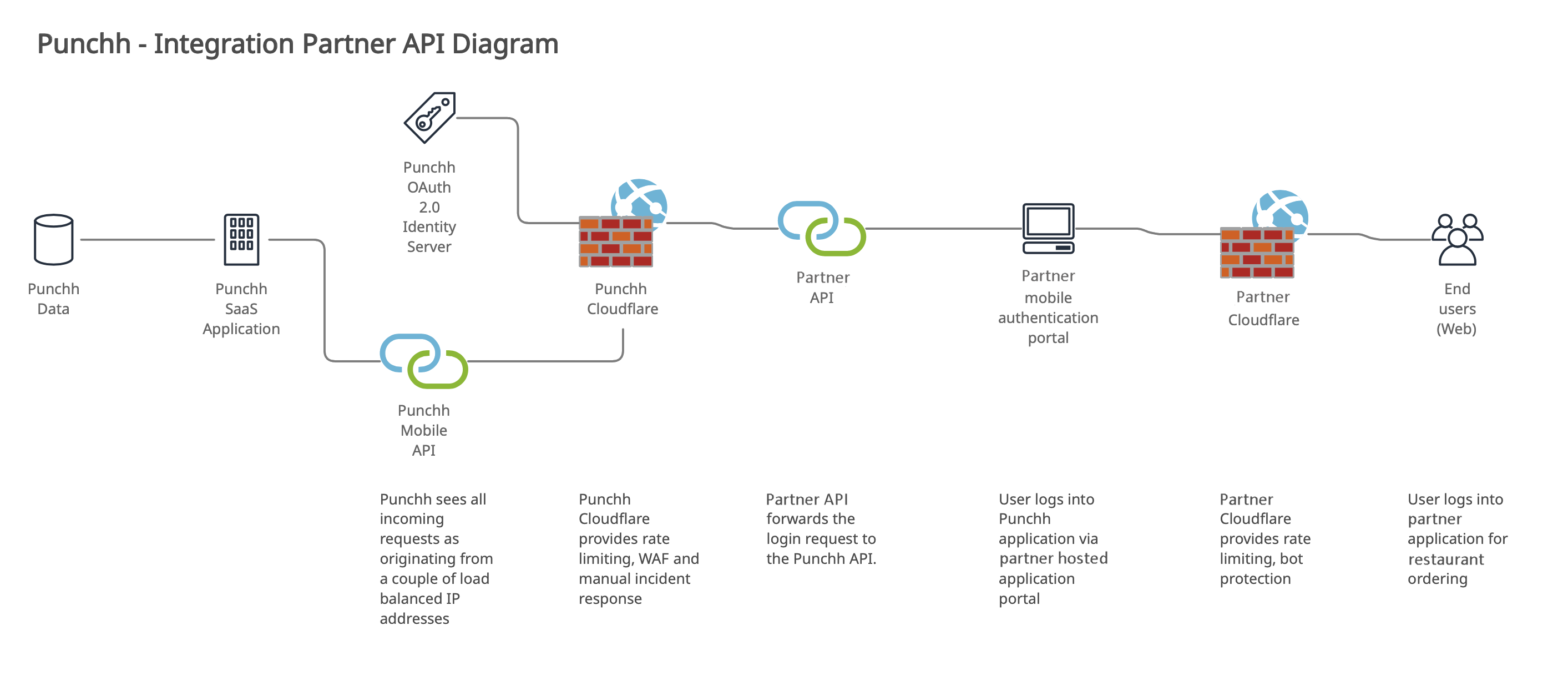
An example of a partner integration
A drawback of this method lies in the fact that Punchh “sees” all incoming connections as originating from the partner's infrastructure, which will generally present as a pair of load balanced IPs to Punchh. This means that we cannot use Cloudflare to filter the traffic because its standard blocking behavior will result in the partner's entire business being taken offline for the duration of the blocking event.
In this scenario, it is the partner’s responsibility to maintain appropriate security controls at the public-facing endpoints and to filter traffic at the partner “front door” that services requests from guests. This is the primary defense point that needs to be protected.
We also use a secondary, failsafe method of filtering traffic, and we examine the traffic as it ingresses the Punchh API endpoints. To do this effectively, we require that partners add a request header with their requests that contains the origin IP of the end user who initiated the request.
On our partner integration endpoints, we perform analysis on this request header to perform rate limiting and bot mitigation, rather than using the actual IP of the system making the connection to our API.
IMPORTANT: This filtering is intended as a last resort, as we do not want to filter a partner's traffic unnecessarily. The partner should always maintain appropriate defenses at the ingress point into their web/mobile infrastructure with settings in-line with a configuration that reflects the partner's risk-tolerance level and existing information security policy.
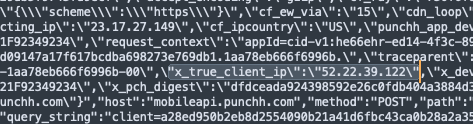
Request with x_true_client_ip passed as parameter
Punchh Shared Security Responsibility Model
Punchh does as much as possible to protect Punchh-owned endpoints and applications with appropriate security measures. There are some cases where a partner/brand works with a third party to deploy applications that consume Punchh services, either directly or by-proxy.
We operate a shared responsibility model that is delineated by the ownership of the public-facing ingress point. While Punchh security controls are robust, there are some use cases where Punchh is less able to mitigate attacks due to lack of control over partner infrastructure.
This document outlines the cases where we need the cooperation of all of our partners to ensure that security controls are deployed as appropriate for the use case.
| Who | Responsibilities |
|---|---|
| Partner | Confidentiality, integrity and availability of websites or third party mobile apps not owned by Punchh, but that integrate with Punchh services. |
| Confidentiality, integrity and availability of public facing API endpoints not owned by Punchh, but that integrate with Punchh services. | |
| Mitigation of attacks that ingress Punchh via a ‘front door’ hosted on third party endpoints. | |
| Punchh | Confidentiality, integrity and availability of Punchh-owned endpoints, infrastructure, authentication mechanisms. |
| Confidentiality, integrity and availability of customer data held within Punchh systems. | |
| Mitigation of attacks that ingress Punchh via a Punchh-owned endpoint. |
Attacks Most Commonly Experienced
We have summarized the most common attack vectors experienced by Punchh below and provide recommended countermeasures in the next sections.
1. Denial of Service Attacks - These attacks are generally the most simplistic and aim to flood public endpoints with requests from large botnets. The intent is to overload the endpoint with requests to slow down responses to an extent that the endpoint is taken offline, or can no longer serve genuine requests in a timely manner.
2. Credential Stuffing / Account Take Over - This method involves using databases of compromised accounts (emails addresses and passwords) against an endpoint with the intent of gaining access to accounts where the user has used the same password as the compromised account. This method relies on the fact that a large percentage of the population reuses passwords across multiple services and accounts. These attacks often originate from a botnet which presents as hundreds or thousands of IPs performing authentications, where each individual IP authenticates at a rate just slow enough to prevent triggering the rate limits set on the endpoint. A combination of bot management, rate limiting and captcha generally mitigates these types of attack.
3. Password Reset Attacks - If the password reset page is not protected by captcha, some attackers will occasionally attempt to bulk reset passwords to inconvenience users. A combination of rate limiting and captcha generally mitigates these attacks.
General Guidelines for Endpoint Security
To maximize security, partners using Punchh APIs must deploy appropriate controls to detect and prevent attacks and fraud.
Partners in most cases deploy two methods of accessing subscriber services such as loyalty programs or online ordering. Services may be accessed via mobile platforms as well as web-driven platforms such as internet browsers.
Web Endpoints
Endpoints designed to be accessed by a computer web browser should use the following controls.
1. DoS Prevention - Infrastructure should be resilient and have a defense against DoS attacks.
2. Rate Limiting - All ‘front door’ endpoints that present authentication or password reset forms should be rate-limited to contain and deter credential stuffing/ATO attacks.
- a) For authentication purposes, we look for 10 failed authentications in a 10 minute period and block the IP for one hour.
- b) A sensible limit should be imposed on password resets as these are often abused also. We suggest a rate limit of 10 resets maximum per hour.
3. Bot Detection - Rate limiting, being based on rules, cannot effectively mitigate attacks that actively attempt to schedule their requests to fall under the rate-limiting threshold. In these cases, we use a bot management tool to detect anomalous traffic patterns and apply a ‘reputation score’ to the sending IP.
- a) When using bot detection algorithms, we use a high threshold for bots and we can reduce this if an attack is detected.
- b) We generally issue captcha on web endpoints and use temporary IP blocks on API endpoints.
4. Captcha - Generally a simple captcha implementation on the authentication endpoints is often enough to dissuade the majority of casual attackers.
5. Geographic Restrictions - Incoming connections should be restricted only to those countries where the customer generally does business. At Punchh we serve captcha to all other countries, since there is always a possibility that the IP databases may not be fully up to date and are flagging certain IPs as originating from the incorrect country.
Mobile Endpoints
With our mobile device endpoints, we use specialized tools that use device fingerprinting techniques to make a determination on whether a device represents a genuine human end user or an automated tool.
We make use of the PerimeterX SDK in all of our mobile apps, and all of our mobile API endpoints are configured to inspect the PerimeterX telemetry supplied with requests for bot mitigation. Any partner wishing to incorporate Punchh APIs into an existing system that is accessed by mobile devices should use the following controls:
1. DoS Prevention - Infrastructure should be resilient and have a defense against DoS attacks.
2. Rate Limiting - Our mobile endpoints are subject to the same rate limits as web endpoints.
3. Mobile Device Fingerprinting - This control analyzes traffic as well as characteristics of the mobile device where the Javascript fingerprinting engine is running to make an assessment of the likelihood of the traffic being of bot origin.
4. Geographic Restrictions - Incoming connections should be restricted only to those countries where the customer generally does business.
Punchh Web & API Integration Endpoints
The following is a list of all Punchh public endpoints with a description of their function and other technical details. Please ensure that you are not using any deprecated endpoints in your integration architecture as these will be terminated in the near future.
Our partner endpoints use most of the security controls described previously, except that they differ in that we apply a much higher threshold on rate limiting. We also use IP whitelists to ensure that only authorized partners can take advantage of the higher threshold, and eliminate exposure to attackers who would also benefit from the higher threshold.
Changes to API Requests - Mandatory/Recommended Headers
Changes that will affect all partners include modifying requests to include the following mandatory parameters:
-
x_true_client_ip - This should be added using a Cloudflare transform rule (or equivalent). This value should contain the client IP making the connection to your public facing endpoint.
-
punchh_app_device_id - This value relates to the device GUID that idenfities a mobile device running your app.
Requests that do not supply these mandatory parameters will be filtered and ignored.
We recommend sending the following parameters with requests:
- x_ja3_fingerprint - If your firewall supports JA3 fingerprinting, please add the JA3 value for the client making the connection to your public endpoint. This is useful for identifying and filtering abuse traffic.
Integration Partners Making API Calls
| Base URIs | Purpose | Additional Required Request Headers | Additional Recommended Request Headers | Required Request Body Variables | TLS Version |
|---|---|---|---|---|---|
| Online Ordering | Endpoint for partner integrations. Rate limits are set at partner-compatible thresholds. | x_true_client_ip - Must be a string variable containing a single IP. | x_ja3_fingerprint - If your firewall supports JA3 fingerprinting, please include this header. | None | TLS 1.2+ |
| Mobile | Mobile endpoint for partner integrations. Rate limits are set at partner-compatible thresholds. In the near future we will require that you integrate the PerimeterX mobile SDK in third party apps and pass through the telemetry to Punchh with requests. | x_true_client_ip - Must be a string variable containing a single IP. | x_ja3_fingerprint - If your firewall supports JA3 fingerprinting, please include this header. | punchh_app_device_id - This is used as an anti-fraud measure | TLS 1.2+ |
| POS | Use by POS terminals | None | None | None | TLS 1.0+ |
| Platform Functions | Admin operations | x_true_client_ip - Must be a string variable equal to the customer brand name (e.g., IHOP, MOD Pizza, etc.). | x_ja3_fingerprint - Must be a string variable equal to the customer brand name (e.g., IHOP, MOD Pizza, etc.). | None | TLS 1.2+ |
You will need to use Punchh base URIs when making APIs calls to the Punchh server in sandbox and production environments. If you do not know which environment to use, contact your Punchh representative.
Vendor Recommendations for Endpoint Security Controls
At Punchh we use Cloudflare primarily for DDoS prevention, firewall, WAF, and we also license their bot management feature which provides a heuristics-based approach to bot detection. We also make use of other controls which are summarized here.
We do not restrict integrations to this choice of vendors only, but we advise to select controls that are similar in scope and feature set, as well as using a vendor that has a mature solution set.
| Security Control | Description of Control |
|---|---|
| AWS Shield | Provides denial-of-service mitigation across all infrastructure. |
| Cloudflare | Firewall, reverse proxy, CDN, WAF, rate limiting, captcha. |
| Cloudflare Bot Management | Separately licensed module that provides analysis of web traffic in real time to identify abuse patterns and assign reputation scores to IPs. |
| Shape Security | Allows for fingerprinting of mobile devices using a Javascript snippet that analyzes multiple client metrics such as mouse pointer motion. |
| PerimeterX | Similar to Shape Security, this vendor provides best of breed fraud prevention as well as compromised credential detection. Operates as a Cloudflare Worker. |
Implementation Checklist
The following steps provide a checklist for ensuring that all appropriate steps are taken to ensure a smooth rollout of your new platform or service.
| Step | Assets | Details |
|---|---|---|
| Define your project scope at a high level. | Network diagram | What is the scope of your integration? What services are you offering? What is your intended use of Punchh services? Will you be using iframe, API, webhooks? What is your intended go-live date? |
| Define your technical & emergency contacts in the case that we need to contact you | Security & Technical Contact List | In the case of emergency (in progress attack) we may need to contact you, particularly in the case where a control may be need reconfiguring. For brands who are using a third party developer, we need contacts for both the brand and the partner. |
| Create a list of endpoints and their functions | Endpoint IP List | For the infrastructure that will consume our APIs or other services, we need to know the public hostnames all static IPs that will be used to consume Punchh services. Include URLs of where you are hosting your authentication pages. |
| Define your security controls | Security Control List | For your public-facing endpoints, what security controls do you intend to deploy to prevent the attack vectors outlined in this document? |
| Send the above assets to Punchh Cybersecurity using the following form | We will review the documents and get back to you with any questions or concerns. Partner Registration Form |
|
| Await Punchh feedback and make any requested changes | Changes requested by Punchh should be implemented and you should notify us of any deviations from the requested changes. | |
| Configure firewall/gateway server to forward the true client IP as a request header on all API calls to Punchh. | We need to receive the true client IP of the end user with all calls made to Punchh. This will be used to perform rate limiting on individual requests. Please use the request header named ‘x_true_client_ip’. | |
| Test your security controls | Your project rollout should include testing of simulated attacks to check that the bot management and rate-limiting capabilities are performing as they should. | |
| Instruct Punchh of your readiness for a security review | We will examine your endpoints to determine readiness for go live. Please inform us of your intended go-live date if it has changed. |
Frequently Asked Questions (FAQ)
The following table illustrates the processes to follow for various operations.
| Question | Answer |
|---|---|
| We want to change the peer IP associated with our peering connection to Punchh endpoints. | Please reach out to your Punchh representative with the details of the original peer IP and the new IP. We will need to update our partner whitelists in order to prevent IP blocking. |
| We want to add a new mobile application and consume loyalty services. | Please reach out to your Punchh representative and advise of the details of the new mobile application. We will need to agree on the user-agent to use for the application. |
| We are using a custom endpoint and want to change the security controls/rate limiting thresholds at the Punchh side. | Please reach out to your Punchh representative and outline the need for the modification of the security control thresholds. We will assess these on an individual basis and get back to you. |
| The security control we want to use is not on your recommended list. Is it acceptable? | Complete the Partner Registration Form and we will perform a security assessment. Generally we do not force the use of specific controls, but we need to ensure that they provide at a minimum rate limiting and captcha enforcement. |
Security Incident Notifications
If Punchh is alerted to or detects a security incident relating to specific customers, we will follow the process outlined below.
| Step | Description |
|---|---|
| Verify that the incident is real | The first step in security incident response is to verify that there is an actual incident and determine the impact. |
| Secure / contain the incident | Our first priority is in containing the security incident before contagion spreads. If an incident is identified as originating from a partner, we may terminate your connection at this stage. |
| Remediate the incident | If the incident arose as a result of a failing control for example, then the control will be replaced. If an incident came from a partner, then the partner needs to demonstrate that the incident is remediated before connectivity is restored. |
| Recover systems | If any connectivity was terminated, these connections will now be restored following remediation of the incident. |
| Notification procedures | Once we can quantify the impact and details of the affected customers, we will communicate a security incident report to you. We will also publish an advisory on our status pages: https://status.punchh.com or https://status.us-west.punchh.com. |
| Notify authorities | If the incident relates to a criminal act such as fraud, we may alert the FBI’s, State, or local cybercrime unit. |