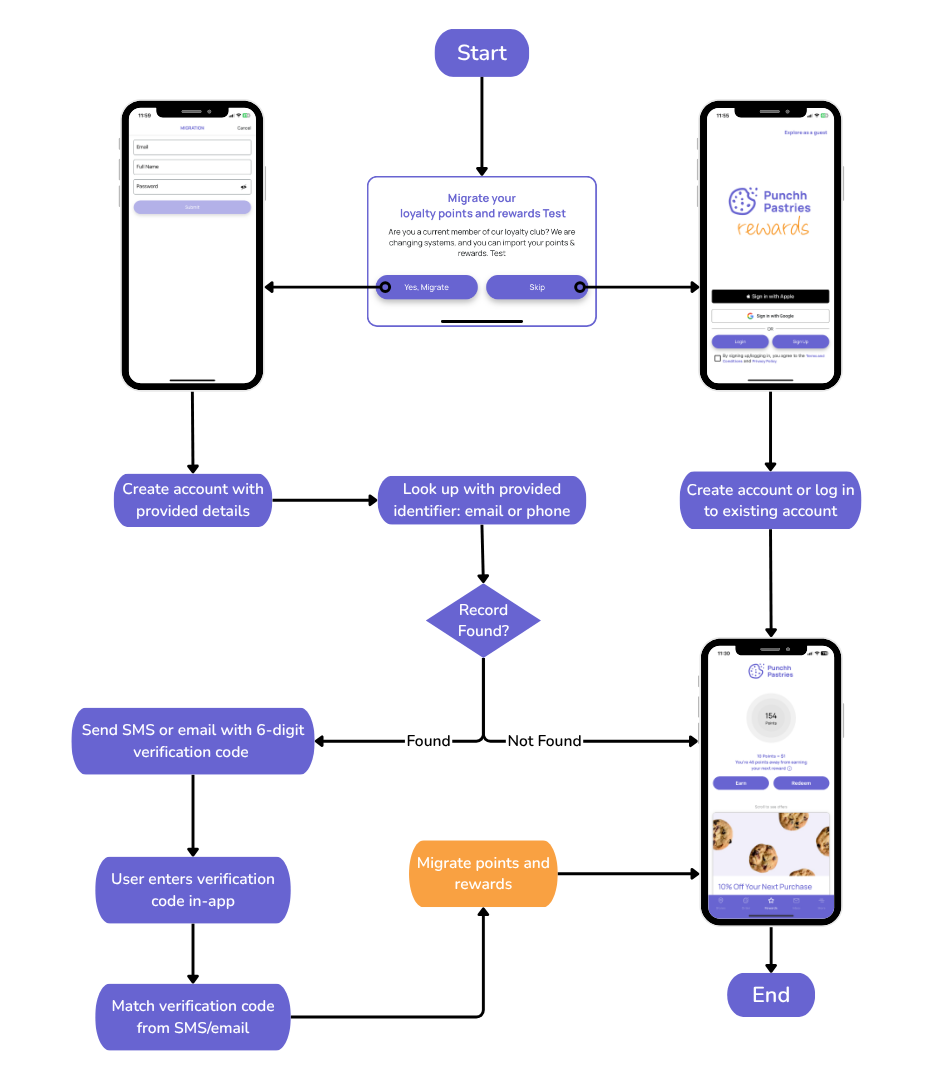
Migration Flows
Overview of Migration From an Old Loyalty Program to Punchh
1. When a user signs up in the Punchh system, a welcome screen will ask the user if the user belongs to an old loyalty program. The user can say either yes or no.
2. If the user confirms belonging to an old loyalty program, the user is asked to fill out and submit a sign-up form to initiate the migration flow. (If the user does not confirm belonging to an old loyalty program, the user follows the standard Punchh sign-up flow.)
3. When submitting the sign-up form, the user must enter a 6-digit code generated using the Generate a One-time Password (OTP) API (unless using Punchh iFrame), depending on the value of the verification_mode parameter returned in the response of the Sign up / Register API (i.e., email, phone, or null). If null, it means the user is not awaiting migration.
4. The user enters the 6-digit code in the app, and the app calls the Verify a One-time Password (OTP) API. The user will be migrated if the code entered is correct and within the expiry duration. If expired, a new code needs to be generated via the Generate a One-time Password (OTP) API.
Punchh SSO and Migration Workflows
Entities Involved in SSO
Single sign-on (SSO) allows a user to log in to multiple systems with a single email and password. The systems are usually independently functional yet related to each other on the back-end. After a successful login, the user can continue using services without having to remember different passwords for different online systems (e.g., both web and mobile).
Implementation of SSO in Punchh enables a user to log in to the Punchh web or mobile systems using the same email and password. Following are the flows that describe how the account information of both un-registered and registered users is handled when a user signs up or logs in via the mobile app. Punchh is the master source for accessing any information related to registered user accounts. Any user data that exists in one system will be updated in another system.
Migration to Punchh Via Email Address or Phone Number
This is the most secured migration flow. When a user wants to migrate points from an old loyalty program to Punchh, details are captured in a sign-up form that contains the user identifier (email address or phone number). Once the user submits this form, the user signs up in the Punchh system (i.e., the user account is created and the server searches the migration data for a match using the specified user identifier):
-
Match found: If a match is found in the "awaiting migration" list with the specified email address or phone number, the system generates a 6-digit verification code via email or SMS, and the user must enter this verification code on the screen. If user enters the correct code and proceeds from this screen, migration triggers on the server side, and the user moves to the Reward screen, which displays points from the old loyalty program. Sometimes it may take longer for points from the old loyalty program to appear in the Punchh system.
-
Match not found: If a match is not found, it is considered as a fresh sign-up where the user's account is created in Punchh but no error is displayed.
Migration rules can be defined in the Punchh platform to determine whether email only, phone only, or both email and phone can be used to uniquely identify a user's record in the migration data.