SAML Single Sign-on
About SAML SSO
Security Assertion Markup Language (SAML) is an open standard for exchanging authentication and authorization data between parties, in particular an identity provider and a service provider (such as the Punchh dashboard).
SAML for Single Sign-on (SSO) enables your admins to authenticate through your company's identity provider when they log in to the Punchh dashboard. SSO allows an admin to log in to the Punchh dashboard without having to remember another password. This allows you to manage employee credentials centrally.
Once your employees log in to the Punchh dashboard from your portal, they still need to be given access to the Punchh dashboard bcecause SAML handles only authentication, not authorization. Authorization still needs to be managed using the roles and permission model within the Punchh dashboard.
Processing Steps
SSO works by transferring the user’s identity from one place (the identity provider) to another (the service provider). This is done through an exchange of digitally signed XML documents in a web browser. This has been implemented as per the SAML 2.0 specification.
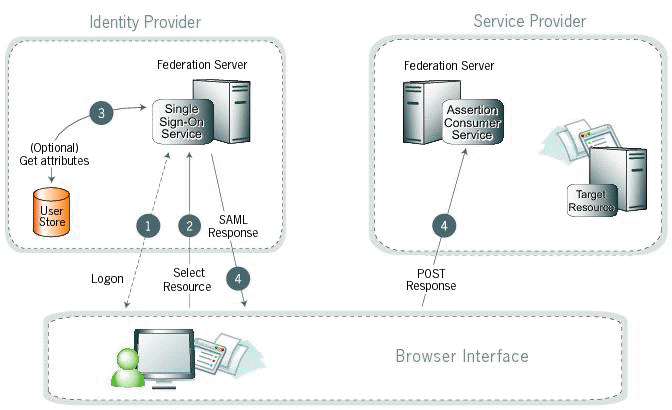
1. A user has logged on to the identity provider (your server). If a user has not yet logged on for some reason, the user is challenged to do so at step 2.
2. The user clicks a link or otherwise requests access to a protected service provider resource (Punchh dashboard).
3. Optionally, the identity provider (IdP) retrieves attributes from the user data store.
4. The IdP's SSO service returns an HTML form to the browser with a SAML response containing the authentication assertion and any additional attributes. The browser automatically posts the HTML form back to the service provider.
For more information please see the specification:
- http://docs.oasis-open.org/security/saml/Post2.0/sstc-saml-tech-overview-2.0.html
- http://docs.oasis-open.org/security/saml/v2.0/saml-core-2.0-os.pdf
- http://docs.oasis-open.org/security/saml/v2.0/saml-profiles-2.0-os.pdf
- http://docs.oasis-open.org/security/saml/v2.0/saml-metadata-2.0-os.pdf
- http://docs.oasis-open.org/security/saml/v2.0/saml-authn-context-2.0-os.pdf
- http://docs.oasis-open.org/security/saml/v2.0/saml-conformance-2.0-os.pdf
- http://docs.oasis-open.org/security/saml/v2.0/saml-sec-consider-2.0-os.pdf
Before You Begin
We recommend that you check the following before you begin:
1. Ensure that your IdP uses HTTPS and supports SAML 2.0.
2. Admin creation is done via business admin APIs, so before the admin can log in, that admin needs to be created via the admin APIs. For details, see Get Admin Roles List under the platform functions APIs.
Setting up SAML SSO
Provide us with the following details. For any questions, please reach out to your Punchh representative.
| Field | Description |
|---|---|
| Identity provider entity ID | This value is the URL for the identity provider where your product will accept authentication requests. |
| Identity provider SSO URL | This value defines the URL your users will be redirected to when logging in. |
| Public x509 certificate | Public x509 certificate |
| Public x509 certificate Fingerprint | Fingerprint of public x509 certificate |