POS Check Details
This topic provides information about the behavior of check details in the Punchh system.
Parameter subtotal_amount = receipt_amount = amount
- Send all 3 parameters (backwards compatibility), rank them, and make sure they are the same.
- If subtotal_amount is provided, copy it to the other 2.
- Else if receipt_amount is provided, copy it to the other 2.
- Else if the amount is provided, copy it to the other 2.
Check Details Balancing
Make sure that:
-
subtotal_amount = Sum (M) - Sum (D) (Punchh and internal discounts)
-
subtotal_amount + Sum of (S) + Sum (T) = Sum (P)
where:
-
M - Menu item ( + or - )
-
D - Discount (negative). Either internal or Punchh. Punchh will always evaluate lines as ( - ) regardless of the sign assigned in the API call.
-
S - Service item. Any item representing money received that is not a sale. For example: service charges, delivery fees, tips, purchase of gift cards/certificates, etc.
-
T - Tax item. Taxes of all sorts
-
P - Payment item. Visa, MasterCard, cash, gift card/certificate (when used to pay for the order)
When Sending Menu Items to Punchh
Choose from the following types based on the type of the menu item:
-
M - Menu item ( + or - ). A menu item submitted as ( - ) is treated as a discount.
-
D - Discount (negative). Either internal or Punchh. Punchh will always evaluate as ( - ) regardless of the sign assigned in the API call.
-
S - Service item. Any item representing money received that is not a sale. For example: service charges, delivery fees, tips, purchase of gift cards/certificates, etc.
-
T - Tax item. Taxes of all sorts
-
P - Payment item. All payments, including gift cards/certificates when used to pay for a transaction
When Sending Check Data to Punchh
Include as much data as possible:
- Send all individual “required” items (as per the API documentation) to be able to complete an API call. Examples: receipt_datetime, location_key, punchh_key. (punchh_key is the value of the Punchh QR code or Punchh barcode)
- Send all other transaction data that may be able to be mapped to Punchh receipt API fields
- Send other individual items (as per the API documentation) if they are available. Examples: revenue_code, last_cc. etc.
Note that while transaction_no is not required, it should still be sent so that the Punchh platform can show the check number as well as allow for searching the check. Send all menu items as per #3 above
Special note regarding discounts
You can opt to reduce item prices for internal discounts instead of sending discounts to Punchh. Check-level discounts can be distributed among line items proportionally. If doing so, make sure the following formula is still correct:
subtotal_amount = Sum(M) - Sum (D) (Punchh ONLY)
subtotal_amount + Sum of (S) + Sum (T) = Sum (P)
Note that internal discounts are excluded.
Two Cases in Which the Calculation of Earnable May Differ
a) If an earning qualifier is set: In this case, the earnable will be calculated on the basis of the availability of the menu item on the receipt. The type of the menu item will surely matter here depending upon the definition of the qualifier.
b) If an earning qualifier is not set: In this case, the earnable will be calculated as:
If (reciept_amount !present) {
error(“Required parameter missing”)
} else if (subtotal_amount !present) {
error(“Required parameter missing”)
} else If (minimum-checkin-amount > receipt_amount) {
error(“minimum checkin amount is xxxx”)
} else if (subtotal_amount > 0) {
If (receipt_amount <= subtotal_amount) {
Earnable = receipt_amount
} else {
Earnable = subtotal_amount
}
} else {
Earnable = receipt_amount
}
As long as the balancing formulas above are adhered to, the calculation of earnable (whether there is an earning qualifier criterion rule in place or not) should be the same.
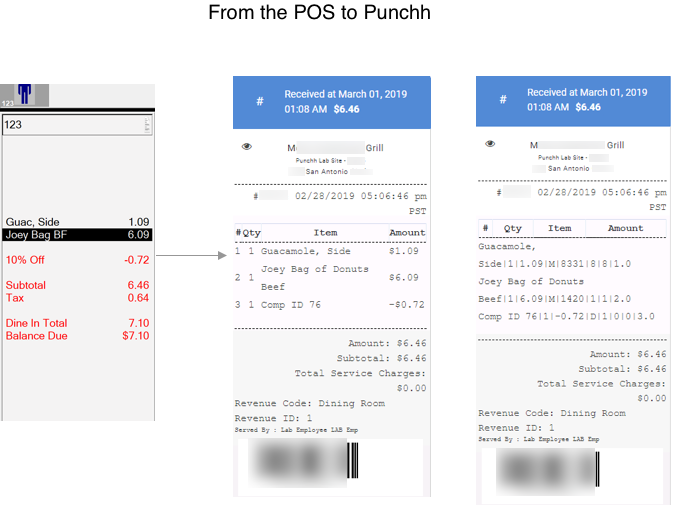
The following image shows the results of data flow details from the POS to the Punchh platform.
Check-in Examples
The reason to send menu item data for check-in calls is to send the final check information to Punchh to ensure the accurate transactional history and guest earning, as well as properly power the data and analytics in the Punchh platform. Given this, you need to send a complete list of:
- Purchased items
- Discounts
- Service items
- Taxes
- Payments
Check-in Example With Discounts, Service Charges, Tax, and Payment
The following example shows how you would represent menu item data for a typical check-in API call with many items on the check. This example shows a sandwich, a modifier to the sandwich, a side, a discount applied to the side, a discount applied to the sandwich modifier, two alcoholic beverages, a tip, taxes, and payment. Note how the serial numbers determine which items modify the others.
"menu_items":[
  {
"item_name":"Muffuletta",
"item_qty":1,
"item_amount":10.00,
"menu_item_type":"M",
"menu_item_id": "3419",
"menu_family":"Sandwiches",
"menu_major_group":"Entrees",
"serial_number":"1.0"
  },
{
"item_name":"Beef Cotto Salame",
"item_qty":1,
"Item_amount":1.00,
"menu_item_type":"M",
"menu_item_id": "7657",
"menu_family":"",
"menu_major_group":"Add-ons",
"serial_number":"1.1"
  },
{
"item_name":"Free Premium Add-ons before 7",
"item_qty":1,
"Item_amount":1.00,
"menu_item_type":"D",
"menu_item_id": "4512",
"menu_family":"",
"menu_major_group":"",
"serial_number":"1.2"
  },
{
"item_name":"Potato Salad",
"item_qty":1,
"item_amount":3.00,
"menu_item_type":"M",
"menu_item_id": "5487",
"menu_family":"",
"menu_major_group":"Sides",
"serial_number":"2.0"
  },
{
"item_name":"Free Potato Salad w/ Sandwich",
"item_qty":1,
"item_amount":3.00,
"menu_item_type":"D",
"menu_item_id": "3548",
"menu_family":"",
"menu_major_group":"",
"serial_number":"2.1"
  },
{
"item_name":"Mezcal Negroni",
"item_qty":2,
"item_amount":14.00,
"menu_item_type":"M",
"menu_item_id": "6547",
"menu_family":"Cocktails",
"menu_major_group":"Alcohol",
"serial_number":"3.0"
  },
{
"item_name":"Tip",
"item_qty":1,
"item_amount":5.00,
"menu_item_type":"S",
"menu_item_id": "1212",
"menu_family":"",
"menu_major_group":"",
"serial_number":"4.0"
  },
{
"item_name":"Tax",
"item_qty":1,
"item_amount":1.98,
"menu_item_type":"T",
"menu_item_id": "2235",
"menu_family":"",
"menu_major_group":"",
"serial_number":"5.0"
  },
{
"item_name":"Credit Card",
"item_qty":1,
"item_amount":30.98,
"menu_item_type":"P",
"menu_item_id": "3325",
"menu_family":"",
"menu_major_group":"",
"serial_number":"6.0"
  }
]
In this example, your subtotal_amount and receipt_amount, which are additional fields you sent alongside the Create Check-in call that represent the subtotal of the check (item costs minus discounts), would be 24.00. This number is what Punchh will use to calculate the points the guest earns for this check. If your earning rules have any exclusions, they will not be applied. For example, if the rules for this business or for the offer itself exclude items with an Alcohol major group from earning, then this check will only earn on $10 worth of the subtotal.
The payable amount, which is the total you collect through all payment types, would be 30.98 for this example.
Check-in Example With a Gift Card and Cash Payment
The following example shows how you would represent menu item data for a check-in API call that includes a gift card purchase. This example shows a burger, a free modifier to the burger, a gift card purchase, a tip, taxes, and payment. Note how the serial numbers determine which items modify the others and how the gift card purchase is classified as a service (“S”) item.
"menu_items":[
  {
"item_name":"Burger",
"item_qty":1,
"item_amount":11.00,
"menu_item_type":"M",
"menu_item_id": "4677",
"menu_family":"Sandwiches",
"menu_major_group":"Entrees",
"serial_number":"1.0"
  },
{
"item_name":"Medium Rare",
"item_qty":1,
"Item_amount":0,
"menu_item_type":"M",
"menu_item_id": "1111",
"menu_family":"",
"menu_major_group":"",
"serial_number":"1.1"
  },
{
"item_name":"$25 Gift Card",
"item_qty":1,
"item_amount":25.00,
"menu_item_type":"S",
"menu_item_id": "1354",
"menu_family":"",
"menu_major_group":"Gift Cards",
"serial_number":"2.0"
  },
{
"item_name":"Tip",
"item_qty":1,
"item_amount":5.00,
"menu_item_type":"S",
"menu_item_id": "2135",
"menu_family":"",
"menu_major_group":"",
"serial_number":"3.0"
  },
{
"item_name":"Tax",
"item_qty":1,
"item_amount":0.91,
"menu_item_type":"T",
"menu_item_id": "7897",
"menu_family":"",
"menu_major_group":"",
"serial_number":"5.0"
  },
{
"item_name":"Cash",
"item_qty":1,
"item_amount":41.91,
"menu_item_type":"P",
"menu_item_id": "9999",
"menu_family":"",
"menu_major_group":"",
"serial_number":"6.0"
  }
]
In this example, your subtotal_amount and receipt_amount, which are additional fields you sent alongside the Create Check-in call that represent the subtotal of the check (item costs minus discounts), would be 11.00. This number is what Punchh will use to calculate the points the guest earns for this check. Note that gift card sales and other service items such as tax and tip are excluded from earning unless your earning rules are set up to include these service items.
The payable amount, which is the total you collect through all payment types, would be 41.91 for this example. If the customer gives you $50 in cash and you make change, you do not reflect the fifty dollars or the change, but simply the net payment collected.
Check-in Example With a Discount That Applies to All Food Items but Not to Alcoholic Beverages
The following example shows how you would represent menu item data for a Create Check-in API call that includes a 20% discount that applies to the food items but excludes alcoholic beverages. This example shows two different kinds of pasta, two of the same beer, the food discounts, a tip, taxes, and payment.
Note that you have to split the shared discount out for each item it applies to. If you do not do this, and instead send the discount as its own base item as you would for a general POS-generated discount, then you could run into unexpected behavior with earning.
"menu_items":[
  {
"item_name":"Bolognese",
"item_qty":1,
"item_amount":14.00,
"menu_item_type":"M",
"menu_item_id": "3326",
"menu_family":"Pasta",
"menu_major_group":"Entrees",
"serial_number":"1.0"
  },
{
"item_name":"20% Off Food",
"item_qty":1,
"item_amount":2.80,
"menu_item_type":"D",
"menu_item_id": "1111",
"menu_family":"",
"menu_major_group":"",
"serial_number":"1.1"
  },
{
"item_name":"Shrimp Linguini",
"item_qty":1,
"item_amount":17.00,
"menu_item_type":"M",
"menu_item_id": "3245",
"menu_family":"Pasta",
"menu_major_group":"Entrees",
"serial_number":"2.0"
  },
{
"item_name":"20% Off Food",
"item_qty":1,
"item_amount":3.40,
"menu_item_type":"D",
"menu_item_id": "1111",
"menu_family":"",
"menu_major_group":"",
"serial_number":"2.1"
  },
{
"item_name":"IPA Draught",
"item_qty":2,
"item_amount":10.00,
"menu_item_type":"M",
"menu_item_id": "6547",
"menu_family":"Beer",
"menu_major_group":"Alcohol",
"serial_number":"3.0"
  },
{
"item_name":"Tip",
"item_qty":1,
"item_amount":10.00,
"menu_item_type":"S",
"menu_item_id": "3333",
"menu_family":"",
"menu_major_group":"",
"serial_number":"4.0"
  },
{
"item_name":"Tax",
"item_qty":1,
"item_amount":2.87,
"menu_item_type":"T",
"menu_item_id": "8888",
"menu_family":"",
"menu_major_group":"",
"serial_number":"5.0"
  },
{
"item_name":"Credit Card",
"item_qty":1,
"item_amount":47.67,
"menu_item_type":"P",
"menu_item_id": "7777",
"menu_family":"",
"menu_major_group":"",
"serial_number":"6.0"
  }
]
In this example, your subtotal_amount and receipt_amount, which are additional fields you sent alongside the Create Check-in call that represent the subtotal of the check (item costs minus discounts), would be 34.80. This number is what Punchh will use to calculate the points the guest earns for this check. If your earning rules have any exclusions, they will not be applied. For example, if the rules for this business exclude items with an Alcohol major group from earning, then this check will only earn on $24.80 worth of the subtotal.
The payable amount, which is the total you collect through all payment types, would be 47.67 for this example.