Generic SMS Partner Integration Guide
Overview
This guide explains how to integrate an SMS partner with the Punchh loyalty platform. This guide is intended for businesses that use a Generic SMS Partner adapter where a third-party SMS provider manages the full SMS lifecycle, messaging, compliance, opt-in/opt-out, and syncs subscription status to Punchh via inbound webhooks. Punchh does not send any SMS messages in this implementation.
Note: Contact your Punchh representative to update this Punchh platform configuration.
The integration is webhook-based. Punchh sends guest create/update and loyalty events to the SMS partner via outbound webhooks, while the SMS partner sends SMS subscription status updates back to Punchh via inbound webhooks after a successful double opt-in.
Integration Flow
| Direction | Method | Purpose |
|---|---|---|
| Punchh → SMS Partner | Webhooks | Send guest profile and loyalty events |
| SMS Partner → Punchh | Webhook | Update SMS subscription status after double opt-in |
How the Integration Works
The integration consists of the following stages:
Guest Sign-up
When a guest signs up through the mobile app or web sign-up form:
-
The guest enters their profile information.
-
The sign-up form displays an SMS marketing consent checkbox.
-
The mobile app or web app sends the consent value in the
profile_field_answersparameter in the Mobile Sign-up / Register or Online Ordering Create New User API request.Note: For Generic SMS Partner businesses, Punchh does not send compliance SMS. The
send_compliance_smsparameter in the sign-up request is ignored. The SMS partner is responsible for initiating the opt-in process. -
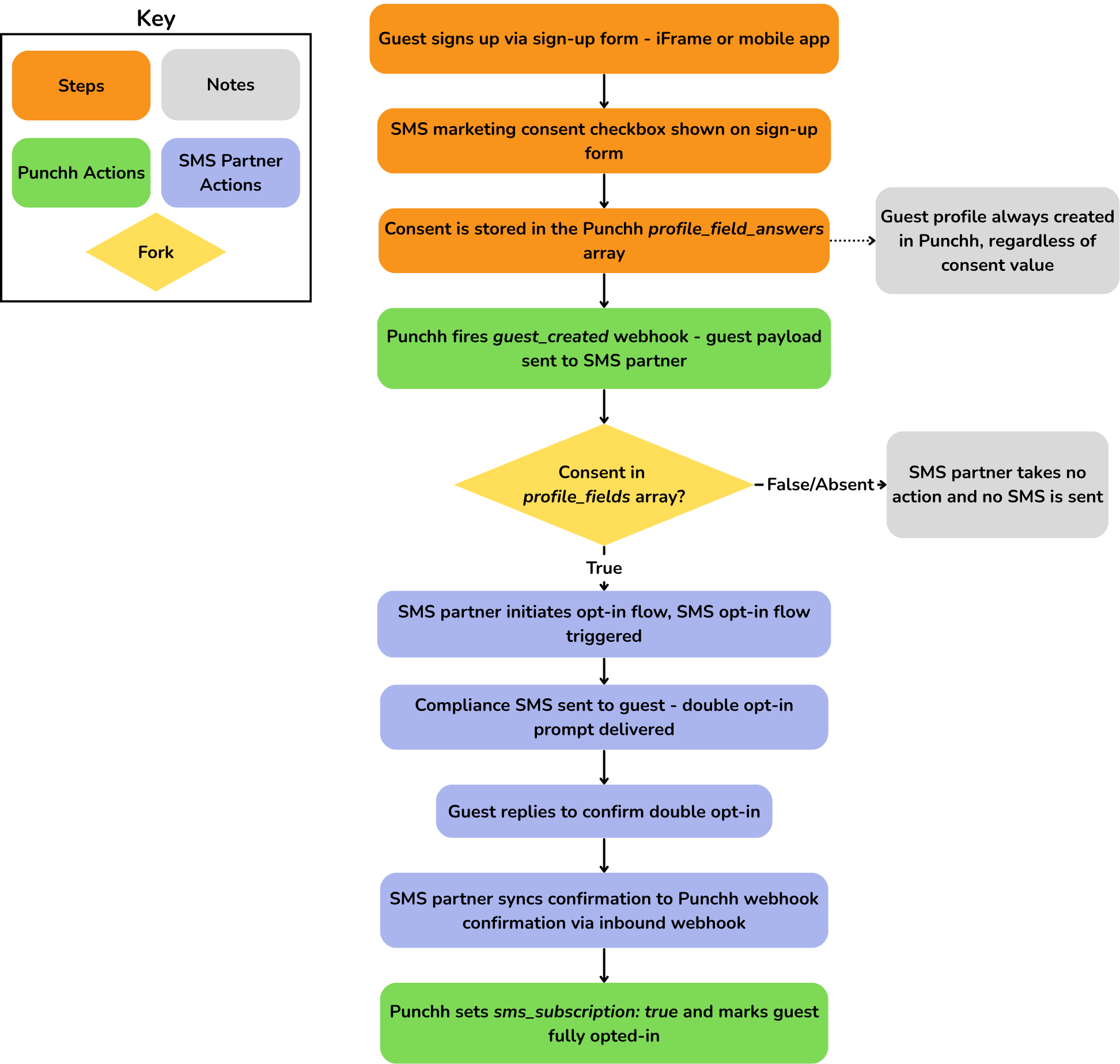
Punchh creates the guest profile, stores the consent value in the
profile_fieldsarray object, and setssms_subscription = false. -
Punchh sends a Guest (
action: create) webhook to the SMS partner, which includes the guest's phone number and the consent value in theprofile_fieldsarray. Here is a sample JSON Guest (action: create) payload withprofile_fieldscontaining the SMS consent."profile_fields": [ { "answer": "Yes", "code": "sms_marketing_consent", "question": "Would you like to receive SMS marketing messages?", "upf": "upf0" } ] -
The SMS partner evaluates the consent value in the
profile_fieldsarray object:- If the consent value is Yes, the SMS partner initiates the double opt-in process by sending a confirmation SMS to the guest.
- If the consent value is No or the field is not present, the SMS partner takes no action, and no SMS is sent.
-
Once the guest confirms opt-in, the SMS partner sends an inbound webhook to Punchh with
sms_subscription: true. -
Punchh updates the guest's
sms_subscriptionstatus totrue.
Note: The sms_subscription parameter in the sign-up API response will always return false, regardless of the consent value provided in profile_field_answers. The value is updated only when the SMS partner sends a subscription status update to Punchh via the inbound webhook.
Social Sign-ups
For social sign-ups (Google, Facebook, and similar providers), a phone number may not be available during account creation.
In this case:
- Punchh sends the initial Guest (
action: create) webhook without aphonevalue. - The SMS partner receives the webhook event but takes no action since the
phoneis null. - When the guest later updates their profile with a phone number and SMS subscription consent in the
profile_fieldsarray object via the Mobile Update User Profile or Online Ordering Update User Information API, Punchh sends a Guest (action: update) webhook event. - The SMS partner evaluates the
phoneand the SMS consent value in theprofile_fieldsarray object. If thephoneis present and consent is Yes, the SMS partner initiates the double opt-in process. - Once the guest confirms, the SMS partner sends the inbound webhook to Punchh with
sms_subscription: true. - Punchh updates the guest's
sms_subscriptionstatus totrue.
Guest Object Attributes
These attributes are included in the Guest action: create and Guest action: update webhook payloads. See the Guest event topic for the complete list of attributes.
| Attribute | Description |
|---|---|
| phone | Phone number of the guest |
| profile_fields.question | Custom profile field question as configured in Punchh |
| profile_fields.answer | Custom profile field answers as configured in Punchh |
| signup_channel | Identifies whether the guest registered through a standard or social sign-up flow. |
SMS Consent Processing
When the SMS partner receives a guest webhook, it evaluates sms_subscription in the webhook payload.
| Consent Value | SMS Partner Action |
|---|---|
| true | Start the SMS opt-in process |
| false or not present | No action |
The SMS partner should also prevent duplicate opt-in messages for phone numbers that have already been processed.
Double Opt-in Process
The SMS partner is responsible for completing the double opt-in process.
The process is:
- Send a confirmation SMS to the guest.
- Wait for the guest to confirm.
- Send a webhook to Punchh confirming the subscription.
- Punchh updates sms_subscription to true.
Note: The sms_subscription field is updated only after Punchh receives the confirmation webhook from the SMS partner.
SMS Opt-in Flow — Generic Adapter Flow
Loyalty Events
After a guest is subscribed, Punchh sends loyalty event webhooks, such as:
The SMS partner can use these events to send transactional or promotional SMS notifications.
Phone Number Updates
When a guest changes their phone number:
- The guest updates their phone number in Punchh via the mobile app using the Update User Profile API or via the web app using the Update User Information API.
- Punchh sends a Guest (
action: update) webhook to the SMS partner containing the updated guest profile with the new phone number. - Mobile or web app sends an explicit update call to the SMS Partner with both the old and new phone numbers.
- The SMS Partner deactivates the old number and updates the record with the new phone number.
- If
sms_subscriptionistrue, the SMS partner re-initiates the double opt-in process for the new phone number. If the guest does not provide consent or opts out during the process, the SMS partner sends the inbound webhook to Punchh withsms_subscriptionset to false.
Note: The mobile or web app is responsible for explicit SMS Partner update call containing both old and new phone numbers. This dual-number payload ensures the SMS Partner can correctly deactivate the old record and link the new number to the existing guest profile.
Webhook Events
| Event | Trigger | SMS Partner Action |
|---|---|---|
Guest (action: create) |
New guest sign-up | Evaluate consent and start opt-in if applicable |
Guest (action: update) |
Guest profile updated | Re-evaluate consent and process phone number changes |
Inbound SMS Subscription Webhook
After a guest completes the double opt-in process, the SMS partner sends a webhook to Punchh to update the guest's SMS subscription status.
Sample Request
curl 'https://SERVER_NAME_GOES_HERE.punchh.com/hooks/smspartner/<business_key>/conversations/status' \
--header 'Content-Type: application/json' \
--header 'x-pch-digest: SIGNATURE_GOES_HERE' \
--data '{
  "client": "CLIENT_GOES_HERE",
  "phone": "1111111111",
  "email": "test@example.com",
  "sms_subscription": true,
  "user_type": "loyalty",
  "first_name": "John",
  "last_name": "Doe"
}'
Request Headers
| Parameter | Description |
|---|---|
| x-pch-digest | The signature for the API call |
| Content-Type | Set this header to application/json. |
Request Parameters
| Parameter | Description |
|---|---|
| client | Business client identifier used for authentication. It is used to authenticate the webhook on the Punchh server. |
| phone | The user's phone number. Used to identify the existing Punchh user whose SMS subscription status is being updated. |
| The user's email address. Can be used as an alternate identifier for locating the existing Punchh user. | |
| sms_subscription | Indicates a user’s SMS subscription status. Set to 'true' when the user is subscribed to SMS notifications and 'false' when the user is not subscribed to SMS notifications. |
| user_type | Guest type (for example, loyalty or eclub). |
| first_name | The user's first name. Included as part of the SMS subscription status update payload. |
| last_name | The user's last name. Included as part of the SMS subscription status update payload. |
SMS Subscription Management
The SMS partner is the source of truth for SMS consent. For Generic SMS Partner businesses, Punchh does not send any SMS messages, including compliance, opt-in confirmation, or opt-out confirmation messages. The SMS partner is responsible for managing SMS opt-in and opt-out requests.
Opt-in (Subscribe SMS)
When a guest opts in to SMS communications through the SMS partner:
- The guest sends a subscribe keyword (for example, START) to the SMS partner's number or completes the SMS partner's double opt-in process.
- The SMS partner updates the guest's subscription status in its system.
- The SMS partner sends the inbound SMS subscription webhook to Punchh with
sms_subscriptionset totrue. - Punchh looks up the guest by phone number.
- If the guest exists, Punchh updates
sms_subscriptiontotrue. - If the guest does not exist, Punchh does not create a guest profile. The webhook is accepted, but no action is taken.
- Punchh does not send a confirmation SMS to the guest. The SMS partner is responsible for sending any opt-in confirmation messages.
Note: The inbound webhook only updates subscription status. It does not create a guest profile in Punchh. The guest must already exist in Punchh and be created through a standard sign-up process (for example, the Mobile Sign-up API or Online Ordering Create User API).
Sample Request
curl 'https://SERVER_NAME_GOES_HERE.punchh.com/hooks/smspartner/<business_key>/conversations/status' \
--header 'Content-Type: application/json' \
--header 'x-pch-digest: SIGNATURE_GOES_HERE' \
--data '{
  "client": "CLIENT_GOES_HERE",
  "phone": "1111111111",
  "email": "test@example.com",
  "sms_subscription": true,
  "user_type": "loyalty",
  "first_name": "John",
  "last_name": "Doe"
}'
Opt-out (Unsubscribe SMS)
When a guest opts out of SMS communications through the SMS partner:
- The guest sends an unsubscribe keyword (for example, STOP) to the SMS partner's number.
- The SMS partner removes the guest from its active subscriber list and stops sending SMS messages.
- The SMS partner sends the inbound SMS subscription webhook to Punchh with
sms_subscriptionset tofalse. - Punchh looks up the guest by phone number and updates sms_subscription to false.
- Punchh does not send an unsubscribe confirmation SMS to the guest. The SMS Partner is responsible for sending any opt-out confirmation messages.
Sample Request
curl 'https://SERVER_NAME_GOES_HERE.punchh.com/hooks/smspartner/<business_key>/conversations/status' \
--header 'Content-Type: application/json' \
--header 'x-pch-digest: SIGNATURE_GOES_HERE' \
--data '{
  "client": "CLIENT_GOES_HERE",
  "phone": "1111111111",
  "email": "test@example.com",
  "sms_subscription": false,
  "user_type": "loyalty",
  "first_name": "John",
  "last_name": "Doe"
}'
Note: The inbound webhook only updates subscription status. It does not create a guest profile in Punchh. The guest must already exist in Punchh and be created through a standard sign-up process (for example, the Mobile Sign-up API or Online Ordering Create User API).
Error Handling
| Scenario | Expected Behavior |
|---|---|
| No phone number during sign-up (e.g., social sign-up) | SMS Partner receives the Guest (action: create) webhook but takes no action since the phone is null. Wait for a Guest (action: update) webhook with the phone number. |
| Guest signs up without SMS consent | The SMS Partner receives the Guest webhook event but does not initiate opt-in. No inbound webhook is sent. sms_subscription remains false in Punchh. The guest can opt in later by updating their profile with SMS consent or by texting a subscribe keyword (e.g., START) directly to the SMS partner. |
| Duplicate opt-in request. The same phone number comes through again. Maybe the guest signed up twice, or the webhook was delivered more than once. | The SMS partner ignores the duplicate. If the guest is already subscribed, do not initiate another opt-in. If the guest is not subscribed, the SMS partner evaluates the consent value in profile_fields. If consent is Yes, initiate the opt-in process. If consent is No, no action is taken. |
| Guest declines the confirmation SMS | The SMS partner does not send an inbound webhook. sms_subscription remains false in Punchh. |
| Phone updated for an unsubscribed guest | The SMS partner updates the phone number in their system and evaluates the consent value in profile_fields. If consent is Yes, initiate opt-in for the new number. If consent is No, no action is taken. |
| Confirmation webhook not received | The guest remains unsubscribed in both the SMS partner's system and Punchh. |
| Inbound webhook for a phone/email with no matching guest | The webhook is accepted, but no action is taken. No guest profile is created in Punchh. |