SSO Accounts Synchronization
Many of the custom ordering applications are created when the Brand already has a customer base, or it is possible that the brand uses a single identity provider to log in their customers into different services - PAR Ordering, Loyalty, Partners and others.
SSO Token Exchange feature can be leveraged to allow the brand to use the full PAR Ordering APIs potential, including customer account settings, stored payment methods, delivery locations, etc.
Before proceeding, please check these pre-requisites:
access_tokenandrefresh_tokento access customer information should be available to share when making callsclient_idandclient_secretshould be provided by PAR Ordering for the M2M authentication
Customer Info Endpoint
To make the registration of the customer accounts and update of the customer information possible and seamless and endpoint should be implemented on the Ordering Application side to expose the necessary customer information.
The endpoint is called /customer-info:
Request
{
  "customer_account_uuid": "1df3d3b3-d2b6-4126-93f2-1fdbd419268b"
}
Response
{
  "customer_account_uuid": "1df3d3b3-d2b6-4126-93f2-1fdbd419268b",
  "first_name":"John",
  "last_name": "Doe",
  "email": "john.doe@mail.com",
  "phone_number": "+23533674523"
}
Register/Login to PAR Ordering
The base SSO flow implements the registration and login features for the Customers that have been authenticated in the Ordering Application system.
The Registration and Login are implemented via the same flow, ensuring that the Ordering Application will not need to store the information whether the customer has an account with PAR Ordering.
If the customer has an account, they will be logged in and the menu_access_token will be shared. If the customer is new, they will be registered and then logged in.
The following diagram represents the interaction flow that should be used to obtain the menu_access_token, which will later be used to access the protected resoueces.
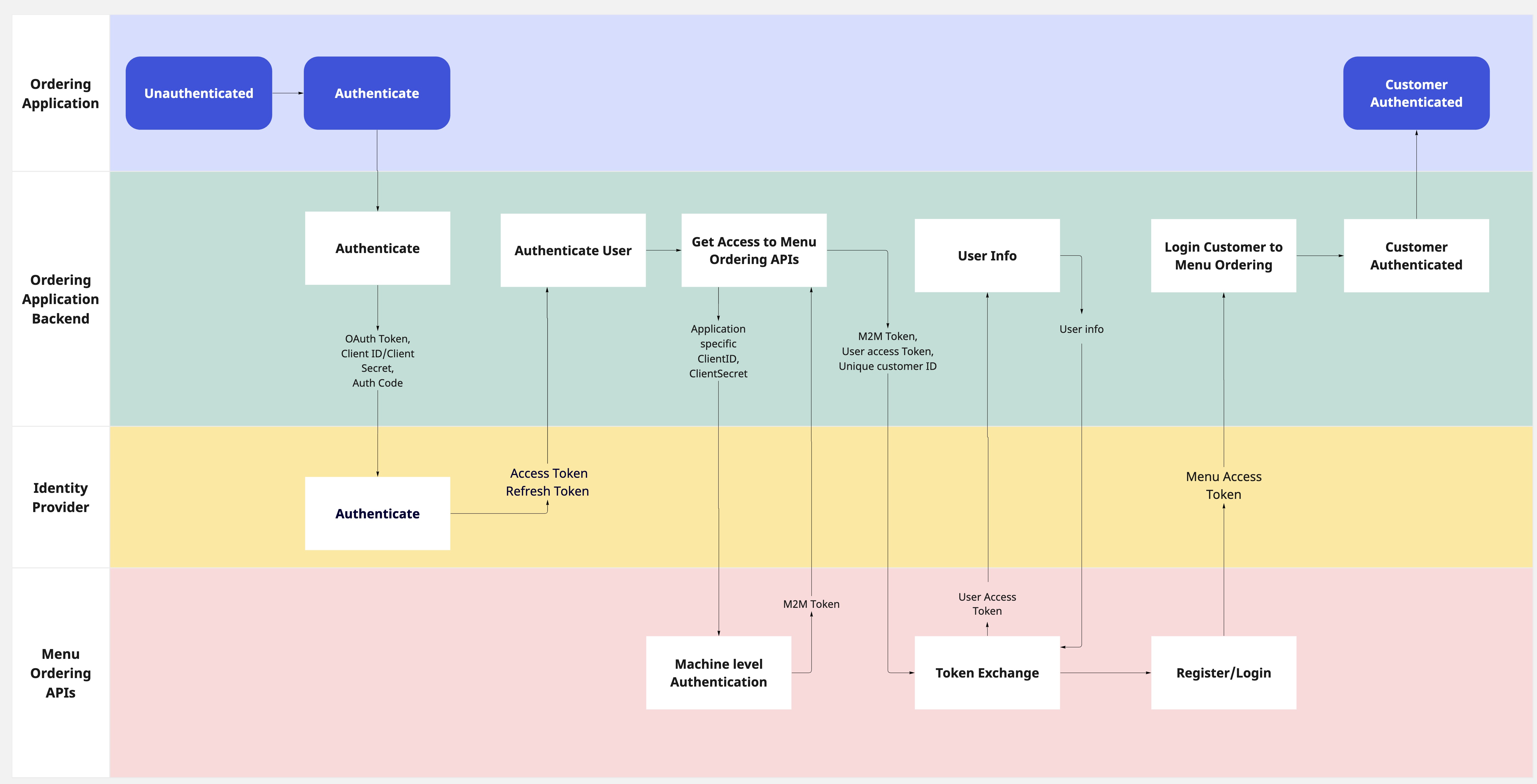
The process unfolds in the following steps:
Authentication with identity provider
The ordering application authenticates the Customer internally or with the identity provider gaining the access_token that will later be sent to PAR Ordering during Token exchange.
M2M Authentication with PAR Ordering
After the Customer is authenticated on the Ordering application side, the Machine level authentication should be initiated.
To establish a secure connection, client applications are provided with client_id and client_secret credentials, which are then used to generate access tokens. These access tokens serve as the authentication mechanism, guaranteeing that only authorized client applications can interact with the API.
By calling the /api/oauth/tokens the access token can be generated and later be used as the Bearer token for setting up the webhook configuration.
Request
| Attribute | Type | Example Value | Description |
|---|---|---|---|
Application |
Header Application Key | "f3a90488ffee32c3acb6fcd0ca417cf6" | Specific Management Center application key provided by PAR Ordering |
Authorization |
Header | "32c3acb6fcd0ca417cf6f3a90488ffee" | Basic Authorization header is based on the previously receiver client_id and client_secret and is generated as follows : base_64_encode(client_id:client_secret) |
{
  "method": "post",
  "url": "https://api-public-demo.menu.app/api/oauth/tokens",
  "headers": {
    "X-Request-ID": "69da3547-204b-4093-a225-54e084c24215",
    "Application": "f3a90488ffee32c3acb6fcd0ca417cf6",
    "Api-Version": "4.78.0",
    "X-Role-ID": "",
    "X-Ordering-API": true
  },
  "body":{
    "grant_type": "client_credentials",
    "scope": "webhooks-management"
}
}
Response
{
    "status": "OK",
    "code": 200,
    "data": {
        "oauth_token": {
            "access_token": "d4c129d3f4560c2beaa3a1a3b15bb771a7038a4bbb680a3912c9ea284d07b291",
            "token_type": "bearer",
            "scope": "webhooks-management",
            "expires_in": 86399
        }
    }
}
| Attribute | Type | Example Value | Description |
|---|---|---|---|
oauth_token.access_token |
string | "f3a90488ffee32c3acb6fcd0ca417cf6" |
Access token for the Machine level authentication, that will be used in token exchange as m2m_token |
oauth_token.expires_in |
int | "86399" | Token expiration time in seconds |
Token Exchange
The next step is registering the customer if they don't have an account yet, and signing them into PAR Ordering.
By calling POST /api/sts/users/sign-in the Ordering application authenticates the Customer with PAR Ordering and receives the menu_token required for all the protected resources.
Request
| Attribute | Type | Example Value | Description |
|---|---|---|---|
Authorization |
string | " Bearer 417cf6f3a90488ffee32c3acb6fcd0ca" |
Machine level token, obtained during the Machine level authentication |
subject_token |
string | "e32c3acb6fcd0ca417cf6f3a90488ffe" |
Customer access token obtained during the customer login on the Ordering Application side |
subject_token_type |
string | "access_token" |
The type of the provided token |
{
  "method": "post",
  "url": "https://api-public-demo.menu.app/api/sts/users/sign-in",
  "headers": {
    "X-Request-ID": "69da3547-204b-4093-a225-54e084c24215",
    "Application": "f3a90488ffee32c3acb6fcd0ca417cf6",
    "Authorization": "Bearer e32c3acb6fcd0ca417cf6e32c3acb6fcd0ca417cf6e32c3acb6fcd0ca417cf6",
    "Api-Version": "4.78.0",
    "X-Ordering-API": true
  },
  "body":{
    "grant_type": "token_exchange",
    "subject_token": "test-1100-jane.doe@partech.com-Jane-Doe-+41767567126",
    "subject_token_type": "access_token"
  }
}
Response
{
    "status": "OK",
    "code": 200,
    "data": {
        "customer_account": {
            "id": "01e6d2c9-976b-4953-91e6-3dade887a4c7",
            "type_id": 1,
            "reference_type": "CustomerAccount",
            "first_name": "Jane",
            "last_name": "Doe",
            "email": "jane.doe@partech.com",
            "phone_number": "+17126417675",
            "locale": "en",
            "state": 1,
            "demographics": [],
            "optin_status_email": 3,
            "optin_status_pn": 3,
            "has_pending_email_change": false,
            "has_pending_phone_number_change": false,
            "is_social": false,
            "social_login": null,
            "updated_at": "2023-09-20 07:38:47",
            "created_at": "2023-09-20 07:38:15",
            "confirmed": false
        },
        "token": {
            "value": "eyJ0eXAiOiJKV1QiLCJhbGciOiJIUzI1NiJ9.eyJpc3MiOiJodHRwczovL2FwaS1wdWJsaWMtcGxheWdyb3VuZC5tZW51LmFwcC9hcGkvc3RzL3VzZXJzL3NpZ24taW4iLCJpYXQiOjE2OTUxOTU1NDUsImV4cCI6MTY5NTE5OTE0NSwibmJmIjoxNjk1MTk1NTQ1LCJqdGkiOiJ1YUdxSDFKSlBzbUtWcEtjIiwic3ViIjoiNTA5MTUxNCIsInBydiI6ImNjMzI5MjFhMTU0ODBhMTE3ZDliYmM3MmMwZTEyNTZhNjg1MjQ1OGIiLCJhcHBsaWNhdGlvbl9pZCI6MjAxNSwic2Vzc2lvbl9pZCI6MzIyMDQsIl9vYXBpX3N0c190b2tlbiI6MX0.xWaQxNP1vAw-VYNS-VwmmXmYM_Ggw6dCW72L6leC89w",
            "ttl": 60,
            "issued_token_type": "access_token",
            "token_type": "Bearer"
        }
    }
}
| Attribute | Type | Example Value | Description |
|---|---|---|---|
customer_account |
object | Customer account object contains customer information shared by the identity provider | |
customer_account.id |
string | "90488ffee32c3acb6fcd0ca417cf6f3a" |
Customer account UUID |
customer_account.first_name |
string | "Jane" |
Customer first name |
customer_account.last_name |
string | "Doe" |
Customer last name |
customer_account.email |
string | "jane.doe@partech.com" |
Customer email address |
customer_account.phone_number |
string | "17126417675" |
Customer phone number |
token.value |
string | "b6fcd0ca417cf6f3a90488ffee32c3ac" |
PAR Ordering Access token, allowing authenticated access to protected resources |
The PAR Ordering Access token should later be used in the calls to protected customer account resources. The token should be sent as Bearer token in the Authorization header.
SSO with Punchh Integration
In case the brand is integrated with Punchh, an additional dlc-token is received that will be later used for Punchh specific calls in DLC-Authorization header
Response
{
    "status": "OK",
    "code": 200,
    "data": {
        "customer_account": {
            "id": "01e6d2c9-976b-4953-91e6-3dade887a4c7",
            "type_id": 1,
            "reference_type": "CustomerAccount",
            "first_name": "Jane",
            "last_name": "Doe",
            "email": "jane.doe@partech.com",
            "phone_number": "+17126417675",
            "locale": "en",
            "state": 1,
            "demographics": [],
            "optin_status_email": 3,
            "optin_status_pn": 3,
            "has_pending_email_change": false,
            "has_pending_phone_number_change": false,
            "is_social": false,
            "social_login": null,
            "updated_at": "2023-09-20 07:38:47",
            "created_at": "2023-09-20 07:38:15",
            "confirmed": false
        },
        "token": {
            "value": "eyJ0eXAiOiJKV1QiLCJhbGciOiJIUzI1NiJ9.eyJpc3MiOiJodHRwczovL2FwaS1wdWJsaWMtcGxheWdyb3VuZC5tZW51LmFwcC9hcGkvc3RzL3VzZXJzL3NpZ24taW4iLCJpYXQiOjE2OTUxOTU1NDUsImV4cCI6MTY5NTE5OTE0NSwibmJmIjoxNjk1MTk1NTQ1LCJqdGkiOiJ1YUdxSDFKSlBzbUtWcEtjIiwic3ViIjoiNTA5MTUxNCIsInBydiI6ImNjMzI5MjFhMTU0ODBhMTE3ZDliYmM3MmMwZTEyNTZhNjg1MjQ1OGIiLCJhcHBsaWNhdGlvbl9pZCI6MjAxNSwic2Vzc2lvbl9pZCI6MzIyMDQsIl9vYXBpX3N0c190b2tlbiI6MX0.xWaQxNP1vAw-VYNS-VwmmXmYM_Ggw6dCW72L6leC89w",
            "ttl": 60,
            "issued_token_type": "access_token",
            "token_type": "Bearer"
        },
        "dlc_access_token": {
            "value": "eyJ0eXAiOiJKV1QiLCJhbGciOiJIUzI1NiJ9.eyJlbWFpbCI6ImRyYWdvcy5uaWN1bGVzY3VAcGFydGVjaC5jb20iLCJpZCI6MzA2MjIzNzI2LCJleHAiOjE2OTA4MTQ0NTN9.MAE4JOlvR6mq_Bmx4Sqj1zYO8s4_b9IIjZIhce6B5Ao",
            "ttl": 60,
            "refresh_ttl": 0,
            "issued_token_type": "access_token",
            "token_type": "Bearer"
        }
    }
}
| Attribute | Type | Example Value | Description |
|---|---|---|---|
dlc_access_token.value |
string | "eyJlbWFpbCI6ImRyYWdvcy5uaWN1bGVzY3VAcGFydGVjaC5jb20iLCJpZCI6MzA2MjIzNzI2LCJleHAiOjE2OTA4MTQ0NTN9" |
Punchh Access token, allowing authenticated access to Punchh protected resources |
Token Refresh Flow
In our SSO token exchange mechanism, we employ a mandatory token refresh flow to seamlessly synchronize user details between systems. This ensures that any updates to user information, such as email addresses, name or phone numbers, are promptly reflected.
This approach streamlines user experiences by maintaining data coherence without the need for explicit refresh token management.
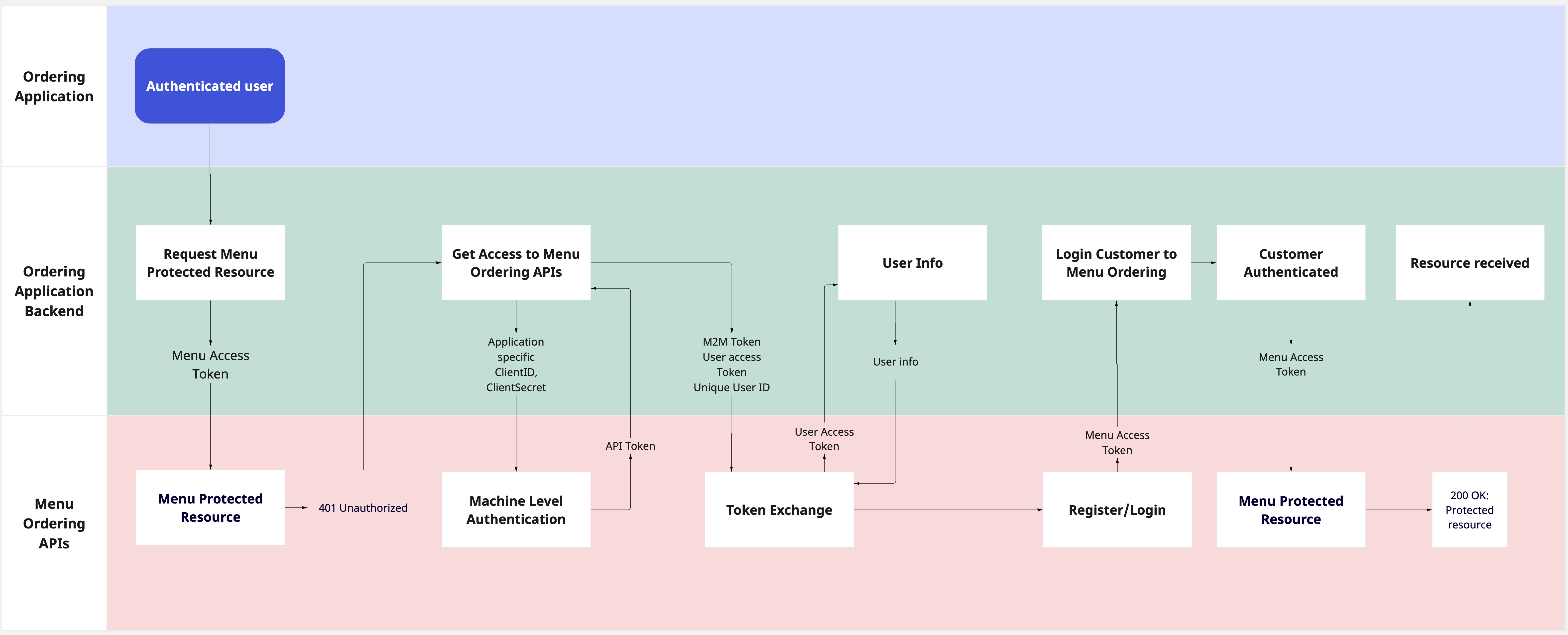
As illustrated in the scheme provided, the token refresh initiates with an attempt to access a protected resource using the menu_token. When an HTTP 401 error is returned, it signifies the token's expiration. At this point, the subsequent steps closely mirror the initial Register/Login to PAR Ordering process.
Importantly,during the sign-in flow, the Token Exchange step plays a pivotal role. During this step, any changes made to the customer's account, such as updated email addresses or phone numbers, are automatically retrieved and synchronized, ensuring that the user's information remains current and consistent across both systems.
Login to the existent White-label account
PAR Orderingoffers a unique capability: the seamless integration of Whitelabel and Custom ordering applications under a single brand. Whether it's a Whitelabel Mobile application paired with a custom Web application or vice versa, this configuration empowers customers to enjoy a unified experience. With this setup, users can maintain a single account, ensuring consistent access to discounts, stored payment methods, and addresses across both applications.
When a customer account is being registered via SSO, our system employs a two-step verification process: initially, the unique customer_account_id provided by the identity provider is checked to determine if the account already exists within our system. If no matching account is found based on this unique ID, a secondary verification is conducted, where we verify the existence of an account associated with the provided email address.
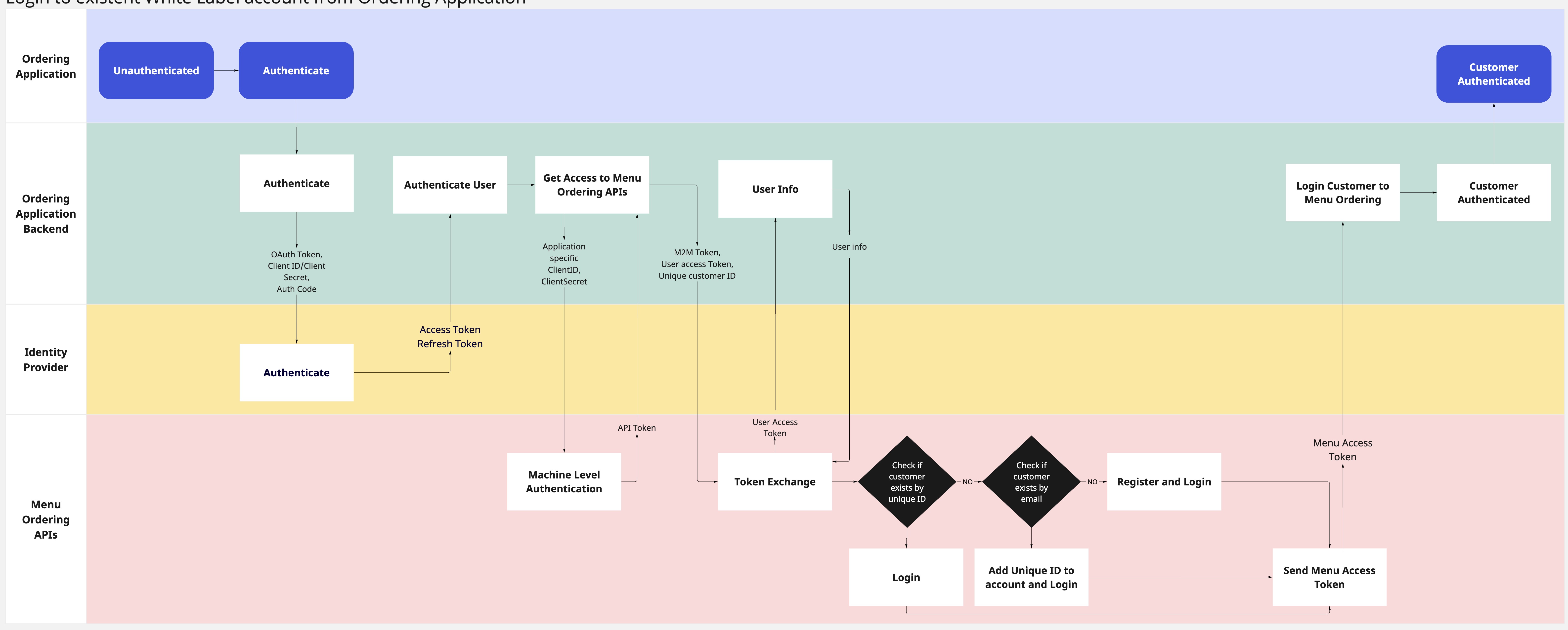
If an account is found using the customer_account_id, the customer is logged in. If there is no account with the given customer_account_id, the next verification by the email address happens, and if the account is found, the provided unique ID is bound to the existing account. This means that the previously established account becomes readily accessible through the SSO method.
This streamlined process ensures that customers can seamlessly integrate their whitelabel accounts with our SSO accounts.