Fetch Loyalty Related Customer Information
For displaying the points and/or credits available to a customer, as well as in-store and kiosk identification scan codes, the /dlc-service/customer-account-loyalty endpoint is called.
Request
{
  "method": "get",
  "url": "https://api-public-demo.menu.app/api/dlc-service/customer-account-loyalty",
  "headers": {
    "X-Request-ID": "69da3547-204b-4093-a225-54e084c24215",
    "Application": "f3a90488ffee32c3acb6fcd0ca417cf6",
    "Api-Version": "4.78.0",
    "Content-Type": "application/json",
    "Dlc-Authorization": ""

  }
}
Response
{
  "status": "OK",
  "code": 200,
  "data": {
    "customer_account_loyalty": {
      "point_balance": 0,
      "banked_currency": 0,
      "total_points_accrued": 0,
      "unbanked_points": 0,
      "user_as_qrcode": "PUNCHHBAhJIiMzMDYwNzYyMzE6bWFyaW9wKzIyMzNAbWVudS5hcHAGOgZFRg==--5aea56cd9fec5ad10fa75da35d0fb046fbc00b49PUNCHH",
      "user_as_barcode": "",
      "user_code_type": "",
      "loyalty_code": "P3WLXVW1O",
      "referral_code": "Mar2233M827",
      "referral_path": "https://engagement.punchh.com/whitelabel/brinkdemo/invite?invite_code=Mar2233M827",
      "expiring_banked_currency": 0,
      "banked_currency_expiring_on": ""
    }
  }
}
| Property | Value | Description |
|---|---|---|
customer_account_loyalty |
JSON | Contains all properties related to a customer's loyalty account. |
point_balance |
Number | It indicates the current point balance of the user. |
banked_currency |
Number | This property is populated only for punchh loyalty program with the program_type "points_convert_to_currency". It represents the current amount of banked currency the user has available." |
total_points_accrued |
Number | It indicates the lifetime amount of points earned by the customer. |
unbanked_points |
Number | This property is populated only for punchh loyalty program with the program_type "points_convert_to_currency". In case of businesses where banking of points is enabled, this value represents the number of points which the user has and have not banked yet. For example, if a business configuration requires 100 points to be banked to $10, and an end-user has accumulated 55 points, this value will be 55. When the end-user earns another 45 points, they will be banked to $10 and this value will then become 0. |
user_as_qrcode |
String | It indicates what the QR code content should be for the user's loyalty card. |
user_as_barcode |
String | It indicates what the barcode content should be for the user's loyalty card. |
user_code_type |
String | Possible values: "barcode", "qrcode" and "". It is used to determine whether to display a barcode or QR code for the user's loyalty card. |
loyalty_code |
String | This is not supported by punchh loyalty. |
referral_code |
String | This is not supported by punchh loyalty at the moment. |
referral_path |
String | This property is populated for only the punchh loyalty program. It is the invite URL that should be shared with referred users. For MENU, the referral feature must be enabled within the Management Center. For punchh, it is automatically generated for each user. |
expiring_banked_currency |
Number | This property is populated only for the punchh loyalty program with the program_type of points_convert_to_currency. In case a business has expiring banked_currency configured in the dashboard, the banked currency will be expired in a FIFO pattern. This returns the value of the banked_currency that will expire. A "null" value indicates that the business is not configured to support expiring_banked_currency. |
banked_currency_expiring_on |
String | This property is not currently supported but will be in future iterations. |
For the program types points_unlock_redeemable and points_convert_to_reward, the point_balance property indicates how many points the customer has available. For the points_convert_to_currency, the unbanked_points property is used instead.
For Surprise & delight program, no points or currency are used or displayed.
Loyalty Card Number
By referencing the user_code_type in the response of /dlc-service/customer-account-loyalty endpoint, it can be determined whether to display the loyalty card number in a barcode or qr code format for the POS scanners to use.
If its value is qrcode, reference the user_as_qrcode property for the QR code value. If its value is barcode, reference user_as_barcode instead.
Adding Loyalty Points to Customer
To determine the number of loyalty points a customer will earn based on their order, update the cart and read the loyalty information from the response. There is no separate calculation call — the cart recalculates on every update.
Response
{
  "status": "OK",
  "code": 200,
  "data": {
    "calculations": {
      "calculation_method": "exclusive",
      "subtotal": 2500,
      "discount": 0,
      "subsidy": 0,
      "service_charge": 0,
      "service_charge_rate": 0,
      "service_charge_tax_rate": 0,
      "delivery_fee": 0,
      "delivery_fee_tax": 0,
      "delivery_fee_tax_rate": 0,
      "minimum_surcharge": 0,
      "minimum_surcharge_tax": 0,
      "tip": 0,
      "tip_rate": 0,
      "total": 2625,
      "amount_for_payment": 2625,
      "tax": 125,
      "tax_exemption": 0,
      "tax_rates": {
        "5": 125
      },
      "tax_rates_exemption": {
        "5": 0
      },
      "items": [
        {
          "id": "19a394da-3f23-11ed-936c-1a67b454859d",
          "type_id": 1,
          "price": 500,
          "quantity": 5,
          "subtotal": 2500,
          "discount": 0,
          "total": 2625,
          "tax": 125,
          "tax_exemption": 0,
          "tax_rate": 5,
          "tax_rates": {
            "5": 125
          },
          "modifiers": []
        }
      ],
      "customer_account_id": "47bf5f70-3f23-11ed-936c-1a67b454859d",
      "discount_info": null,
      "loyalty_info": {
        "points_spent": 0,
        "points_accrued": 25,
        "available_loyalty_points": 0
      }
    }
  }
}
The backend will internally call Punchh service to obtain the points calculation based on the order details provided. The response will contain the number of loyalty points that the user will earn for this order.
The system will handle the automatic granting of loyalty points as a backend task when the order is placed.
However, there is also the flexibility of using Punchh's dashboard for manual intervention and direct granting of loyalty points if needed.
Adding Loyalty Points for In-store Transactions
When the user makes an in-store purchase without identifying themselves, they can earn points from that order by scanning the QR/barcode from the receipt.
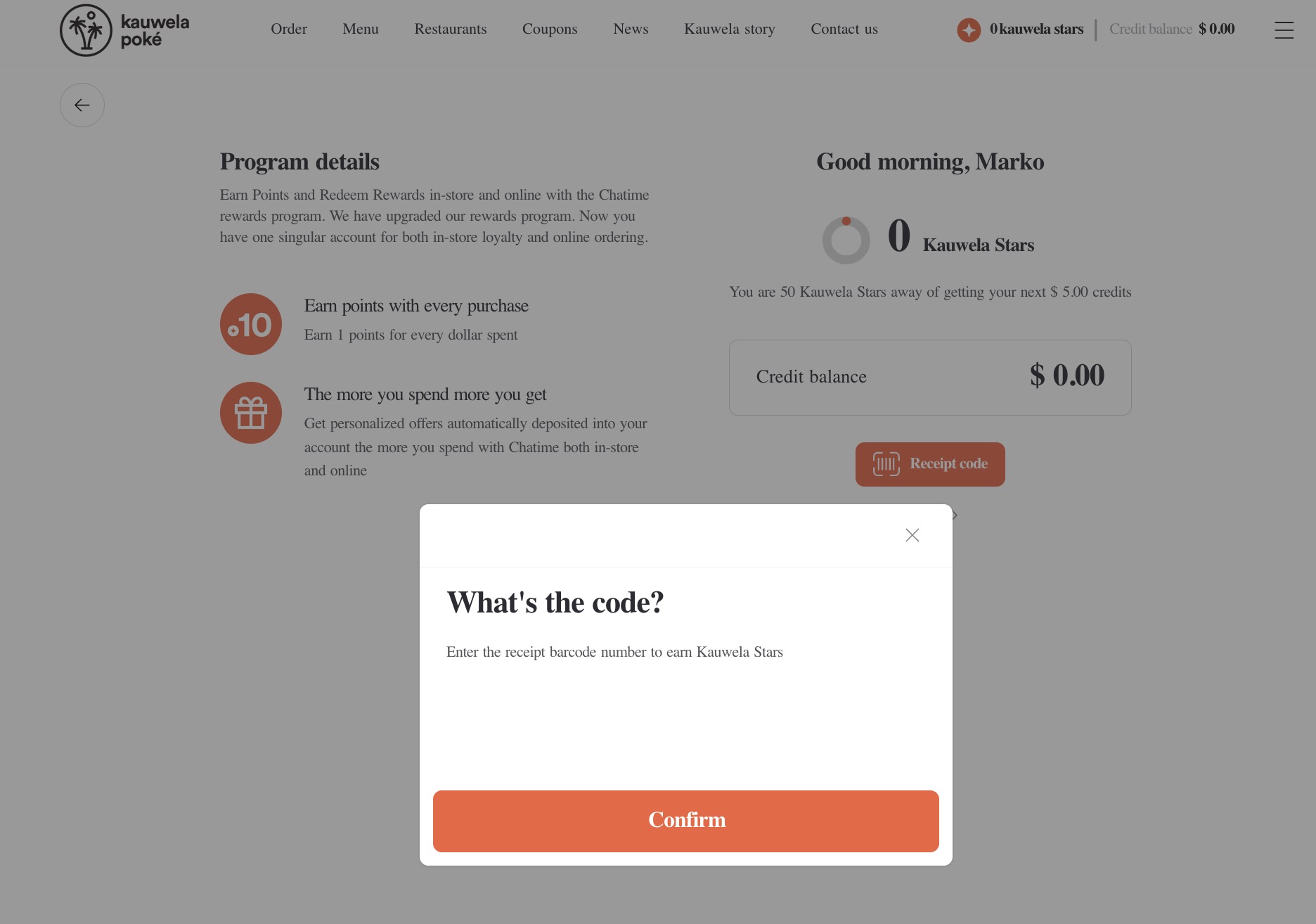
To add these points to their balance /dlc-service/loyalty/checkin needs to be called with the code type and code value.
| Property | Value | Description |
|---|---|---|
type |
string | barcode or qrcode |
code |
integer | the code obtained from the scan |
latitude |
integer | User's current location |
longitude |
integer | User's current location |
is_manual |
boolean | True if the end-user entered the barcode by hand |
Request
{
  "method": "get",
  "url": "https://api-public-demo.menu.app/api/dlc-service/loyalty/checkin",
  "headers": {
    "X-Request-ID": "69da3547-204b-4093-a225-54e084c24215",
    "Application": "f3a90488ffee32c3acb6fcd0ca417cf6",
    "Api-Version": "4.78.0",
    "Content-Type": "application/json",
    "Dlc-Authorization": ""

  },
  "body": {

    "type": "barcode",
    "code": 5504339697795,
    "is_manual": true
  }
}
Response
{
    "status": "OK",
    "code": 200,
    "data": {
        "checkin": {
            "checkin_id": "1054637900",
            "points_earned": 15,
            "is_first_checkin": true
        }
    }
}
| Property | Value | Description |
|---|---|---|
checkin_id |
integer | It indicates the internal id of the checkin |
points_earned |
integer | Number of points earned in the order |
is_first_checkin |
boolean | Flag to avoid double earning |