Order Lifecycle
The order processing follows a two-phase approach: Validate first, then Submit.
Phase 1: Validate Order
Purpose: Validate order details without committing to the POS system.
Endpoint: POST /posnext/order/validate
When to Use:
- Before final order submission
- To check item availability
- To validate pricing
- To verify that the location is accepting orders
Response:
- Status:
validated(if successful) - Order details with calculated totals
- POS order ID should NOT be generated yet
Phase 2: Submit Order
Purpose: Submit the validated order to the POS system for processing.
Endpoint: POST /posnext/order/submit
When to Use:
- After successful validation
- When the customer confirms the order
- To create the order in the POS system
Response:
- Status:
placed(if successful) - Order details with the POS order ID
- Final pricing confirmation
Order Lifecycle Flow
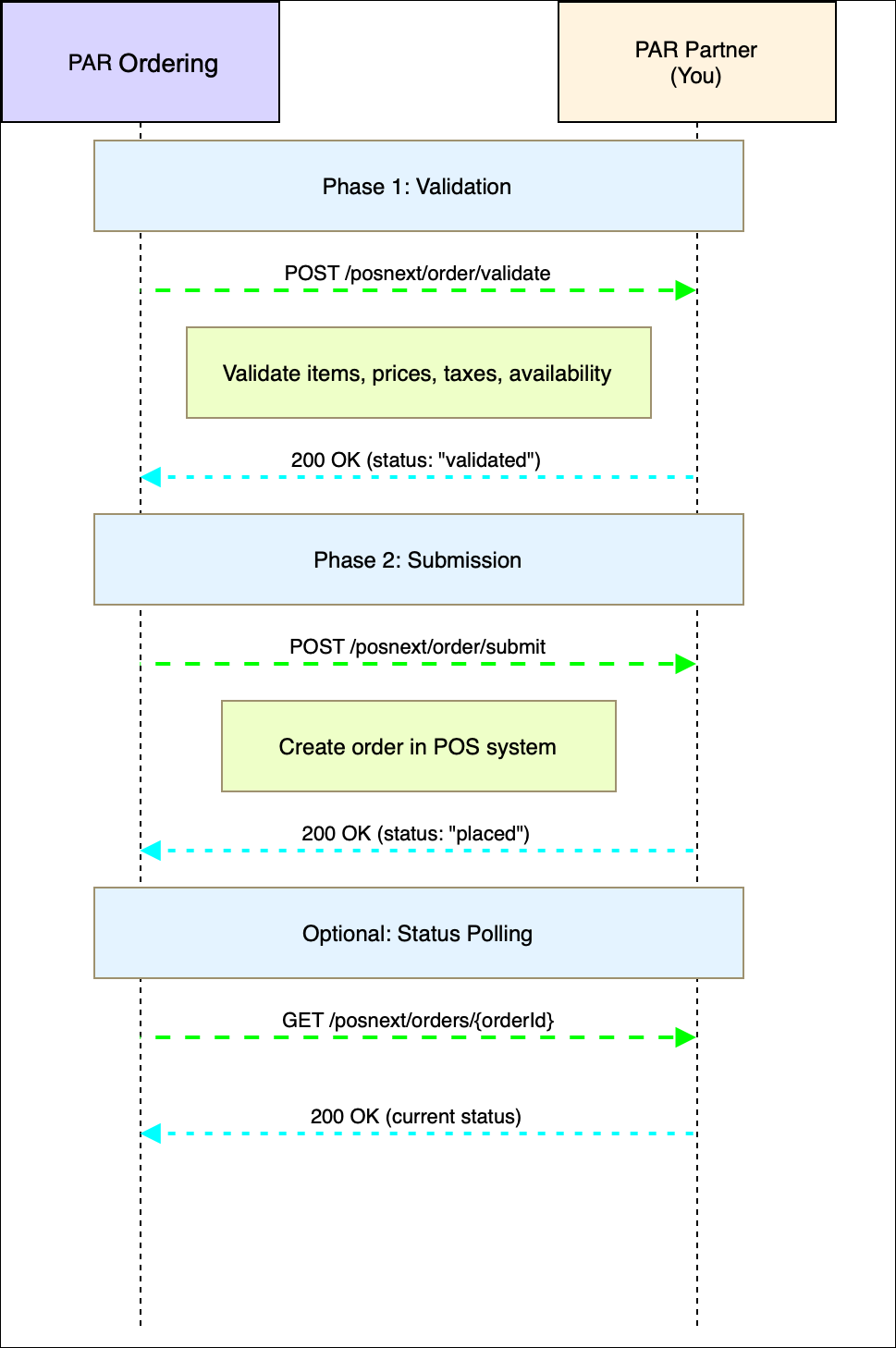
Menu Data Requirement
Important: Menu data must be available and cached before order processing. PAR Ordering will fetch menu data via the /posnext/menus endpoint to:
- Validate menu items exist
- Verify pricing
- Check item availability
Ensure your menu sync endpoint is implemented and returns accurate, up-to-date menu data.
Status Messages
The following status values are defined in GenericOrderStatuses and must be used in all API responses:
| Status | Description | When to Use |
|---|---|---|
validated |
The order has been validated and is ready for processing. | Return from the validate endpoint when the order is valid |
placed |
The order has been placed, typically for orders injected into the POS system. | Return from the submit endpoint when the order is created in the POS system. |
pending |
The order is pending further action | Use with 202 response in exceptional cases only, or when the order is in progress. |
errored |
An error occurred during order processing | Return when validation/submission fails |
rejected |
The order was rejected due to validation or business rules | Return when the order doesn't meet business rules |
Status Flow
Track order progress through these states:
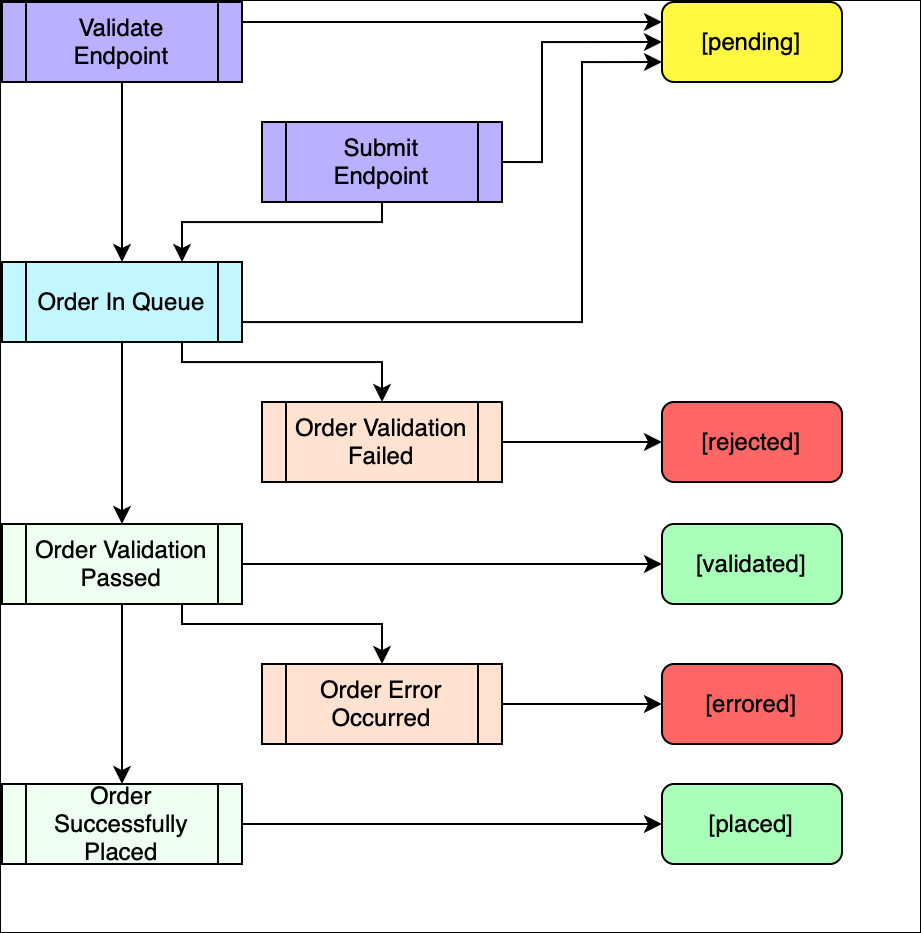
Request and Response Properties
Request Type (request_type)
The request_type field in order requests indicates the type of operation being performed. This field is required in all order requests.
| Value | Description | Used In |
validate-order |
Request to validate the order details without placing it | POST /posnext/order/validate |
place-order |
Request to place the order in the POS system | POST /posnext/order/submit |
Example:
{
  "request_type": "validate-order",
  ...
}
Schedule Type (schedule_type)
The schedule_type field indicates whether the order is for immediate or future fulfillment.
| Value | Description |
current |
Request to place the order now (immediate fulfillment) |
future |
Request to place the order in the future (scheduled fulfillment) |
Example:
{
  "schedule_type": "current",
  ...
}
Default Value: "current" (if not specified)
Order Status (status)
The status field in order responses indicates the current state of the order. See Status Messages section for complete details.
Valid Values:
validated- Order validated and ready for processingplaced- Order placed in POS systempending- Order pending further actionerrored- Error occurred during processingrejected- Order rejected due to validation or business rulescancelled- Order cancelled (TBD)
Item Type (item_type)
The item_type field in menu items distinguishes between main items and modifiers.
| Value | Description |
Item |
Main menu item (e.g., burger, pizza) (as main item only) |
Modifier |
Modifier or add-on item (e.g., size, toppings) (as child item only) |
Discount |
Price reduction (as main item or child item) |
Combo |
Bundle of multiple items sold together (as main item only) |
Promotion |
Special promotional offering (as main item only) |
Memo |
Informational note (as main item or child item) |
Example:
{
  "menu_items": [
    {
      "id": "item-001",
      "name": "Burger",
      "item_type": "Item",
      ...
    },
    {
      "id": "mod-001",
      "name": "Large",
      "item_type": "Modifier",
      ...
    }
  ]
}
Time-to-Live (ttl)
The ttl (Time-to-Live) field specifies the validity duration of the order payload in seconds. This indicates how long the order request remains valid for processing.
Type: integer (optional)
Unit: Seconds
Example:
{
  "ttl": 300,
  ...
}
Note: If not specified, the order validity is determined by your system's default timeout settings.
Common Request/Response Fields
Required Fields
request_uid(string): Unique identifier for the order requestrequest_datetime(string): ISO 8601 UTC datetime format (yyyy-MM-ddTHH:mm:ss.fffZ)location_id(string): Location identifierorder_details(object): Order details including items, totals, etc.
Optional Fields
schedule_type(string):"current"or"future"(default:"current")callback_url(string): URL for asynchronous callbacksttl(integer): Time-to-live in secondscompleted_at(string): ISO 8601 UTC datetime when order processing completedreceived_at(string): ISO 8601 UTC datetime when order was received