Offers Ingestion Developer Guide
Overview
Offers Ingestion is a PAR Punchh Platform feature and functionality that can help your brand manage offers. Offers Ingestion's features make it easier for platform applications to provision and monitor all aspects of offers, such as line item selectors (LIS), qualification criteria (QC), and redeemables, using APIs instead of being forced to do it through the Punchh dashboard.
Please see Offers Ingestion Overview for requirements and platform configurations.
Intended Audience
This developer guide is intended for software developers with third-party software vendors. It provides information on how to use the PAR Punchh REST APIs to integrate the PAR Offers Ingestion feature into their platform or CDP applications.
The audience needs to understand the full use cases of Offers Ingestion.
Getting Started
To get started with Offers Ingestion, the following is a useful course of action:
1. Learn the key use cases and key concepts described in this document. These concepts and use cases are useful to understand when studying the scenarios.
2. Acquire the prerequisites, such as a Punchh business test environment configured with Offers Ingestion enabled. Your PAR Punchh representative will provide these for you.
3. Download Postman or use it from your web browser. Fork the PAR Punchh Postman Platform collection, and set up the environment variables for your PAR Punchh test environment. Once the environment is configured, run the Offers Ingestion folder in the Postman collection. It exercises most of the Offers Ingestion APIs and implements many of the most common offer types.
4. After running these scenarios, study the API endpoint documentation in Appendix A and the scenarios codified in these documents. In particular, take note of the HTTP method, URLs, HTTP request headers, HTTP body, and HTTP responses. Study the data that goes into each call in the Postman collection, sometimes prepared in the pre-request script, and sometimes directly from an environment variable using the pm.environment.get() call, and the data saved after each call in the post-response script.
5. After this, carefully read the data sequence diagram to learn what to build and how to build it. The data sequence diagram shows the messages and information flows between an end user and the PAR Punchh back end.
6. Study the Offers Ingestion data model and key concepts described in this document. Study the relationships between the various data entities in the key concepts. They will enable better understanding of the use cases in the data sequence diagram. Study the use cases and the data model a few times, as the data model informs learning the use cases and use cases inform learning the data model.
7. Based on the data sequence diagram, the Postman collection, and your requirements, build your project plan on how to effectively and efficiently build your integration with Offers Ingestion.
Key Business Use Cases
The following sections outline a few key use cases that highlight the feature capabilities of Offers Ingestion. For the comprehensive list of use cases, please refer to the Offers Ingestion Data Sequence Diagram and Postman collections. There are more business use cases defined in the Postman collections, but understanding the following use cases should help you understand the rest of them.
Use Case 1 - Create a Flat Dollar Discount Offer
This scenario explains how a Punchh platform API user creates a "flat dollar discount" offer.
Business Use Case
1. The platform user creates an offer that applies to all orders, and therefore does not require QC or LIS.
API Call Sequence
This is the sequence of PAR Punchh API calls to create a "flat dollar discount" offer. It is also described in the Postman scenario in the Offers Ingestion folder of the Platform Functions collection. This offer only needs a redeemable, but because it applies to all orders, it does not need QC. The API call sequence is described as follows:
1. Create a redeemable named “Flat Dollar Discount” with a single receipt_rule that has qualifier_type = “flat_discount” and discount_amount = 5.0. Save the external_id of the redeemable from the response.
Use Case 2 - Create a Free Salad With Sandwich Offer
This scenario explains how a Punchh platform API user creates an offer that gives a free salad if the order has a salad and a sandwich on it.
Business Use Case
1. The platform user creates a LIS with clauses to include menu item identifiers for salads.
2. The platform user creates a LIS with clauses to include menu item identifiers for sandwiches.
3. The platform user creates the QC with line item filters for the salads LIS defined in step 1, and item qualifiers for sandwiches and salads defined in steps 1 and 2. Remember that the menu item identifiers on the LIS belonging to item qualifiers must be on the order for the QC to be true, and that the discount applies to the menu items on the LIS belonging to the line item filters eligible for the discount. The discount on the salad is controlled by the attribute percentage_of_processed_amount. If it is null or 100, then the item in the item_identifiers (salad in this case) is discounted by 100%. If you want to grant a different discount, then specify it with a number between 1 and 100 inclusively.
4. The platform user creates a redeemable offer based on the QC defined in step 3.
API Call Sequence
This is the sequence of PAR Punchh API calls to create a "free salad with sandwich" offer. It is also described generically in the data sequence diagram for Offers Ingestion and in the Postman scenario in the Offers Ingestion folder of the Platform Functions collection. This offer only needs two LIS, the QC, and a redeemable. The API call sequence is described as follows:
1. The platform user creates a LIS with clauses to include menu item identifiers for salads. Save the external_id of this LIS.
2. The platform user creates a LIS with clauses to include menu item identifiers for sandwiches. Save the external_id of this LIS.
3. The platform user creates the QC with line item filters for the salads LIS, and line item qualifiers for sandwiches and salads. Set the line_item_selector_id values of the line item filters and item qualifiers to the external_id values from step 1 and step 2. Save the external_id of the QC.
4. The platform user creates a redeemable predicated on the QC defined in step 3 by specifying in the receipt_rule that redeeming_crition_id = external_id, where the external_id is that of the QC defined in step 3.
Use Case 3 - Create a $2 Off All Drinks From 5-8 PM on Mondays Offer
This scenario explains how a Punchh platform API user creates an offer that gives a $2 discount on all drinks from 5:00 PM to 8:00 PM on Mondays.
Business Use Case
1. The platform user creates a LIS with clauses to include menu item identifiers for various drinks.
2. The platform user creates the QC with line item filters and item qualifiers for the drinks LIS defined in step 1. Include receipt qualifiers with clauses to ensure that the order was placed between 5:00 PM and 8:00 PM, and that it was placed on a Monday. Include a cap on the discount.
3. The platform user creates a redeemable offer based on the QC defined in step 2.
API Call Sequence
This is the sequence of PAR Punchh API calls to create a "$2 off all drinks from 5-8 PM on Mondays" offer. It is also described generically in the data sequence diagram for Offers Ingestion and in the Postman scenario in the Offers Ingestion folder of the Platform Functions collection. This offer needs one LIS, the QC, and a redeemable. The API call sequence is described as follows:
1. The platform user creates a LIS with clauses to include menu item identifiers for drinks. Save the external_id of this LIS.
2. The platform user creates the QC with line item filters for the drinks LIS, and line item qualifiers for drinks. Set the line_item_selector_id values of the line item filters and item qualifiers to the external_id value from step 1. Also include clauses in receipt_qualifiers to ensure receipt_week_day == 1 and receipt_hour in_range “17..19”. Save the external_id of the QC. Also ensure that amount_cap = 2.0 and rounding_rule = “round” in the QC data.
3. The platform user creates a redeemable predicated on the QC defined in step 2 by specifying in the receipt_rule that redeeming_crition_id = external_id, where the external_id is that of the QC defined in step 2.
Key Concepts
Implementing PAR Offers Ingestion into the system depends on understanding a few key concepts. If you understand these key concepts, and how they relate to each other as described below, it will be easier to understand the key use cases that will enable you to build an integration with PAR Punchh and PAR Punchh Offers Ingestion. This description is organized around key managed data entities and their sub-entities. There are provisioned managed entities, and each one comprises multiple sub-entities. Provisioned managed entities are created with their sub-entities in one API call, but the sub-entities are required to separate data into cohesive units.
Provisioned Managed Entities
This list describes the 3 types of managed entities and lists their sub-entities.
1. Provisioned Line Item Selector (LIS) - Each LIS is associated with a set of menu items from the menu database. For example, it may be associated with the menu identifier of a small hamburger, or it could be associated with the menu identifiers of all hamburgers. The base items and modifiers describe the relationship between menu items and the LIS. The provisioned LIS creates a LIS entity along with its sub-entities listed below. The LIS is described in Line Item Selector (Object), Base Items (Object), and Modifiers (Object).
-
1a. Line Item Selector - The identity attributes of a LIS are the name and the external_id. The name must be provided by the creator, and the external_id can be provided by the creator, but if it is not provided, the system will generate one. The external_id is used when it is referred to by QC.
-
1b. Base Items - This belongs to a LIS, and comprises a set of clauses.
-
1c. Clause (for base items) - This item belongs to a Base Items object, and it codifies a single logical expression with its attributes called attribute, operator, and value. For example, the attribute could be “price”, the operator could be “equals”, and the value could be “10”. This lets the system build the logical expression from the data.
-
1d. Modifier - This belongs to a LIS, and comprises a set of clauses. It also has attributes to define how modifiers to base items are discounted.
-
1e. Clause (for modifiers) - This item belongs to a Modifier object, and it codifies a single logical expression with its attributes called attribute, operator, and value, and works like the Clause (for base items) described above.
2. Provisioned Qualifying Criterion - Each provisioned QC is a predicate that describes when a LIS qualifies for a discount. The predicate comprises statements of which Line Item Selectors are the subject of the qualification via Line Item Filters, how items qualify via Item Qualifiers, and additional clauses defined in Receipt Qualifiers. The provisioned QC creates a QC entity along with its sub-entities listed below. The provisioned QC is described in QC Input (Object), Receipt Qualifiers (Array Object), and Item Qualifiers (Array Object).
-
2a. Qualifying Criterion - The identity attributes of the QC are the name and the external_id. The name must be provided by the creator, and the external_id can be provided by the creator, but if it is not provided, the system will generate one. The external_id is used when it is referred to by a redeemable.
-
2b. Line Item Filters - This entity associates the QC with a LIS. This is a list of LIS objects for LIS menu items to which discounts apply for this QC. When creating the QC for pre-existing LIS, this field must specify the line_item_selector_id to be the same as the external_id field of the LIS being associated with the QC as a line item filter.
-
2c. Item Qualifiers - This entity also associates the QC with a LIS. This is a list of LIS objects for LIS menu items which must be present on a check for the QC predicate to be true. When creating the QC for pre-existing LIS, this field must specify the line_item_selector_id to be the same as the external_id field of the LIS being associated with the QC as an item qualifier.
-
2d. Receipt Qualifiers - These belong to the QC, and each one codifies a single logical expression with its attributes called attribute, operator, and value, and works like the Clause (for base items) described above. It is similar to clauses in LIS base items, but the names of the attribute attribute are different.
3. Provisioned Redeemable - Each provisioned redeemable is the offer that can be granted when its Redeeming Criterion (which comprises Receipt Rules, each of which is true when its QC predicate is true) is true. The Provisioned Redeemable is described in Redeemable Input (Object) and Redeeming Criterion (Object).
-
3a. Redeemable - The identity attributes of a redeemable are the name and the external_id. The name must be provided by the creator, and the external_id can be provided by the creator, but if it is not provided, the system will generate one.
-
3b. Receipt Rule - The receipt rule associates a redeemable with the QC, and is thus the rule defined by its qualifying criterion. When creating the receipt rule, the redeeming_criterion_id is set to the external_id of the QC.
Offers Ingestion Data Model
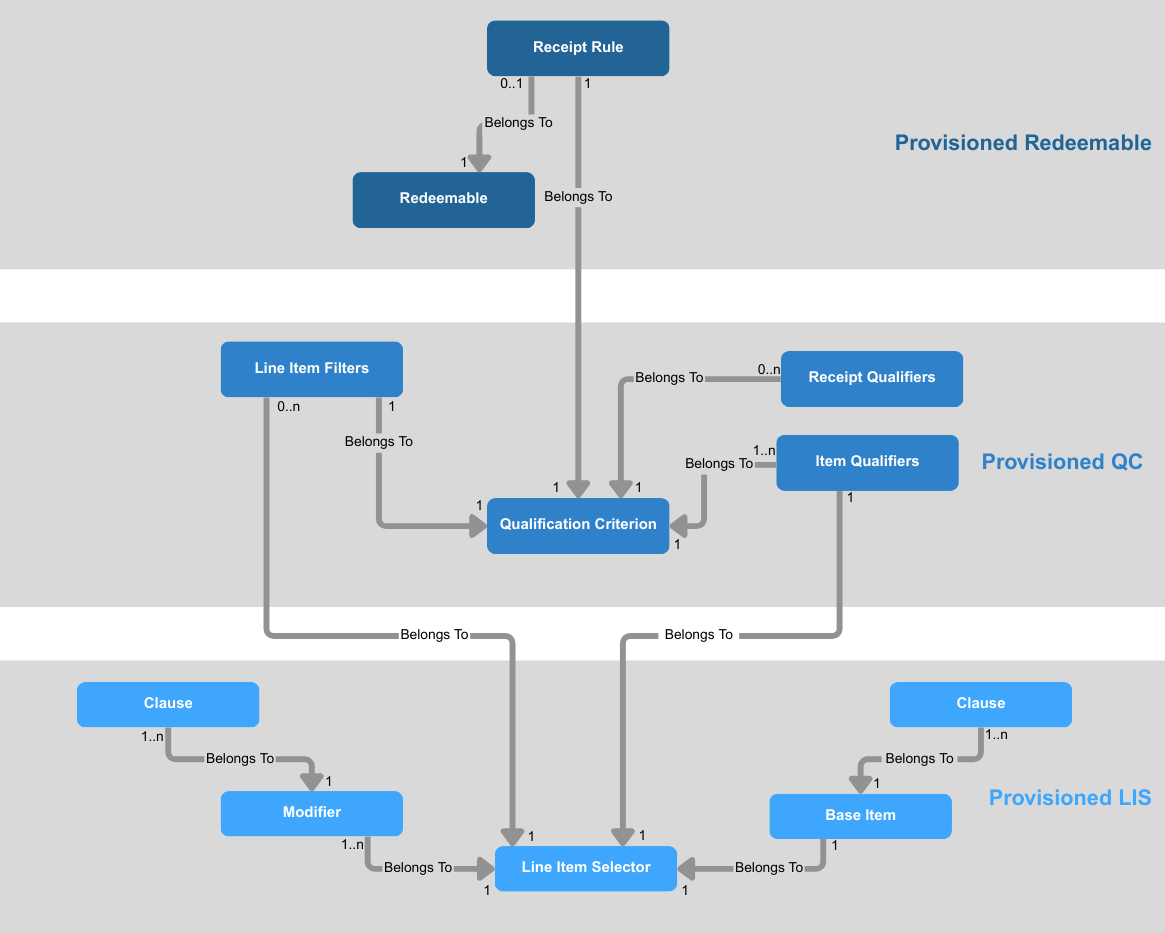
The following diagram illustrates how the various data entities depend on each other. (The dependency goes in the direction of the arrow; e.g., the QC depend on a LIS.) A couple of notes about the diagram:
-
The “belongs to” and “has many” relationships go in the direction of the arrow; e.g., a Receipt Rule belongs to a Redeemable. These relationships must be recorded and managed in an integration that uses Offers Ingestion APIs.
-
The numbers at the ends of the solid arrow show the cardinality of the relationship; e.g., there can be n gift cards entities that belong to 1 loyalty user.
Prerequisites
In order to develop an integration with Offers Ingestion APIs, you will need the following environments set up:
1. Punchh business on a production stack (e.g., Mothership 2). This would include a URL to the Punchh dashboard of that business.
2. URLs used to call Platform APIs.
3. The above store configuration for the dashboard miscellaneous configuration must be ”Enable Offers Ingestion”.
4. A business administrative user must be configured with the “Business Owner” role, and a business_admin_key must be generated for that administrative user. This key is used to authenticate and authorize Punchh calls for Offers Ingestion.
Please ask your Punchh representative to ensure that your test environment has these things configured. The Punchh Platform hosts the Offers Ingestion APIs.
Resources
PAR Punchh Postman Collections
The PAR Punchh Postman collections comprise scenarios that can be used to exercise various PAR Punchh APIs against a PAR Punchh test environment. These scenarios demonstrate programmatically how to initialize data and properly sequence PAR Punchh API calls to implement various business PAR Punchh loyalty scenarios. The Platform Functions collection contains a subfolder that holds all of the Offers Ingestion scenarios for Postman.
Certification
There is no certification process for using Offers Ingestion APIs because it is not a core loyalty function.
Useful Links
1. PAR Punchh Offers Ingestion Postman collection
2. Getting Started With the PAR Punchh Integration
Appendix A: API Endpoints
On the PAR Developer Portal, you will find information about PAR Punchh Rest APIs, including other products. Here is a list of APIs that are relevant to Offers Ingestion: