Loyalty Pay Developer Guide
Overview
Loyalty Pay is a growing set of digital wallet features and functionality that can help your brand increase loyalty acquisitions, engagement, frequency, and spending. Loyalty Pay's features make it easier for guests to securely pay and get the most out of their loyalty membership. With experts predicting that digital wallets will overtake plastic cards by 2030, Loyalty Pay is a solution to improve guest experience and simplify brand adoption. The benefits speak for themselves:
- Frictionless consumer experience
- Increase loyalty program usage and engagement
- Increase loyalty sign-ups
- Reach and engage with frequent customers who do not download apps
Loyalty Pay is a part of the PAR Punchh loyalty system that enables loyalty users to save frequently used payment methods such as credit card, gift cards and pre-purchased subscriptions on their loyalty account. It also lets you make payments using these forms of stored value. Payments can be made through a mobile application using PAR Punchh Mobile APIs, or through a mobile application handing off user authentication and payment authorization tokens to a POS terminal that calls PAR Punchh POS APIs to make payments on the user’s behalf. PAR Punchh currently supports payment integration with the PAR payment processor: PAR Pay.
Please see Loyalty Pay Overview on the Punchh Support Portal for requirements and platform configurations.
Note: To view the Punchh product documentation on the Punchh Support Portal, you must log in to a Punchh platform production environment. If you already have access to a production environment, follow the instructions here to access the Punchh Support Portal. If you do not have access to a Punchh production environment, your PAR Punchh representative can provide you with temporary access to a Punchh test environment. For more information, see Getting Started With the PAR Punchh Integration.
Intended Audiences
This developer guide is intended for third-party software vendor developers. It provides information on how to use the PAR Punchh REST APIs to integrate the PAR Loyalty Pay product into their Mobile and Point-of-Sale (POS) applications.
-
The first audience for this document is mobile application developers who want to use Loyalty Pay as part of a loyalty program integration with Punchh.
-
The second audience for this document is POS system developers who want to enable their POS systems to use the features of Loyalty Pay, such as a payment integration (PAR Pay), and single-scan codes (that transfer authorizations from the mobile application to the POS system to complete payments from a mobile application to the POS terminal).
Both audiences need to understand the full use cases of Loyalty Pay, even though many use cases require both the mobile application and the POS system to support Loyalty Pay features. This document will highlight which parts of the use case are for the POS and which part is for the mobile application.
Getting Started
To get started with Loyalty Pay, the following is a useful course of action:
1. Learn the key use cases and key concepts described above in this document. These concepts and use cases are useful to understand when studying the scenarios.
2. Acquire the prerequisites, such as a test environment configured with your selected payment processor, gift card adapter, and keys. Your PAR Punchh representative will provide these for you.
3. Download Postman or use it from your web browser. Fork the PAR Punchh Postman collections, and set up the environment variables for your PAR Punchh test environment. Try out a few API calls and scenarios for end-to-end testing, and make sure the test cases in the Postman scenarios pass. The best scenarios to try are two key use cases described above, and codified in the Loyalty Pay collection. They are:
-
3a. Mobile: Save Credit Card With a Single-use Payment Token for PAR Pay. You can use test credit cards for your environment.
-
3b. Mobile & POS: Single-Scan Code Flow With a Saved Credit Card for PAR Pay. You can use test credit cards for your environment.
4. After running these scenarios, study the API endpoint documentation in Appendix A and the scenarios codified in these documents. In particular, take note of the HTTP method, URLs, HTTP request headers, HTTP body, and HTTP responses. Study the data that goes into each call in the Postman collection, sometimes prepared in the pre-request script, and sometimes directly from an environment variable using the pm.environment.get() call, and the data saved after each call in the post-response script. Also, study the algorithm used to generate the x-pch-digest signatures for the request.
5. After this, carefully read the feature matrix, certification matrix, and data sequence charts to learn what to build and how to build it.
-
5a. The feature matrix describes the specific features required for Loyalty Pay. Some are optional while others are mandatory, and might depend on the specific SOW (statement of work) signed with PAR Punchh.
-
5b. The data sequence chart shows the messages and information flows between an end user, a mobile application, the PAR Punchh backend, the POS terminal system, and the payment provider (PAR Pay).
-
5c. The certification matrix details how to verify that a feature has been implemented.
6. Study the Loyalty Pay data model and key concepts described in this document. Study the relationships between the various entities in the key concepts. They will enable better understanding of the use cases in the feature matrix, certification matrix, and data sequence charts. Study the use cases and the data model a few times, as the data model informs learning the use cases and use cases inform learning the data model.
7. Based on the feature matrix, certification matrix, and data sequence charts, build your project plan on how to effectively and efficiently build your integration with Loyalty Pay.
Key Use Cases
The following sections outline a few key use cases that highlight the feature capabilities of Loyalty Pay. For the comprehensive list of use cases, please refer to the Loyalty Pay Feature Matrix.
Note: The following use cases focus only on the payment flows and do not cover a complete loyalty transaction. To understand loyalty redemption and check-in flows, please refer to the channel-specific certification pages available here: POS, Online Ordering, Mobile, and Kiosk.
1. Mobile: Save Credit Card With a Single-Use Payment Token (PAR Pay)
This scenario explains how a Punchh loyalty user saves a payment card on the user’s account. This use case is for the mobile application only.
Business Use Case
1. The loyalty user authenticates with the Punchh Platform through the mobile application, using email and password to authenticate.
- 1a. The mobile application signs the user into the Punchh Platform.
2. The loyalty user tells the mobile application to add a payment card on the user’s account.
-
2a. The mobile application asks the Punchh Platform for a single-use payment token that enables the save credit card action.
-
2b. The loyalty user is presented with an HTML form that solicits the user’s credit card information.
3. The user fills in the HTML form with the user’s credit card details.
-
3a. Credit card data is submitted directly via the mobile application to the payment processor.
-
3b. The payment processor responds to the mobile application with the single-use payment token.
-
3c. The mobile application uses the single-use payment token to save the credit card in the Punchh loyalty user’s account.
API Call Sequence
To view the sequence of API calls for this use case, please refer to the Save CC with Single-use Payment Token tab on the Loyalty Pay With PAR Payments - Data Sequence Diagrams. To understand the implementation specifics, you may refer to the PAR Punchh Postman Collection Mobile: Save Credit Card With a Single-use Payment Token.
2. Mobile & POS: Single-Scan Code Flow With a Saved Payment Card
This scenario explains how a Punchh loyalty user uses a saved payment card to make a purchase in-store. This use case is for both mobile application developers and POS system developers. The first 3 steps are for the mobile application, while step 4 is for the POS system.
Business Use Case
1. The loyalty user authenticates with the Punchh Platform through the mobile application, using email and password to authenticate.
- 1a. The mobile application signs the user into the Punchh Platform.
2. The loyalty user tells the mobile application to Earn (Loyalty Look-up) to generate a single-scan code that will enable user look-up and pay for the order in one step.
- 2a. The mobile application fetches and presents all payment cards on the user’s account.
3. The user selects the user’s preferred payment card to use for the purchase.
-
3a. The mobile application asks the Punchh Platform to generate a single-scan token embedded with the selected payment card reference.
-
3b. The Punchh Platform generates the token and presents it to the user as a QR code.
4. The user presents the QR code to the POS terminal to scan and pay.
-
4a. The POS system looks up the loyalty user with the Punchh Platform and fetches its balance using the QR code.
-
4b. The POS system creates a payment authorization in the PAR Payments gateway commiting the payment.
-
4c. The POS system then updates the payment status in the Punchh Platform.
-
4d. After the payment is complete, the POS generates a Punchh check-in to register the transaction with the Punchh Platform.
-
4e. The purchase receipt is presented to the loyalty user at the POS.
API Call Sequence
To view the sequence of API calls for this use case, please refer to the Generate QR Code to Pay with a saved Credit Card Payment tab on the PAR Loyalty Pay With PAR Payments - Data Sequence Diagrams. To understand the implementation specifics, you may refer to the PAR Punchh Postman Collection Mobile & POS: QR Code to Pay with a saved Credit Card.
3. Mobile: Purchase a Gift Card With a Saved Payment Card
This scenario explains how a Punchh loyalty user buys a gift card with a saved payment card. This use case is for the mobile application only.
Business Use Case
1. The loyalty user authenticates with the Punchh Platform through the mobile application, using email and password to authenticate.
- 1a. The mobile application signs the user into the Punchh Platform.
2. The loyalty user tells the mobile application to purchase a gift card with a saved payment card.
- 2a. The mobile application fetches all payment cards from the Punchh Platform and presents them to the user.
3. The loyalty user tells the mobile application which saved payment card to use.
- 3a. The mobile application asks the user which gift card design to use and how much to load onto the card.
4. The loyalty user selects a gift card design and an amount to purchase the gift card.
- 4a. The mobile application tells the Punchh Platform to purchase the gift card with the selected design and amount.
5. The mobile application adds the purchased gift card to the list of gift cards owned by the user and presents them to the user.
API Call Sequence
To view the sequence of API calls for this use case, please refer to the Purchase a Gift Card With a Saved Credit Card tab on the PAR Loyalty Pay With PAR Payments - Data Sequence Diagrams. To understand the implementation specifics, you may refer to the PAR Punchh Postman Collection Mobile: Purchase a Gift Card With a Saved Credit Card.
4. Mobile & POS: Single-Scan Code Flow With a Saved Gift Card
This is a purchase flow where a Punchh loyalty user uses a saved gift card to make a purchase of an order at a POS system. This use case is for both mobile application developers and POS system developers. The first 3 steps are for the mobile application, while step 4 is for the POS system.
Business Use Case
1. The loyalty user authenticates with the Punchh Platform through the mobile application, using email and password to authenticate.
- 1a. The mobile application signs the user into the Punchh Platform.
2. The loyalty user tells the mobile application to Earn (Loyalty Look-up) to generate a single scan code that will enable user look-up and pay for the order in one step.
- 2a. The mobile application fetches and presents all gift cards on the user’s account.
3. The user selects the user’s preferred gift card to use for the purchase.
-
3a. The mobile application asks the Punchh Platform to generate a single-scan token embedded with the selected gift card reference.
-
3b. The Punchh Platform generates the token and presents it to the user as a QR code.
4. The user presents the QR code to the POS terminal to scan and pay.
-
4a. The POS system looks up the loyalty user with the Punchh Platform and fetches its balance using the QR code.
-
4b. The POS system calls the gift card processor to pay for the purchase.
-
4c. After the payment is complete, the POS generates a Punchh check-in to register the transaction with the Punchh Platform.
-
4d. The purchase receipt is presented to the loyalty user at the POS.
API Call Sequence
To view the sequence of API calls for this use case, please refer to the Generate Single Scan Code Flow With a Saved Gift Card tab on the Loyalty Pay With PAR Payments - Data Sequence Diagrams. To understand the implementation specifics, you may refer to the PAR Punchh Postman Collection Mobile & POS: Single Scan Code Flow With a Saved Gift Card.
Key Concepts
Implementing Loyalty Pay into the system depends on understanding a few key concepts. If you understand these key concepts, and how they relate to each other as described below, it will be easier to understand the key use cases that will enable you to build an integration with PAR Punchh and Loyalty Pay.
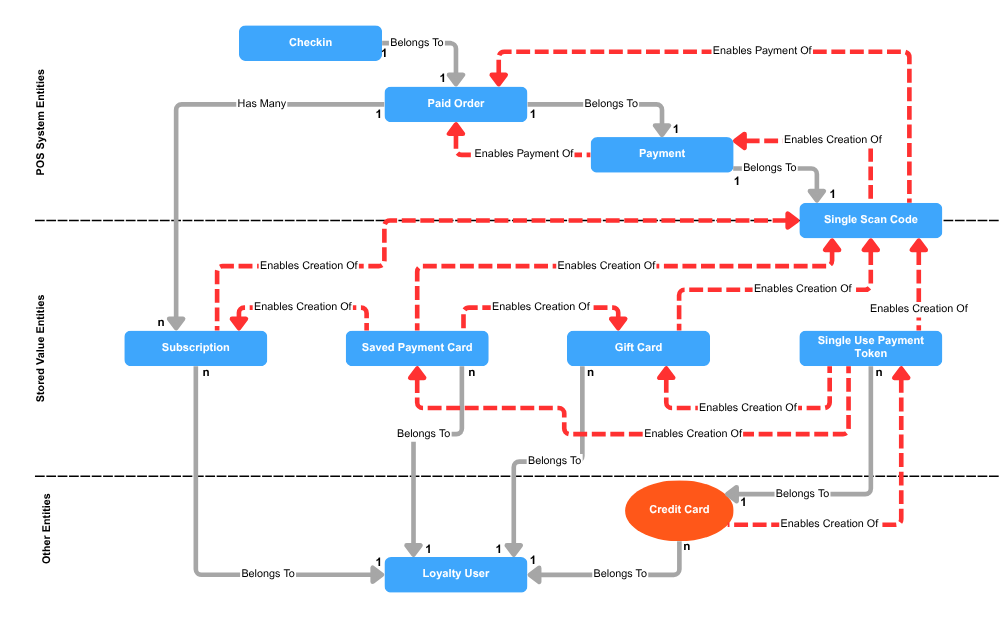
1. Other Entities - These entities are other entities participating in the system.
-
1a. Loyalty User - This represents a person who has registered to participate in the loyalty program powered by PAR Punchh. Loyalty users are typically identified by some combination of phone number, email address, and name. Loyalty users keep their data private using authentication methods within the PAR Punchh loyalty system. The third-party software must usually keep records of loyalty users in its system in order to integrate properly with PAR Punchh. A loyalty user is a managed entity in the Punchh system.
-
1b. Credit Card - This is a credit card that is identified by name, credit card number, expiry date, and CVV code. The credit card can be real or fake. Fake credit cards are used in test systems. Credit cards can be used to create single-use payment tokens. A credit card belongs to a loyalty user, but it is not a managed entity in the Punchh system (which is why it is an oval on the diagram instead of a rectangle), but it is represented in the Punchh system as a saved payment card.
2. Stored Value Entities - These entities are used to make purchases or redemptions, and are managed entities within a Punchh integration.
-
2a. Single-Use Payment Tokens - In order to secure a credit card, full credit card data is never stored in Loyalty Pay. For the Loyalty Pay system to use a credit card to buy things, the payment provider/gateway will solicit credit card data from the loyalty user, via a Loyalty Pay user interface, and create a short-lived single-use payment token that will enable authorized actions, such as a purchase or saving a payment card. Many single use payment tokens belong to a credit card.
-
2b. Saved Payment Card - These are entities within the Punchh system that are references to real credit cards that can be used by the payment provider/gateway. The data in these entities will have only minimal information about the card, such as the last 4 digits of the card number, the name, and the expiry date, as well as an identifier known to the payment provider/gateway to associate it with a real credit card. Software developers might also wish to store these saved payment cards in their internal configuration data. Zero or more saved payment cards belong to a loyalty user, and the association of each payment card is enabled by the use of a single-use payment token.
-
2c. Gift Card - These are entities within the Punchh system that are references to a physical gift card, or they could be a virtual gift card. Gift cards can be purchased by a payment card, or imported. They can also be reloaded with money using a payment card. Gift cards can be used to enable purchases. Software developers might also wish to store these gift cards in their internal configuration data. Zero or more gift cards belong to a loyalty user, and the association is facilitated by a purchase made by a saved payment card or a single-use payment token.
-
2d. Subscription - These are entities within the Punchh system that entitle a loyalty user to recurring special offers or discounts. Subscriptions can be purchased using a saved payment card. They can also be renewed with money using a saved payment card. Subscription offers can be redeemed when making a purchase. Software developers might also wish to store subscriptions in their internal configuration data. Zero or more subscriptions belong to a loyalty user, and the association is facilitated by a subscription purchase made using a saved payment card.
3. Single-Scan Code - Once a loyalty user can make purchases because the user has saved payment cards and gift cards, the user will need to enable a POS system to make a purchase. The POS system may not store data related to a user’s gift card or payment card in the user’s system, so the user needs a temporary authorization to use the saved payment card or gift card to make a purchase. For example, the user will have the user’s saved payment card or gift card information stored within Loyalty Pay under the loyalty user profile, and accessible via a mobile application. The user instructs the mobile application to generate a short-lived single-scan code, which can then be transferred to the POS system (e.g., by encoding the single-scan code as a QR code), which authorizes the POS system to use the payment/gift card to complete a purchase transaction. The POS system will use this single-scan code to ask the Loyalty Pay system to contact the payment provider/gateway or the gift card gateway to make the purchase. The single-scan code depends on one of a single-use payment token, a saved payment card, a gift card, or a subscription.
4. POS System Entities - These are the elements of a standard transaction in a POS system.
-
4a. Payment - When a POS system is authorized to use a single-scan code to make a purchase, it creates a payment that can be authorized, cancelled, completed, or refunded. Software developers may choose to record payments made in their systems. Payments are associated indirectly with payment cards. A payment is enabled by a single-scan code.
-
4b. Paid Order - This is a list of things purchased and a record of various costs in an order. It optionally includes various redemptions enabled by redeemables. A paid order is enabled by a payment or by a single-scan code, which was enabled by a single-use payment token or a saved payment card or a gift card.
-
4c. Check-in - After a payment transaction is completed by the POS system, the Punchh loyalty system needs the order transaction to be recorded in Punchh as a loyalty check-in. Loyalty check-ins are used to associate the payment transaction with a loyalty user, and this enables the Punchh system to accrue loyalty credits to the loyalty user for future redemption.
The following diagram illustrates how the various entities depend on each other. (The dependency goes in the direction of the arrow; e.g., a payment card depends on a loyalty user.) A couple of notes about the diagram:
-
The “belongs to” and “has many” relationships go in the direction of the arrow; e.g., a check-in belongs to a paid order. These relationships must be recorded and managed in an integration that uses Loyalty Pay APIs.
-
The numbers at the ends of the solid arrow show the cardinality of the relationship; e.g., there can be n gift cards entities that belong to 1 loyalty user.
-
There is no cardinality documented for dotted-line relationships because they are all 1:1.
-
'The “enables creation of” relationship applies to a:
-
Credit card (which enables the creation of a single-use payment token)
-
Single-use payment token (which enables the creation of a saved payment card, a gift card, or a single-scan code)
-
Single-scan code (which enables creation of a payment on the POS system)
-
Saved payment card (which enables the creation of a gift card, subscription, or a single-scan code)
-
Prerequisites
In order to develop this integration, whether as a mobile application developer or a POS system developer, you will need the following environments set up:
1. Punchh Platform
2. Payment processor
3. Gift card processor (required only if integrating with gift card APIs)
Please ask your Punchh representative to ensure that your test environment has these things configured. The Punchh Platform hosts the Loyalty Pay APIs, while the payment and gift card processor environments enable the payment and gift card processing respectively. The following section outlines the list of parameters required for setup of each of the above environments.
Prerequisites for Mobile Application Developers
In addition to the prerequisites described above, mobile application developers need to either:
-
Access a POS system to complete end-to-end testing, OR
-
Use the POS API part of the Loyalty Pay Postman collection (after the point of creating the single-scan code)
Please contact your PAR Punchh representative to get a list of POS systems that work with Loyalty Pay.
Prerequisites for POS System Developers
In addition to the prerequisites described above, POS system developers need to either:
-
Access a mobile application integrated with Loyalty Pay to complete end-to-end testing, where this mobile application will come from the brand that wants to integrate with Loyalty Pay (the mobile app may be built by Punchh or a third-party vendor), OR
-
Use the mobile API part of the Loyalty Pay Postman collection (up to the point of creating the single-scan code) instead of a mobile application
Please contact your PAR Punchh representative or your brand to get access to a mobile application integrated with Loyalty Pay.
Punchh Platform Environment
1. OAuth keys
2. (POS) business key
3. Location keys
4. Business admin key(s)
5. URLs for Mobile, Online Ordering, POS, and Platform APIs
6. URL for the Punchh dashboard of your test environment
Please work with your PAR Punchh representative to request and set up your Punchh Platform environment.
Payment Processor Environment
PAR Punchh currently supports integration with the PAR payment processor: PAR Pay. Once you, as the developer of the integration, have chosen the payment processor, you will need the following information for configuring the environment. Your PAR Punchh representative will provide you with a shared Punchh test environment configured with PAR Pay, on which you can perform limited testing.
PAR Pay
If you select PAR Pay, please work with your PAR Punchh representative and your brand to coordinate a request to configure PAR Pay as the payment adapter in your Punchh test environment.
Resources
PAR Punchh Postman Collections
The PAR Punchh Postman Collections comprise scenarios that can be used to exercise various PAR Punchh APIs against a PAR Punchh test environment. These scenarios demonstrate programmatically how to initialize data and properly sequence PAR Punchh API calls to implement various business PAR Punchh loyalty scenarios. The Postman collections clearly indicate which API calls are for mobile applications and which ones are for POS systems. In general, any scenario requiring a single-scan code has a component that is for POS systems, where that component receives a single-scan code and completes a transaction.
Test Credit Cards
If you need to use a test credit card with Punchh, contact your Punchh representative.
Certification
Once you are finished with your development, run through the test cases outlined on the certification matrices available on Punchh API Certification - Loyalty Pay. After you have completed your testing, please contact your PAR Punchh representative to schedule a verification call with the PAR Punchh Integrations team.
1. Mobile application developers should carefully review the Loyalty Pay - Mobile SSO Feature Matrix and the Loyalty Pay - Mobile SSO Certification Matrix to drive the development and testing of the integration.
2. POS system developers should carefully review the Loyalty Pay - POS (Point-of-sale) Feature Matrix and the Loyalty Pay - POS (Point-of-sale) Certification Matrix to drive the development and testing of the integration.
Useful Links
1. Loyalty Pay Certification (includes feature matrix, certification matrix, and API data sequence diagrams)
2. Loyalty Pay Postman Collections
3. Getting Started With the PAR Punchh Integration
Appendix A: API Endpoints
On the PAR Developer Portal, you will find information about PAR Punchh Rest APIs, including other products. Here is a list of APIs that are relevant to Loyalty Pay:
Saved Payments
Saved payments allow loyalty members to securely store their credit/debit cards and seamlessly pay directly from the app without re-entering their card each transaction.
Payment Cards API Endpoints
Stored Value With Gift Cards
Gift cards are virtual cards that loyalty users with your app can purchase, share with, or gift to another user. Information such as current card balance, card number, and card purchase history can be shown to the user. Punchh provides multiple APIs that allow loyalty users to manage their gift cards.
Gift Cards API Endpoints
Subscriptions
Loyalty members with your app can use one of the payment methods listed above for the purchase and auto-renewal of a subscription plan. Subscriptions with Loyalty Pay can improve guest engagement and monetize loyalty through pre-paid, recurring benefits.
Subscription API Endpoints - Mobile
Subscription API Endpoints - Online Ordering
Subscription API Endpoints - Platform Functions
Scan To Pay via Single Scan Flow
Punchh allows a user at the POS to pay using a gift card, credit card, or saved payment card (recurring) added to the mobile app, earn points for purchases, and redeem rewards, all in one scan of a QR code from the user's mobile app. See Single Scan Flow