Getting Started With SSO APIs
Overview
The Punchh Auth API provides user-management functions such as login, registration, forgot password, and connect with Facebook for users on the Punchh loyalty platform.
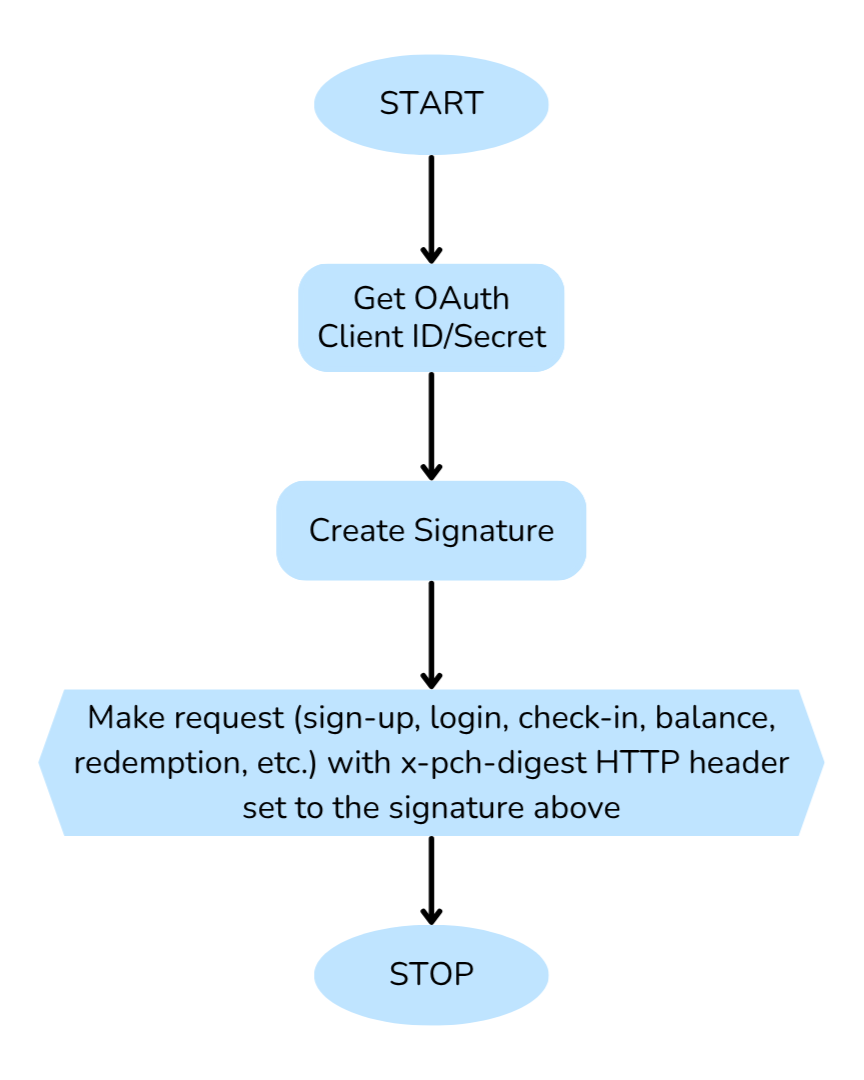
The flow chart below shows the process of making a request to the Punchh Auth API. The following sections provide tips on API methods along with example requests using cURL for each method.
Making Your First API Call
Note: You can refer to Make Your First SSO API Call for more information.
Step 1: Get Your Client ID and Secret Key
All client applications need the following credentials:
- Client ID: Should be supplied with all requests. Also known as Application ID.
- Secret Key: Used to sign requests. Should NOT be shared.
For API keys or necessary integration setup, reach out to your Punchh representative.
Step 2: Generate Signature
A registered OAuth application is assigned a unique 64-character client ID and client secret.
Signature As header
The signature must be included as HTTP header x-pch-digest with every request.
We use the SHA1 (Secure Hash Algorithm) to generate the secure signature. The function is shown below:
Ruby
hmac("sha1", concat(url, body), secret)
This function can implemented in a language of your choice. For reference, we provide implementations for generating the x-pch-digest header in commonly used languages.
Step 3: Make the Request
So far, we have retrieved our client ID from the Punchh dashboard and generated a signature for secure authentication. Now it is time to make the actual request to the Auth API as shown in the following examples.
a) Sign up
For the sign-up call, we require two parameters: email and password. And along with the required parameters, we can send some optional parameters: first name, last name, date of birth, anniversary, etc. The following example shows a cURL request with some unrealistic data to create a new user.
$ curl https://SERVER_NAME_GOES_HERE.punchh.com/api/auth/customers.json \
  -H "Content-Type:application/json" \
  -H "Accept: application/json" \
  -H "x-pch-digest:SIGNATURE_GOES_HERE"  \
  -X POST \
  -d '{"user":{"email":EMAIL_GOES_HERE,"first_name":FIRST_NAME_GOES_HERE,"last_name":LAST_NAME_GOES_HERE,"birthday":BIRTHDAY_GOES_HERE,"anniversary":ANNIVERSARY_GOES_HERE,"password":PASSWORD_GOES_HERE},"client":CLIENT_KEY_GOES_HERE}' \
The following example creates a new user by sending a cURL request to the API using sample realistic data.
$ curl https://SERVER_NAME_GOES_HERE.punchh.com/api/auth/customers.json \
  -H "Content-Type:application/json" \
  -H "Accept: application/json" \
  -H "x-pch-digest:SIGNATURE_GOES_HERE"  \
  -X POST \
  -d '{"user":{"email": "test@example.com","password": "PASSWORD_GOES_HERE","first_name": "FIRST_NAME_GOES_HERE","last_name": "LAST_NAME_GOES_HERE","birthday": "1999-01-01","anniversary": ""},"client": CLIENT_GOES_HERE}' \
The response to successful creation of the new user is in JSON:
{
  "id": 111111111,
  "authentication_token": "AUTHENTICATION_TOKEN_GOES_HERE",
  "created_at": "2014-10-15T07:42:54Z",
  "updated_at": "2014-11-06T11:47:17Z",
  "first_name": "FIRST_NAME_GOES_HERE",
  "last_name": "LAST_NAME_GOES_HERE",
  "email": "test@example.com",
  "avatar_remote_url": null,
  "allow_multiple": false,
  "phone": null,
  "fb_uid": "FB_UID_GOES_HERE",
  "favourite_locations": "",
  "user_as_qrcode": "QR_CODE_GOES_HERE",
  "user_as_barcode": "1111111",
  "wants_menu_notifications": false,
  "preferred_menu_items": [],
  "anniversary": null,
  "secondary_email": "test@example.com",
  "birthday": "1999-01-01",
  "gender": null,
  "migrate_status": false,
  "address_line1": null,
  "zip_code": null,
  "email_unsubscribe": null,
  "allow_push_notifications": true,
  "facebook_signup":false,
  "phone":null
}
b) Sign up With facebook
Login or sign-up with Facebook requires the user information (first name, last name, date of birth, etc.) along with the fb_uid parameter.
$ curl https://SERVER_NAME_GOES_HERE.punchh.com/auth/users/connect_with_facebook.json \
       -H "Content-Type:application/json" \
       -H "Accept: application/json" \
       -H "x-pch-digest:SIGNATURE_GOES_HERE"  \
       -X POST \
       -d '{"first_name":FIRST_NAME_GOES_HERE,"last_name":LAST_NAME_GOES_HERE,"email":EMAIL_GOES_HERE,"fb_uid":FB_UID_GOES_HERE,"client":CLIENT_KEY_GOES_HERE}' \
c) Log in / Sign in
To sign in / log in a user, email and password are mandatory fields.
$ curl https://SERVER_NAME_GOES_HERE.punchh.com/api/auth/customers/sign_in.json \
       -H "Content-Type:application/json" \
       -H "Accept: application/json" \
       -H "x-pch-digest:SIGNATURE_GOES_HERE"  \
       -X POST \
       -d '{"user":{"email":EMAIL_GOES_HERE,"password":PASSWORD_GOES_HERE},"client":CLIENT_KEY_GOES_HERE}' \
d) Earn Points / Check in
To earn points or create a check-in, we have to use the receipt barcode.
$ curl https://SERVER_NAME_GOES_HERE.punchh.com/api/auth/checkins \
       -H "Content-Type:application/json" \
       -H "Accept: application/json" \
       -H "x-pch-digest:SIGNATURE_GOES_HERE"  \
       -X POST \
       -u "USER_TOKEN_GOES_HERE:x" \
       -d '{"barcode": BARCODE_GOES_HERE,"client": CLIENT_KEY_GOES_HERE}' \
e) Redemption
Redeem points on behalf of the user and fetch the generated redemption code for the current redemption.
$ curl https://SERVER_NAME_GOES_HERE.punchh.com/api/auth/redemptions \
       -H "Content-Type:application/json" \
       -H "Accept: application/json" \
       -H "x-pch-digest:SIGNATURE_GOES_HERE"  \
       -X POST \
       -d '{"locale": LOCALE_GOES_HERE,"location_id": LOCATION_ID_GOES_HERE,"business_id": BUSINESS_GOES_HERE,"latitude": LATITUDE_GOES_HERE,"longitude": LONGITUDE_GOES_HERE,redeemed_points": REDEEMED_POINTS_GOES_HERE,"web": WEB_GOES_HERE,"redeemable_id": REDEEMABLE_GOES_HERE,"gps_accuracy": GPS_ACCURACY_GOES_HERE,"reward_id": REWARD_ID_GOES_HERE,"client": CLIENT_KEY_GOES_HERE}' \
       -u "USER_TOKEN_GOES_HERE:x" \
f) Forgot Password
Trigger the forgot password email containing the password reset link.
$ curl https://SERVER_NAME_GOES_HERE.punchh.com/api/auth/users/forgot_password \
       -H "Content-Type:application/json" \
       -H "Accept: application/json" \
       -H "x-pch-digest:SIGNATURE_GOES_HERE"  \
       -X POST \
       -d '{"user":{"email":EMAIL_GOES_HERE},"client":CLIENT_KEY_GOES_HERE}' \
API at a Glance
Here are some of the methods that you might find useful while you try to establish an SSO flow.
| Goal | API Endpoint |
|---|---|
| Sign up / register a user. | Sign up With Email and Password |
| Sign in / log in a user. | Log in With Email and Password |
| Log in / sign in with Facebook. | Connect With Facebook |
| Fetch account balance of the user. | Fetch Account Balance of User |
| Redeem a card, reward, or discount on a particular receipt. | Create Online Redemption |
| Fetch available offers of the user. | Fetch Available Offers of the User |
| Update user profile (first name, last name, birthday, anniversary, password, etc.) | Update User Information |
| Trigger forgot password email containing the password reset link. | Forgot Password |
| Update password of the user. | Change Password |