Dynamic Tokens
PAR Games offers a method to control “plays” on the PAR Games system using “Dynamic Tokens." The Dynamic Tokens are implemented using open Internet standards and can be generated without interacting with the PAR Games servers.
Dynamic Tokens are based on the JSON Web Token (JWT) standard [JWT]. This allows off-the-shelf, open-source software to be used for creating the tokens. By establishing a secret key known only to the client and the PAR Games system, the client can create secure tokens, and the PAR Games system can verify that the tokens are authentic.
The structure and format of the Dynamic Tokens allow clients to encode player identifiers and other data to associate with a play. The tokens can be used to simply identify a player and then use PAR Games play control to restrict how many plays the player gets. Alternatively, the tokens can be given an identifier that makes the tokens good for one play only per token.
Structure
Data Format
The format for the data that will be encoded into a Dynamic Token is Javascript Object Notation (JSON) [RFC7159].
Algorithms
There are two algorithms used in creating Dynamic Tokens. The first algorithm is a keyed-hash method authentication code that is called HMAC-SHA256 [JWS] [RFC2104]. HMAC-SHA256 creates a digital signature of a sequence of bytes and is used to show the authenticity of a Dynamic Token. There are other algorithms that can be used with JWTs, but HMAC-SHA256 is the only officially supported algorithm for Dynamic Tokens.
The second algorithm is called Base64url encoding [RFC4648]. Base64url encoding allows binary data to be encoded into ASCII characters that can then be attached to a URL.
JWT Structure
The basic structure of the JWTs used for Dynamic Tokens is a header and data payload that are each Base64url-encoded and then concatenated and digitally signed with HMAC-SHA256, with the signature concatenated to the header and payload to complete the full JWT.
Header
The Header section of the JWT identifies that the entity is a JWT and specifies the HMAC algorithm used in creating it. It is expressed in JSON. As such, the Dynamic Token JWT headers should all match the following:
{
"typ":"JWT",
"alg":"HS256"
}
Payload
The Payload section of the JWT includes optional data fields that will be associated with a play that is created using the Dynamic Token. The data fields are expressed in JSON, and so are made up of key-value pairs. Some examples of data fields are:
| Name | Description |
|---|---|
| jti | JWT Index. This is a field defined by the JWT standard. The JWT Index is a value unique across the target campaign that makes the token unique. Once the token has been used, then any token submitted using the same JWT Index will be responded to as "already used". |
| AccountID | Player Identifier. This parameter is used as the "player id" on the PAR Games system. It is typically named "AccountID", but that name can be changed by request to the account manager. |
| Custom | Any additional fields that are present in the Payload will be associated with the play and will show up in the play activity data and in the data that is written by an API Writeback, if a Writeback is configured. |
An example payload:
{
"jti":"5ef27408-811c-4de6-92cf-679d5633510f",
"AccountID":"3055952658",
"mobile":"2145551212"
}
Signature
The signature portion of the JWT is calculated as follows. The Header and Payload are both Base64url-encoded, and the two encodings are concatenated with a ‘.’ character between them. The combined value is then HMAC’d with a predefined “secret” key.
The signature operation can be expressed by the following pseudocode:
const signature = HMAC-SHA256(
  secret,
  base64urlEncoding(header) + '.' +
  base64urlEncoding(payload))
Completed Token
Once the Header, Payload, and Signature have been calculated, the completed token is calculated by Base64url encoding each piece and concatenating them together with a ‘.’ character between each segment.
The following pseudocode expresses the operation of completing the token:
const token = base64urlEncoding(header) + '.' +
base64urlEncoding(payload) + '.' + base64urlEncoding(signature)
Attaching to URL
The completed token is attached to a URL by adding a URL query parameter named “token” to the URL string and setting it equal to the completed token calculated above.
The below URL is an example of what the completed URL and token would look like (not a working link):
https://games.partech.com/direct/demo-pick-1x3-cards?token=abc123efgh.iJKlM0987noPQ6_54rStUVWx321yZ
Generating Tokens
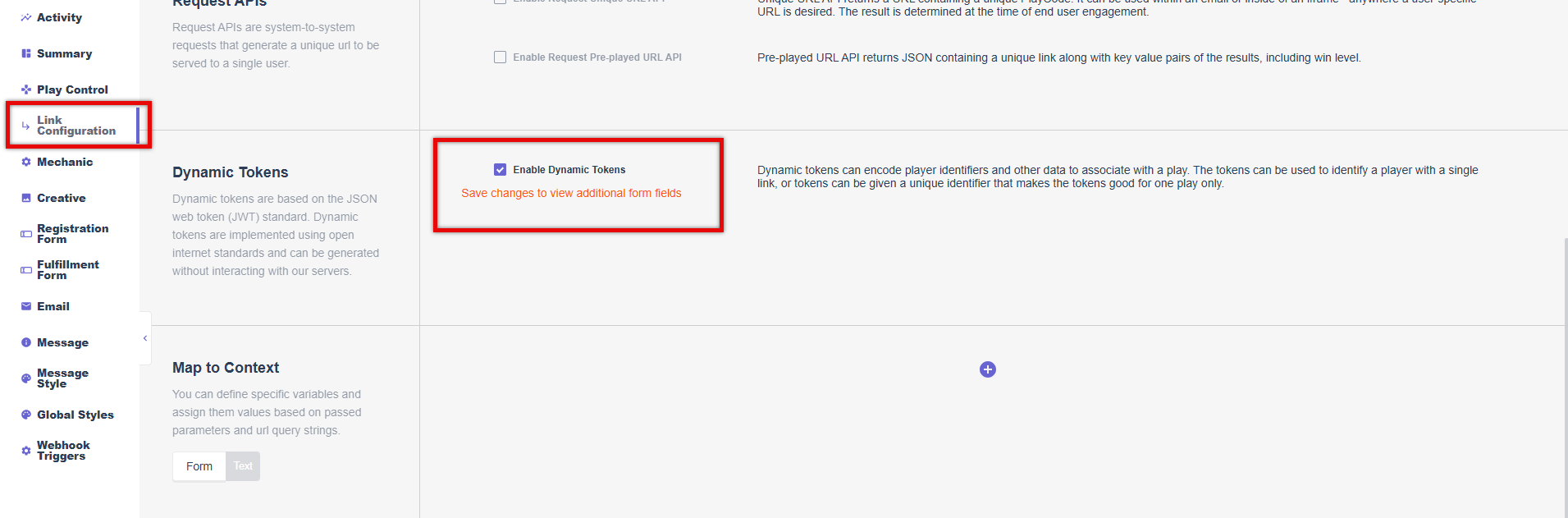
Enable Dynamic Tokens for Campaign
In order to use Dynamic Tokens with your campaign, you must enable Dynamic Tokens. See PAR Games: How to Set Up a Game in the PAR Product Documentation Portal for more details.
- Navigate to the Link Configuration on the left side panel.
- Click the Enable Dynamic Tokens checkbox.
- Click Save Settings at the bottom of the page to view additional form fields.
Set the JWT Secret
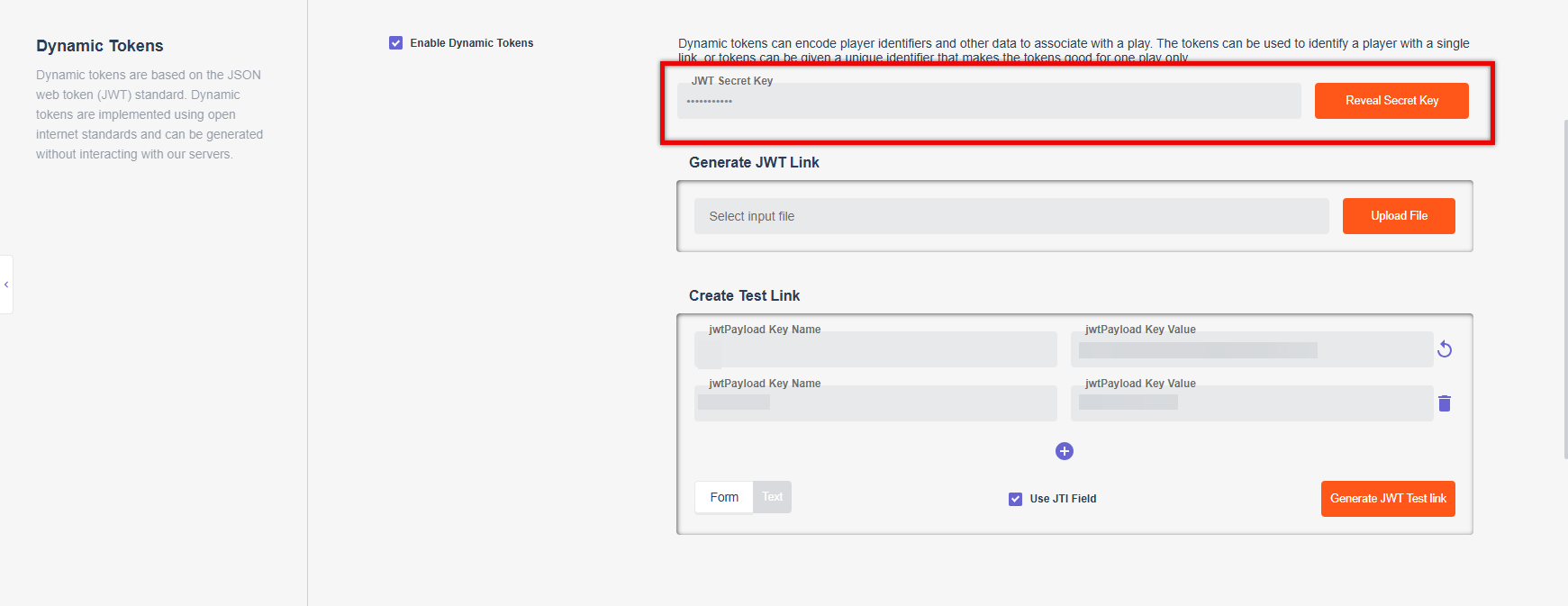
The PAR Games system will generate a random secret key automatically when the campaign is created, but this needs to be replaced by the secret key provided by your Punchh representative.
- In the JWT Secret Key field, paste the secret key provided by your Punchh representative.
- Click Save Settings.
Create a Single Play URL
You can create a single play URL in the campaign summary view. When the campaign summary page is loaded, an example token payload with a unique id for "jti" is loaded in the "JWT Example Payload" field.
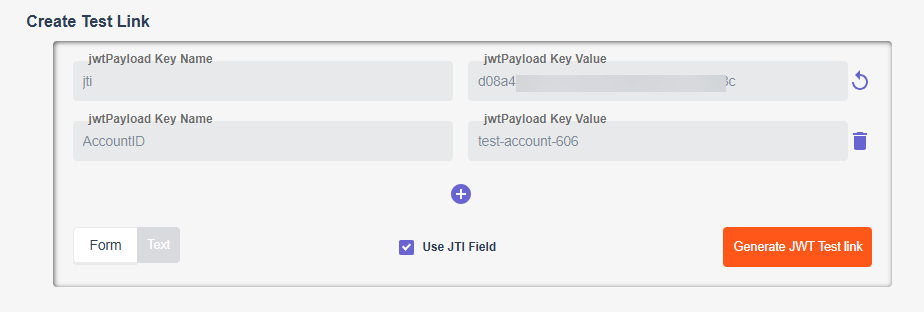
A URL including the Dynamic Token will be displayed at the top of the campaign summary page:

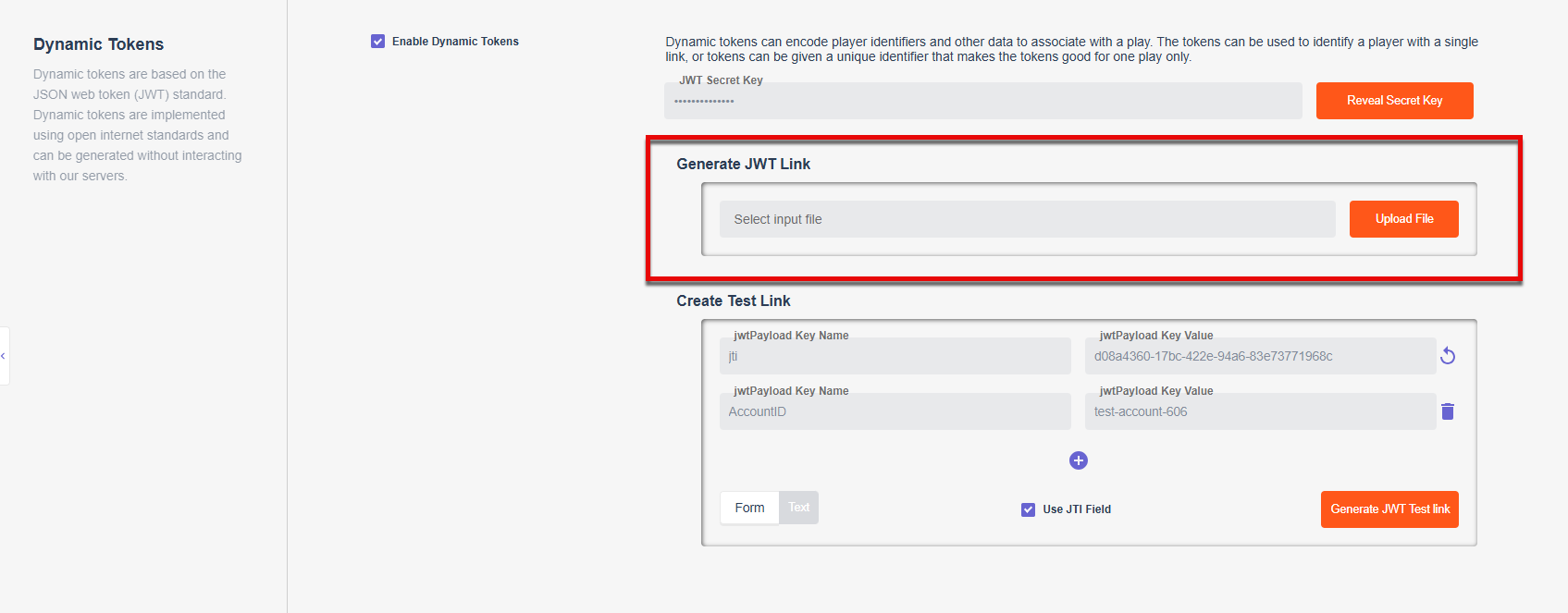
Upload a file with Account IDs
You can upload a file with Account IDs/player IDs. A new file will be generated that includes the Account IDs and the generated URLs with tokens.
- Create a comma-separated values (CSV) file with the first line "AccountID" and the subsequent lines containing one AccountID each. For example, a file named "accountid-example.csv":
AccountID
A000100
A000101
A000102
A000103
-
Upload the file to the JWT Token Generator under Dynamic Tokens on the Link Configuration tab:
-
Click the link for the file to download the output file. The output file will include a column for the input AccountIDs, a column for the generated "jti" or token indexes, and a column for the URLs that can be given to players to access the game.
Example Output: AccountID (Column A), jti (Column B), URL (Column C)

Upload a File with Account IDs and an Additional Field
You can add additional fields to each play for communicating information about the player or the play that might help in data reporting later. As an example, let’s assume that there are two reporting systems, one that is keyed on AccountID and another that is keyed on the player’s mobile number.
By adding an additional column for “mobile” you can associate the player's AccountID and mobile number with the play such that both will be listed in the play activity data.
The example input file would look like this:
AccountID,mobile
A000100,7301173417
A000101,8448317467
A000102,2045078782
A000103,5886088635
The output file would include the original fields plus one for the generated “jti” and the URL for the play:
AccountID,mobile,jti,URL
A000100,7301173417,abc123efg-ab123-1234-a123-fghi876klm02,http://...
A000101,8448317467,abc123efg-cd987-5678-b456-xyz123abc,http://...
A000102,2045078782,abc123efg-ef654-9012-c789-qrst987lmno,http://...
A000103,5886088635,abc123efg-gh789-3456-d012-jklmn09rst3,http://...
Generate Tokens with Python
You can generate Dynamic Tokens with Python. First, install the required libraries for creating JWTs and for creating unique identifiers:
pip install pyjwtpip install uuid
The following Python program will read in a file such as the accountid-example.csv listed above and generate game URLs:
import jwt
import uuid

secret_key = 'super secret key'
player_id_param_name = 'AccountID'
base_url = 'http://games.partech.com/myplay/pargames-test-jwt-2'
infile_name = 'accountid-example.csv'
outfile_name = 'pargames-test-jwt-2-urls.csv'
with open(infile_name) as inf:
	with open(outfile_name, 'w') as outf:
		inf.readline() #skip first line that has column headers
		for line in inf:
			my_line = line.strip()
			fields = my_line.split(",")
			player_id = fields[0].strip()
			token_id = str(uuid.uuid4())
			token_payload = {player_id_param_name: player_id, "jti":
token_id}
			token = jwt.encode(token_payload, secret_key)
			url = base_url + '?token=' + str(token, 'utf-8')
			outf.write(player_id + ',' + token_id + ',' + url + '\n')
References
Expand for References
-
[JWT] Jones, M., Bradley, J., and N. Sakimura, "JSON Web Token (JWT)", RFC 7519, DOI 10.17487/RFC7519, May 2015, RFC 7519: JSON Web Token (JWT)
-
[JWS] Jones, M., Bradley, J., and N. Sakimura, "JSON Web Signature (JWS)", RFC 7515, DOI 10.17487/RFC, May 2015, RFC 7515: JSON Web Signature (JWS)
-
[JWA] Jones, M., "JSON Web Algorithms (JWA)", RFC 7518, DOI 10.17487/RFC7518, May 2015, RFC 7518: JSON Web Algorithms (JWA)
-
[RFC2104] Krawczyk, H., Bellare, M., and R. Canetti, "HMAC: Keyed-Hashing for Message Authentication", RFC 2104, DOI 10.17487/RFC2104, February 1997, RFC 2104: HMAC: Keyed-Hashing for Message Authentication
-
[RFC4648] Josefsson, S., "The Base16, Base32, and Base64 Data Encodings", RFC 4648, DOI 10.17487/RFC4648, October 2006, RFC 4648: The Base16, Base32, and Base64 Data Encodings
-
[RFC7159] Bray, T., Ed., "The JavaScript Object Notation (JSON) Data Interchange Format", RFC 7159, DOI 10.17487/RFC7159, March 2014, RFC 7159: The JavaScript Object Notation (JSON) Data Interchange Format