POS Payments
Creating Payment
Payment via Punchh Single Scan Flow (SSF)
With the Punchh single scan flow (SSF) functionality, a guest uses a credit card to "Earn & Pay" or "Earn, Redeem, & Pay" with a single scan on a business’s Punchh app.
For more information, see: Create Payment API
Updating Payment Status
At the time of the close-check event during a transaction. the Update Payment Status API updates the payment status on the Punchh platform after the POS marks the payment as complete.
For the status parameter, use the Get Payment Status API to retrieve the payment status.
For more information, see: Update Payment Status API
Getting Payment Status
The Get Payment Status API is used in a continuous loop until you receive the correct status and response message to know how to handle the next step (e.g., success--apply payment, cancel--payment cancelled by user, etc.). As a best practice, this should be called within every 3 seconds for updates to status and messages. Loop for 20 seconds before handling as a timeout.
There are three different ways to check payment status:
- All open transactions at the POS for the current business day
- All open transactions at the POS for a specific business day
- Get transaction with a specific payment_reference_id
For more information, see: Get Payment Status API
Refunding Payment
After a payment is accepted/processed, you can use the Refund Payment API to refund the payment.
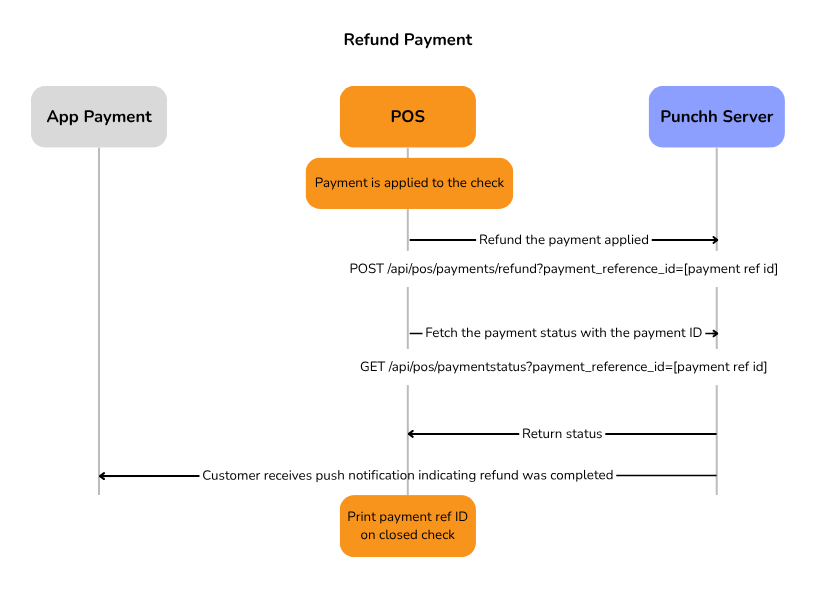
For more information, see: Refund Payment API
Voiding Payment
The Void/Cancel Payment API is most commonly used when the POS has issues such as timeout or connectivity, or if the guest cancels payment authorization. This process voids the payment request. The following diagram shows the workflow for voiding payments.
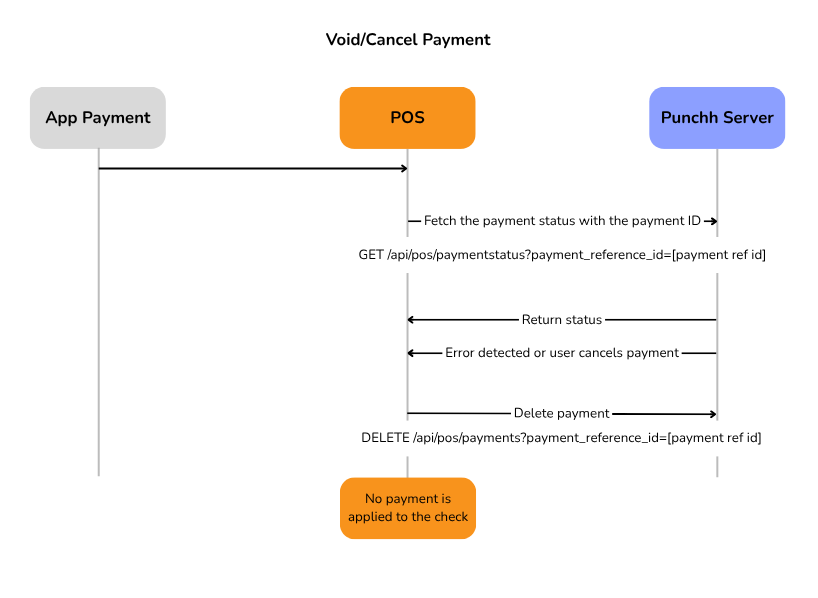
For more information, see: Void/Cancel Payment API