Single Scan Flow
Punchh single scan flow allows a user to earn points for purchases, redeem rewards, and pay using a gift card, credit card, or saved credit card (recurring) added to the mobile app, all in one scan of a QR code from the user's mobile app.
User Experience
At a POS store, users can use Punchh's single scan flow through the mobile app for various purposes, including making payments for their orders, redeeming discounts, and adding a tip if desired. Users can choose to perform any combination of these activities. Once the user selects the desired options (payment option, discounts, and tip amount) and submits them through the mobile app, the app calls the Punchh API server to generate a single scan code, presented as a QR code. The single scan code is a UUID string containing alphanumeric characters.
The user presents the QR code to the scanner attached to the POS. The POS scans the QR code and, based on the information in the single scan code, processes a payment using a gift card, credit card, or saved credit card (payment_type = recurring), redeems a discount, and deducts a tip amount if the guest selected these options on the mobile app when generating the single scan code.
Single Scan Code
When the POS scans the QR code containing the single scan code from the guest mobile app and makes a call to the User Look-up and Fetch Balance API with a single scan code, the API fetches the user details along with the information stored in the single scan code, including payment method (GiftCard, CreditCard, recurring), discount, and tip amount based on what the user selected when generating the single scan code.
The POS APIs that accept single scan codes are: 1) User Look-up and Fetch Balance, 2) Possible Redemptions 1.0 / Create Redemption 1.0, 3) Create Check-in, and 4) Create Payment. When you pass the single scan code in
- Possible Redemptions 1.0 / Create Redemption 1.0 and Create Check-in, the APIs use the code to identify the user.
- Create Payment, the API uses the code to process the payment information if the user selects a credit card or saved card for payments when generating a single scan code on the mobile app.
Punchh Platform Configuration for Single Scan Code
SSC (single scan code) length and expiry can be configured in the Punchh platform. Contact your Punchh representative for more information about this Punchh platform configuration.
Generate Single Scan Code on Mobile App
The API request to generate a single scan code using the mobile app accepts the payment type, the discount the guest wants to redeem, and the tip amount in the single scan code generation request (see Generate Single Scan Code API).
Sample Code for Generating Single Scan Code for a User With a Gift Card
Here is a sample Generate Single Scan Code API request with a gift card as a payment type, a gift card UUID, banked rewards with a discount of $2.20, and a tip amount of $1:
curl --location --request POST 'https://SERVER_NAME_GOES_HERE.punchh.com/api2/mobile/single_scan_tokens' \
--header 'x-pch-digest: ' \
--header 'User-Agent: USER_AGENT_GOES_HERE' \
--header 'punchh-app-device-id: PUNCHH_APP_DEVICE_ID_GOES_HERE' \
--header 'Authorization: Bearer ACCESS_TOKEN_GOES_HERE' \
--header 'Content-Type: application/json' \
--data-raw '{
    "client":"CLIENT_ID_GOES_HERE"
    "payment_type":"GiftCard",
    "gift_card_uuid":"GIFT_CARD_UUID_GOES_HERE",
    "banked_reward_amount":"2.2",
    "tip":"1",
 }'
Here is a sample Generate Single Scan Code API response containing a single scan code.
{
    "expires_in": "2022-06-08T10:19:52Z",
    "created_at": "2022-06-08T10:14:52Z",
    "single_scan_code": "SINGLE_SCAN_CODE_GOES_HERE"
}
Generating Single Scan Code with Gift Card and Reward
Here is a sample Generate Single Scan Code API request for generating a single scan code for a guest with the payment_type as a gift card, a gift card UUID, and a reward.
curl --location --request POST 'https://SERVER_NAME_GOES_HERE.punchh.com/api2/mobile/single_scan_tokens' \
--header 'x-pch-digest: ' \
--header 'User-Agent: USER_AGENT_GOES_HERE' \
--header 'punchh-app-device-id: PUNCHH_APP_DEVICE_ID_GOES_HERE' \
--header 'Authorization: Bearer ACCESS_TOKEN_GOES_HERE' \
--header 'Content-Type: application/json' \
--data-raw '{
    "client":"CLIENT_ID_GOES_HERE",
    "payment_type":"GiftCard",
    "gift_card_uuid":"GIFT_CARD_UUID_GOES_HERE",
    "reward_id":"REWARD_ID_GOES_HERE"
 }'
Generating Single Scan Code with Gift Card and Redeemable
Here is a sample Generate Single Scan Code API request for generating a single scan code for a guest with the payment_type as a gift card, a gift card UUID, and a redeemable.
curl --location --request POST 'https://SERVER_NAME_GOES_HERE.punchh.com/api2/mobile/single_scan_tokens' \
--header 'x-pch-digest: ' \
--header 'User-Agent: USER_AGENT_GOES_HERE' \
--header 'punchh-app-device-id: PUNCHH_APP_DEVICE_ID_GOES_HERE' \
--header 'Authorization: Bearer ACCESS_TOKEN_GOES_HERE' \
--header 'Content-Type: application/json' \
--data-raw '{
    "client":"CLIENT_ID_GOES_HERE",
    "payment_type":"GiftCard",
    "gift_card_uuid":"GIFT_CARD_UUID_GOES_HERE",
    "redeemable_id":"REDEEMABLE_ID_GOES_HERE"
 }'
Generating Single Scan Code with Gift Card and Coupon
Here is a sample Generate Single Scan Code API request for generating a single scan code for a guest with the payment_type as a gift card, a gift card UUID, and a coupon code.
curl --location --request POST 'https://SERVER_NAME_GOES_HERE.punchh.com/api2/mobile/single_scan_tokens' \
--header 'x-pch-digest: ' \
--header 'User-Agent: USER_AGENT_GOES_HERE' \
--header 'punchh-app-device-id: PUNCHH_APP_DEVICE_ID_GOES_HERE' \
--header 'Authorization: Bearer ACCESS_TOKEN_GOES_HERE' \
--header 'Content-Type: application/json' \
--data-raw '{
    "client":"CLIENT_ID_GOES_HERE",
    "payment_type":"GiftCard",
    "gift_card_uuid":"GIFT_CARD_UUID_GOES_HERE",
    "coupon":"COUPON_CODE_GOES_HERE"
 }'
Generating Single Scan Code with Gift Card and Reedemable Card
Here is a sample Generate Single Scan Code API request for generating a single scan code for a guest with the payment_type as a gift card, a gift card UUID, and a redeemable card.
curl --location --request POST 'https://SERVER_NAME_GOES_HERE.punchh.com/api2/mobile/single_scan_tokens' \
--header 'x-pch-digest: ' \
--header 'User-Agent: USER_AGENT_GOES_HERE' \
--header 'punchh-app-device-id: PUNCHH_APP_DEVICE_ID_GOES_HERE' \
--header 'Authorization: Bearer ACCESS_TOKEN_GOES_HERE' \
--header 'Content-Type: application/json' \
--data-raw '{
    "client":"CLIENT_ID_GOES_HERE",
    "payment_type":"GiftCard",
    "gift_card_uuid":"GIFT_CARD_UUID_GOES_HERE",
    "redeemable_card_count":"2"
 }'
Generating Single Scan Code with Gift Card and Subscription
Here is a sample Generate Single Scan Code API request for generating a single scan code for a guest with the payment_type as a gift card, a gift card UUID, and a subscription.
curl --location --request POST 'https://SERVER_NAME_GOES_HERE.punchh.com/api2/mobile/single_scan_tokens' \
--header 'x-pch-digest: ' \
--header 'User-Agent: USER_AGENT_GOES_HERE' \
--header 'punchh-app-device-id: PUNCHH_APP_DEVICE_ID_GOES_HERE' \
--header 'Authorization: Bearer ACCESS_TOKEN_GOES_HERE' \
--header 'Content-Type: application/json' \
--data-raw '{
    "client":"CLIENT_ID_GOES_HERE",
    "payment_type":"GiftCard",
    "gift_card_uuid":"GIFT_CARD_UUID_GOES_HERE",
    "subscription_id":"SUBSCRIPTION_ID_GOES_HERE"
 }'
Generating a Single Scan Code for a User With a Credit Card
Here is a sample Generate Single Scan Code API request with a credit card as a payment type, the transaction token, banked rewards with a discount of $2.20, and a tip amount of $1:
curl --location --request POST 'https://SERVER_NAME_GOES_HERE.punchh.com/api2/mobile/single_scan_tokens' \
--header 'x-pch-digest: ' \
--header 'User-Agent: USER_AGENT_GOES_HERE' \
--header 'punchh-app-device-id: PUNCHH_APP_DEVICE_ID_GOES_HERE' \
--header 'Authorization: Bearer ACCESS_TOKEN_GOES_HERE' \
--header 'Content-Type: application/json' \
--data-raw '{
    "client":"CLIENT_ID_GOES_HERE",
    "payment_type":"CreditCard",
    "transaction_token":"TRANSACTION_TOKEN_GOES_HERE",
    "banked_reward_amount":"2.2",
    "tip":"1"
 }'
Generating a Single Scan Code for a User With a Saved Payment Card
Here is a sample Generate Single Scan Code API request with recurring as a payment type, the transaction token (UUID of the saved credit card), banked rewards with a discount of $2.20, and a tip amount of $1:
curl --location --request POST 'https://SERVER_NAME_GOES_HERE.punchh.com/api2/mobile/single_scan_tokens' \
--header 'x-pch-digest: ' \
--header 'User-Agent: USER_AGENT_GOES_HERE' \
--header 'punchh-app-device-id: PUNCHH_APP_DEVICE_ID_GOES_HERE' \
--header 'Authorization: Bearer ACCESS_TOKEN_GOES_HERE' \
--header 'Content-Type: application/json' \
--data-raw '{
    "client":"CLIENT_ID_GOES_HERE",
    "payment_type":"recurring",
    "transaction_token":"TRANSACTION_TOKEN_GOES_HERE",
    "banked_reward_amount":"2.2",
    "tip":"1"
 }'
POS User Look-up Using Single Scan Code
When the guest scans the QR code containing the single scan code with the scanner attached to the POS, the POS sends a User Look-up and Fetch Balance API request with the single scan code to the Punchh server. The Punchh server uses the single scan code of the user to perform the user look-up and fetch the 1) selected payment method (GiftCard, CreditCard, or Recurring for saved payment card), card number (for payment mode selected as GiftCard), 2) selected discount type with discount ID or amount (reward ID/redeemable ID/discount amount) for redemption, and 3) tip amount.
Code Sample for POS User Look-up API
This is a sample User Look-up and Fetch Balance API request and response for a guest on the Banked Rewards program who makes a payment through Punchh's single scan flow using a gift card at the POS store. The user generates a single scan code with the gift card as a payment method and the banked currency amount as a discount.
In the User Look-up and Fetch Balance API response, the Punchh server returns the payment method as GiftCard in the payment_mode parameter, the gift card number in the selected_card_number parameter, the discount type and the discount amount in the selected_discount_amount object, and the tip amount (if selected) in the selected_tip_amount parameter. The POS will use this information to identify the user, pay for the purchase, redeem the discount amount, and deduct the selected tip amount.
curl --location --request POST 'https://SERVER_NAME_GOES_HERE.punchh.com/api/pos/users/search?SINGLE_SCAN_CODE=SINGLE_SCAN_CODE_GOES_HERE' \
--header 'Authorization: Token token=LOCATION_KEY_GOES_HERE, btoken=BUSINESS_KEY_GOES_HERE'
Here is the sample POS User Look-up API response.
{
    "address_line1": null,
    "anniversary": null,
    "avatar_remote_url": null,
    "birthday": "1999-01-01",
    "city": null,
    "created_at": "2022-06-08T09:16:55Z",
    "email": "test@example.com",
    "email_verified": false,
    "fb_uid": null,
    "first_name": "FIRST_NAME_GOES_HERE",
    "age_verified": false,
    "privacy_policy": false,
    "gender": null,
    "id": ID_GOES_HERE,
    "last_name": "LAST_NAME_GOES_HERE",
    "state": null,
    "updated_at": "2022-09-08T10:03:20Z",
    "zip_code": "302012",
    "test_user": false,
    "balance": {
        "banked_rewards": "3.00",
        "membership_level": "level 1",
        "membership_level_id": 54,
        "net_balance": 3.0,
        "net_debits": 0.0,
        "pending_points": 0.0,
        "points_balance": 5.0,
        "signup_anniversary_day": "06/08",
        "total_credits": 5.0,
        "total_debits": "0.0",
        "total_point_credits": 5.0,
        "total_redeemable_visits": 2,
        "expired_membership_level": null,
        "total_visits": 1,
        "initial_visits": 0,
        "unredeemed_cards": 0
    },
    "selected_card_number": "GIFT_CARD_NUMBER_GOES_HERE",
    "selected_discount_amount": {
        "banked_currency": "2.2",
        "discount_type": "discount_amount"
    },
    "selected_rewards": [],
    "selected_redeemables": [],
    "selected_redeemable_cards": [],
    "selected_coupons": [],
    "selected_subscriptions": [],
    "payment_mode": "GiftCard",
    "loyalty_cards": [],
    "selected_tip_amount": "1",
    "phone": ""
}
Sample User Look-up Response for Single Scan Code Containing Reward and Gift Card
This is a sample response for the User Look-up and Fetch Balance API request in which the single scan code contains a reward for redemption and a gift card for payment.
{
    "address_line1": null,
    "anniversary": null,
    "avatar_remote_url": null,
    "birthday": "1999-01-01",
    "city": null,
    "created_at": "2022-06-08T09:16:55Z",
    "email": "test@example.com",
    "email_verified": false,
    "fb_uid": null,
    "first_name": "FIRST_NAME_GOES_HERE",
    "age_verified": false,
    "privacy_policy": false,
    "gender": null,
    "id": ID_GOES_HERE,
    "last_name": "LAST_NAME_GOES_HERE",
    "state": null,
    "updated_at": "2022-09-08T10:03:20Z",
    "zip_code": "302012",
    "test_user": false,
    "balance": {
        "banked_rewards": "0.00",
        "membership_level": "level 1",
        "membership_level_id": 54,
        "net_balance": 3.0,
        "net_debits": 0.0,
        "pending_points": 0.0,
        "points_balance": 5.0,
        "signup_anniversary_day": "06/08",
        "total_credits": 5.0,
        "total_debits": "0.0",
        "total_point_credits": 5.0,
        "total_redeemable_visits": 2,
        "expired_membership_level": null,
        "total_visits": 1,
        "initial_visits": 0,
        "unredeemed_cards": 0
    },
    "selected_card_number": "GIFT_CARD_NUMBER_GOES_HERE",
    "selected_rewards": [
        {
         "id": 2980055562,
         "created_at": "2022-06-08T10:10:10Z",
         "end_date_tz": null,
         "start_date_tz": "2022-06-08T10:10:10Z",
         "updated_at": "2022-06-08T10:10:10Z",
         "image": "IMAGE_URL_GOES_HERE",
         "status": "unredeemed",
         "points": 0,
         "discount_amount": 3.0,
         "discount_type": "reward",
         "description": "Free Entree",
         "name": "Entree",
         "redeemable_properties": null
        }
    ],
    "selected_discount_amount": [],
    "selected_redeemables": [],
    "selected_redeemable_cards": [],
    "selected_coupons": [],
    "payment_mode": "GiftCard",
    "loyalty_cards": [],
    "selected_tip_amount": "1",
    "phone": ""
}
Sample User Look-up Response for Single Scan Code Containing Redeemable and Gift Card
This is a sample response for the User Look-up and Fetch Balance API request in which the single scan code contains a redeemable for redemption and a gift card for payment.
{
    "address_line1": null,
    "anniversary": null,
    "avatar_remote_url": null,
    "birthday": "1999-01-01",
    "city": null,
    "created_at": "2022-06-08T09:16:55Z",
    "email": "test@example.com",
    "email_verified": false,
    "fb_uid": null,
    "first_name": "FIRST_NAME_GOES_HERE",
    "age_verified": false,
    "privacy_policy": false,
    "gender": null,
    "id": ID_GOES_HERE,
    "last_name": "LAST_NAME_GOES_HERE",
    "state": null,
    "updated_at": "2022-09-08T10:03:20Z",
    "zip_code": "302012",
    "test_user": false,
    "balance": {
        "banked_rewards": "0.00",
        "membership_level": "level 1",
        "membership_level_id": 54,
        "net_balance": 3.0,
        "net_debits": 0.0,
        "pending_points": 0.0,
        "points_balance": 5.0,
        "signup_anniversary_day": "06/08",
        "total_credits": 5.0,
        "total_debits": "0.0",
        "total_point_credits": 5.0,
        "total_redeemable_visits": 2,
        "expired_membership_level": null,
        "total_visits": 1,
        "initial_visits": 0,
        "unredeemed_cards": 0
    },
    "selected_card_number": "GIFT_CARD_NUMBER_GOES_HERE",
    "selected_redeemables": [
        {
         "id": 777388,
         "created_at": "2022-09-02T15:03:00Z",
         "updated_at": "2022-09-10T15:07:14Z",
         "status": "activated",
         "points": 10,
         "discount_amount": null,
         "name": "By points",
         "description": "",
         "redeemable_properties": "",
         "count": null,
         "discount_type": "redeemable",
         "image": "IMAGE_URL_GOES_HERE",
         "end_date_tz": null,
         "start_date_tz": null
        }
    ],
    "selected_discount_amount": [],
    "selected_rewards": [],
    "selected_redeemable_cards": [],
    "selected_coupons": [],
    "payment_mode": "GiftCard",
    "loyalty_cards": [],
    "selected_tip_amount": "1",
    "phone": ""
}
Sample User Look-up Response for Single Scan Code Containing Coupon and Gift Card
This is a sample response for the User Look-up and Fetch Balance API request in which the single scan code contains a coupon for redemption and a gift card for payment.
{
    "address_line1": null,
    "anniversary": null,
    "avatar_remote_url": null,
    "birthday": "1999-01-01",
    "city": null,
    "created_at": "2022-06-08T09:16:55Z",
    "email": "test@example.com",
    "email_verified": false,
    "fb_uid": null,
    "first_name": "FIRST_NAME_GOES_HERE",
    "age_verified": false,
    "privacy_policy": false,
    "gender": null,
    "id": ID_GOES_HERE,
    "last_name": "LAST_NAME_GOES_HERE",
    "state": null,
    "updated_at": "2022-09-08T10:03:20Z",
    "zip_code": "302012",
    "test_user": false,
    "balance": {
        "banked_rewards": "0.00",
        "membership_level": "level 1",
        "membership_level_id": 54,
        "net_balance": 3.0,
        "net_debits": 0.0,
        "pending_points": 0.0,
        "points_balance": 5.0,
        "signup_anniversary_day": "06/08",
        "total_credits": 5.0,
        "total_debits": "0.0",
        "total_point_credits": 5.0,
        "total_redeemable_visits": 2,
        "expired_membership_level": null,
        "total_visits": 1,
        "initial_visits": 0,
        "unredeemed_cards": 0
    },
    "selected_card_number": "GIFT_CARD_NUMBER_GOES_HERE",
    "selected_coupons": [
        {
            "code": "COUPON_CODE_GOES_HERE",
            "image_url": "IMAGE_URL_GOES_HERE",
            "discount_type": "redemption_code",
            "name": "Dynamic Coupon - $2.5 OFF",
            "description": "",
            "start_date": null,
            "end_date": null
        }
    ],
    "selected_discount_amount": [],
    "selected_rewards": [],
    "selected_redeemables": [],
    "selected_redeemable_cards": [],
    "selected_subscriptions": [],
    "payment_mode": "GiftCard",
    "loyalty_cards": [],
    "selected_tip_amount": "1",
    "phone": ""
}
Sample User Look-up Response for Single Scan Code Containing Redeemable Card and Gift Card
This is a sample response for the User Look-up and Fetch Balance API request in which the single scan code contains a redeemable card for redemption and a gift card for payment.
{
    "address_line1": null,
    "anniversary": null,
    "avatar_remote_url": null,
    "birthday": "1999-01-01",
    "city": null,
    "created_at": "2022-06-08T09:16:55Z",
    "email": "test@example.com",
    "email_verified": false,
    "fb_uid": null,
    "first_name": "FIRST_NAME_GOES_HERE",
    "age_verified": false,
    "privacy_policy": false,
    "gender": null,
    "id": ID_GOES_HERE,
    "last_name": "LAST_NAME_GOES_HERE",
    "state": null,
    "updated_at": "2022-09-08T10:03:20Z",
    "zip_code": "302012",
    "test_user": false,
    "balance": {
        "banked_rewards": "0.00",
        "membership_level": "level 1",
        "membership_level_id": 54,
        "net_balance": 3.0,
        "net_debits": 0.0,
        "pending_points": 0.0,
        "points_balance": 5.0,
        "signup_anniversary_day": "06/08",
        "total_credits": 5.0,
        "total_debits": "0.0",
        "total_point_credits": 5.0,
        "total_redeemable_visits": 2,
        "expired_membership_level": null,
        "total_visits": 1,
        "initial_visits": 0,
        "unredeemed_cards": 0
    },
    "selected_card_number": "GIFT_CARD_NUMBER_GOES_HERE",
    "selected_redeemable_cards": [
        {
            "id": 108,
            "created_at": "2022-09-11T12:57:18Z",
            "updated_at": "2022-09-13T13:21:44Z",
            "status": "activated",
            "points": 0,
            "discount_amount": 5.0,
            "name": "Base Redeemable",
            "description": "",
            "redeemable_properties": "Donate",
            "count": "2",
            "discount_type": "card",
            "image": "IMAGE_URL_GOES_HERE",
            "end_date_tz": null,
            "start_date_tz": null
        }
    ],
    "selected_discount_amount":[],
    "selected_rewards": [],
    "selected_redeemables": [],
    "selected_subscriptions": [],
    "selected_coupons": [],
    "payment_mode": "GiftCard",
    "loyalty_cards": [],
    "selected_tip_amount": "1",
    "phone": ""
}
Sample User Look-up Response for Single Scan Code Containing Subscription and Gift Card
This is a sample response for the User Look-up and Fetch Balance API request in which the single scan code contains a subscription for redemption and a gift card for payment.
{
    "address_line1": null,
    "anniversary": null,
    "avatar_remote_url": null,
    "birthday": "1999-01-01",
    "city": null,
    "created_at": "2022-06-08T09:16:55Z",
    "email": "test@example.com",
    "email_verified": false,
    "fb_uid": null,
    "first_name": "FIRST_NAME_GOES_HERE",
    "age_verified": false,
    "privacy_policy": false,
    "gender": null,
    "id": ID_GOES_HERE,
    "last_name": "LAST_NAME_GOES_HERE",
    "state": null,
    "updated_at": "2022-09-08T10:03:20Z",
    "zip_code": "302012",
    "test_user": false,
    "balance": {
        "banked_rewards": "0.00",
        "membership_level": "level 1",
        "membership_level_id": 54,
        "net_balance": 3.0,
        "net_debits": 0.0,
        "pending_points": 0.0,
        "points_balance": 5.0,
        "signup_anniversary_day": "06/08",
        "total_credits": 5.0,
        "total_debits": "0.0",
        "total_point_credits": 5.0,
        "total_redeemable_visits": 2,
        "expired_membership_level": null,
        "total_visits": 1,
        "initial_visits": 0,
        "unredeemed_cards": 0
    },
    "selected_card_number": "GIFT_CARD_NUMBER_GOES_HERE",
    "selected_subscriptions": [
     {
      "subscription_id": 331,
      "start_time": "2024-06-05T17:21:48+05:30",
      "end_time": "2024-07-25T23:59:59+05:30",
      "external_plan_identifier": null,
      "plan_id": 14,
      "cancelled_at": null,
      "name": "Sub plan",
      "description": "",
      "miscellaneous": "",
      "status": "active"
    }
   ],
   "selected_redeemable_cards": [],
   "selected_discount_amount":[],
   "selected_rewards": [],
   "selected_redeemables": [],
   "selected_redeemable_cards": [],
   "selected_coupons": [],
   "payment_mode": "GiftCard",
   "loyalty_cards": [],
   "selected_tip_amount": "1",
   "phone": ""
}
POS User Look-up Parameters for Single Scan Flow
The following table lists important parameters in the User Look-up and Fetch Balance API response for the single scan flow. These parameters are set only in a single scan flow.
| Parameter | Type | Description |
|---|---|---|
| payment_mode | string | Returns the payment mode selected as a part of the single scan flow. Currently, the parameter supports the following values: GiftCard, CreditCard, and recurring. |
| selected_card_number | string | This is the number of the gift card that the user selected on the mobile application for payments through the single scan flow. If this value is set, use it to make the payments for the order. |
| selected_discount_amount | array object | This object shows the user-selected banked currency amount if the user wants to redeem it as part of the single scan flow. If this object is set, trigger the banked rewards redemption flow. See the Create Redemption 1.0 API. This parameter applies to the Banked Rewards loyalty program. |
| selected_rewards | array object | This object shows one or more user-selected rewards if the user wants to redeem them as part of the single scan flow. If this object is set, trigger the reward redemption flow. See the Create Redemption 1.0 API. |
| selected_tip_amount | string | This is the amount the user selected as a tip. |
| selected_redeemables | array object | This object shows one or more user-selected redeemables if the user wants to redeem them as part of the single scan flow. If this object is set, trigger the redeemable redemption flow. See the Create Redemption 1.0 API. This parameter applies to the Points Unlock Redeemables loyalty program. |
| selected_coupons | array object | This object shows one or more user-selected Punchh coupon codes if the user wants to redeem them as part of the single scan flow. If this object is set, trigger the Punchh coupon redemption flow. See the Create Redemption 1.0 API. |
| selected_redeemable_cards | array object | This object shows one or more selected redeemable cards if the user wants to redeem them as part of the single scan flow. If this object is set, trigger the card completion redemption flow. See the Create Redemption 1.0 API. This object applies to the Visit-based loyalty program. |
| selected_subscriptions | array object | This object shows one or more selected subscriptions if the user wants to redeem them as part of the single scan flow. If this object is set, trigger the subscription redemption flow. See the Create Redemption 1.0 API. |
Flows
Depending on whether or not the User Look-up and Fetch Balance API response contains values in the payment_mode parameter and discount objects such as selected_redeemables, selected_rewards, etc., one of the following flows is applicable:
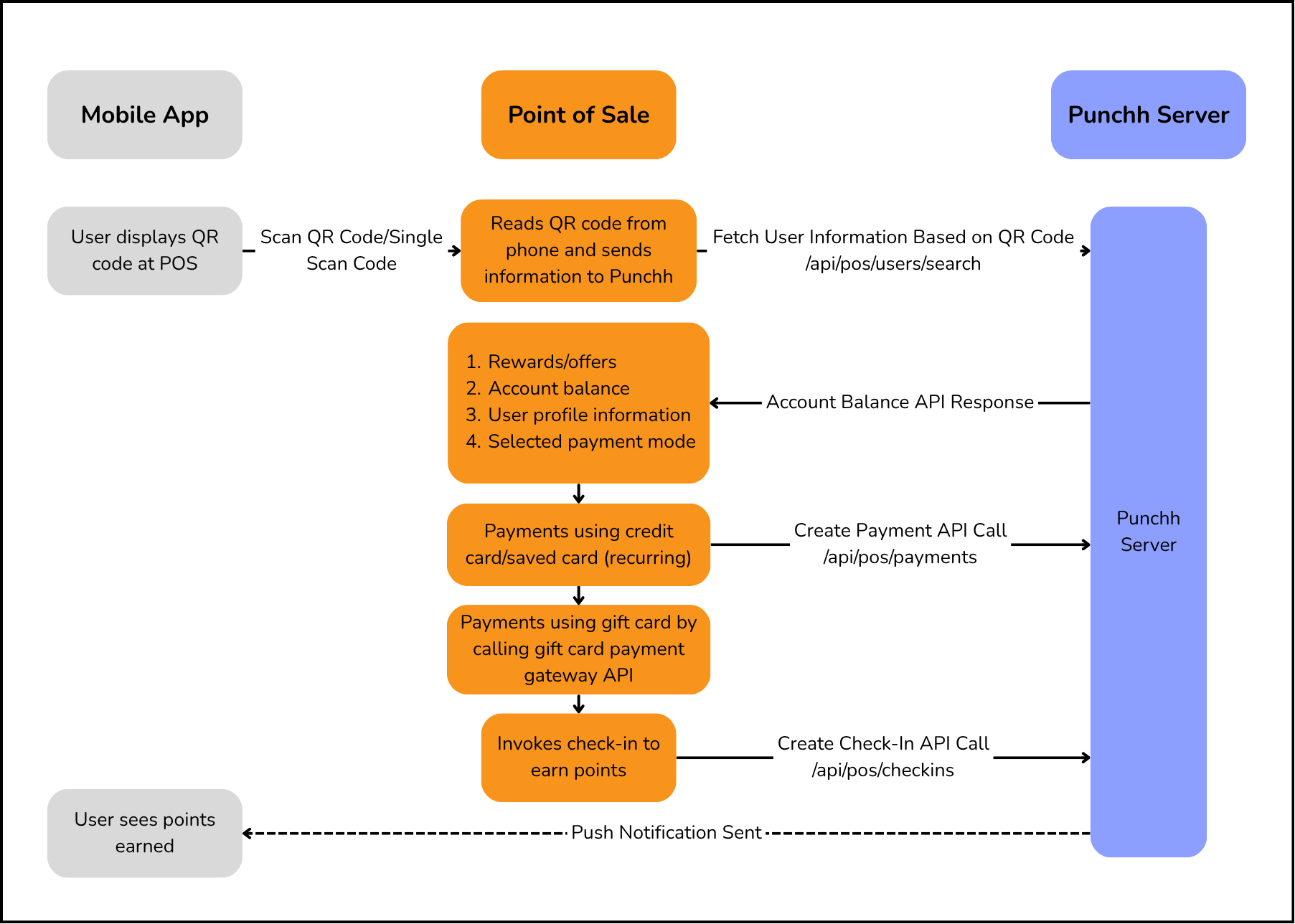
1. Check in and pay - When payment_mode has a value and discount objects are empty
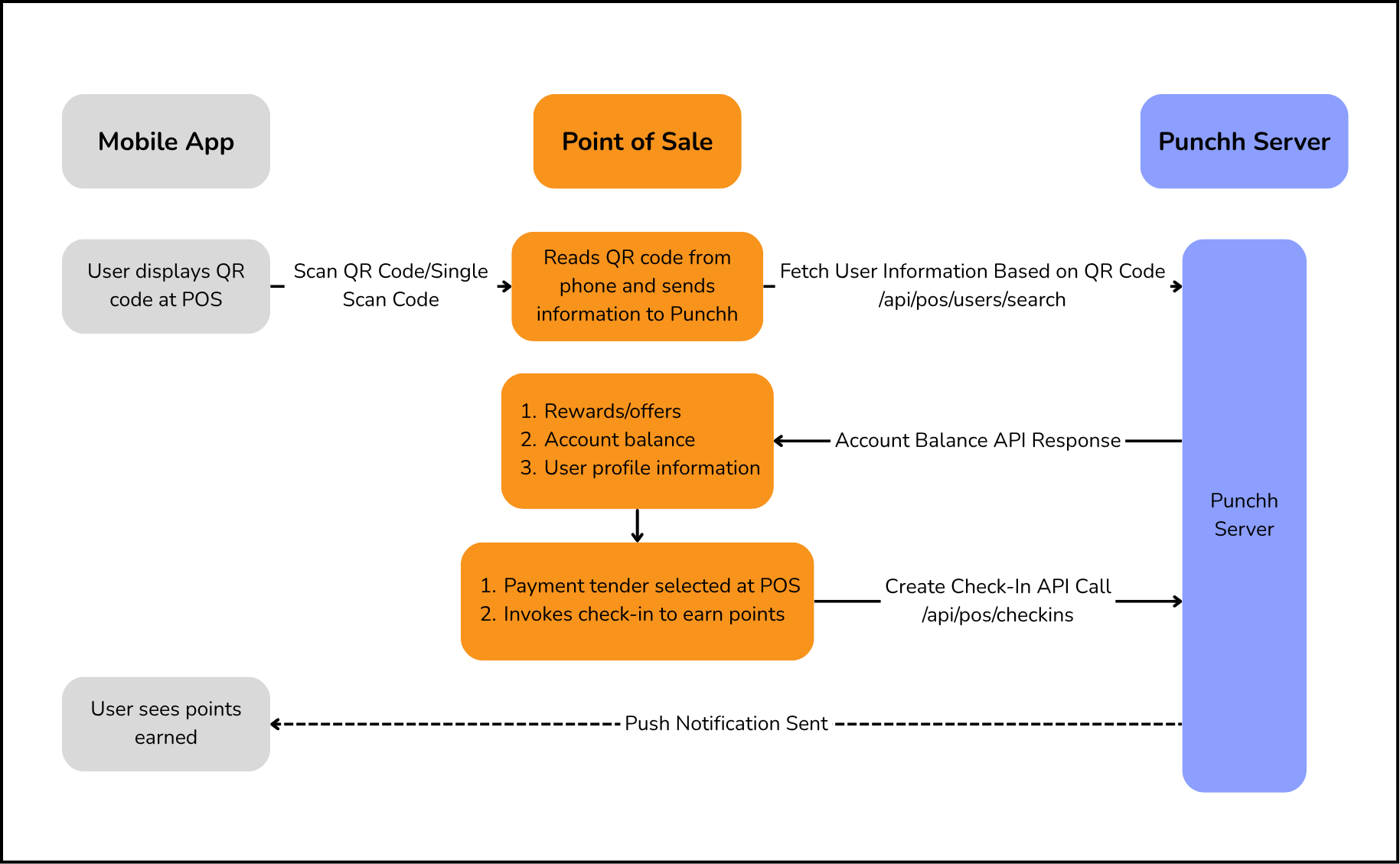
2. Check in only - When payment_mode has no value and discount objects are empty
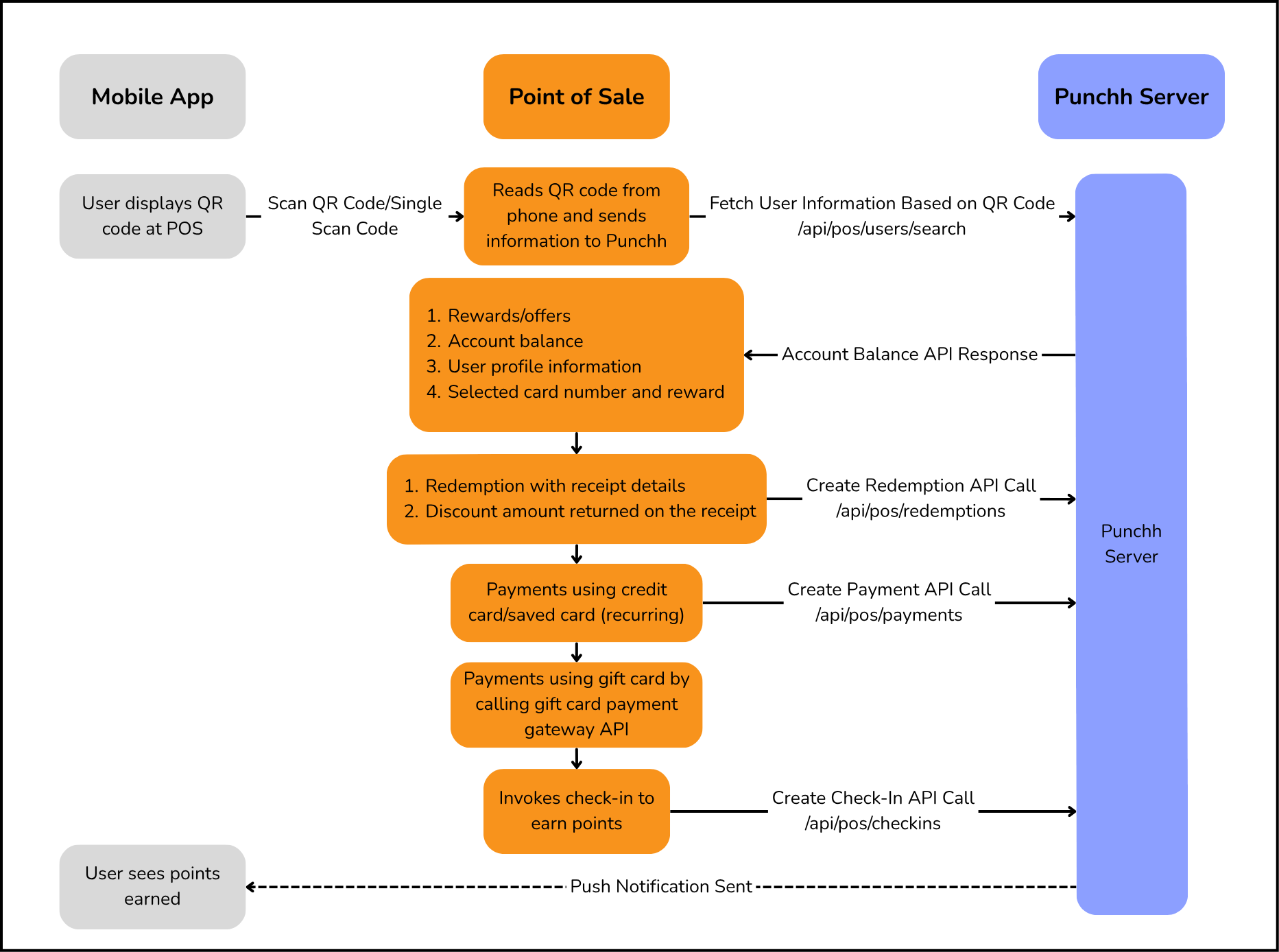
3. Redeem, pay, and check in - When both payment_mode and at least one of the discount objects have values
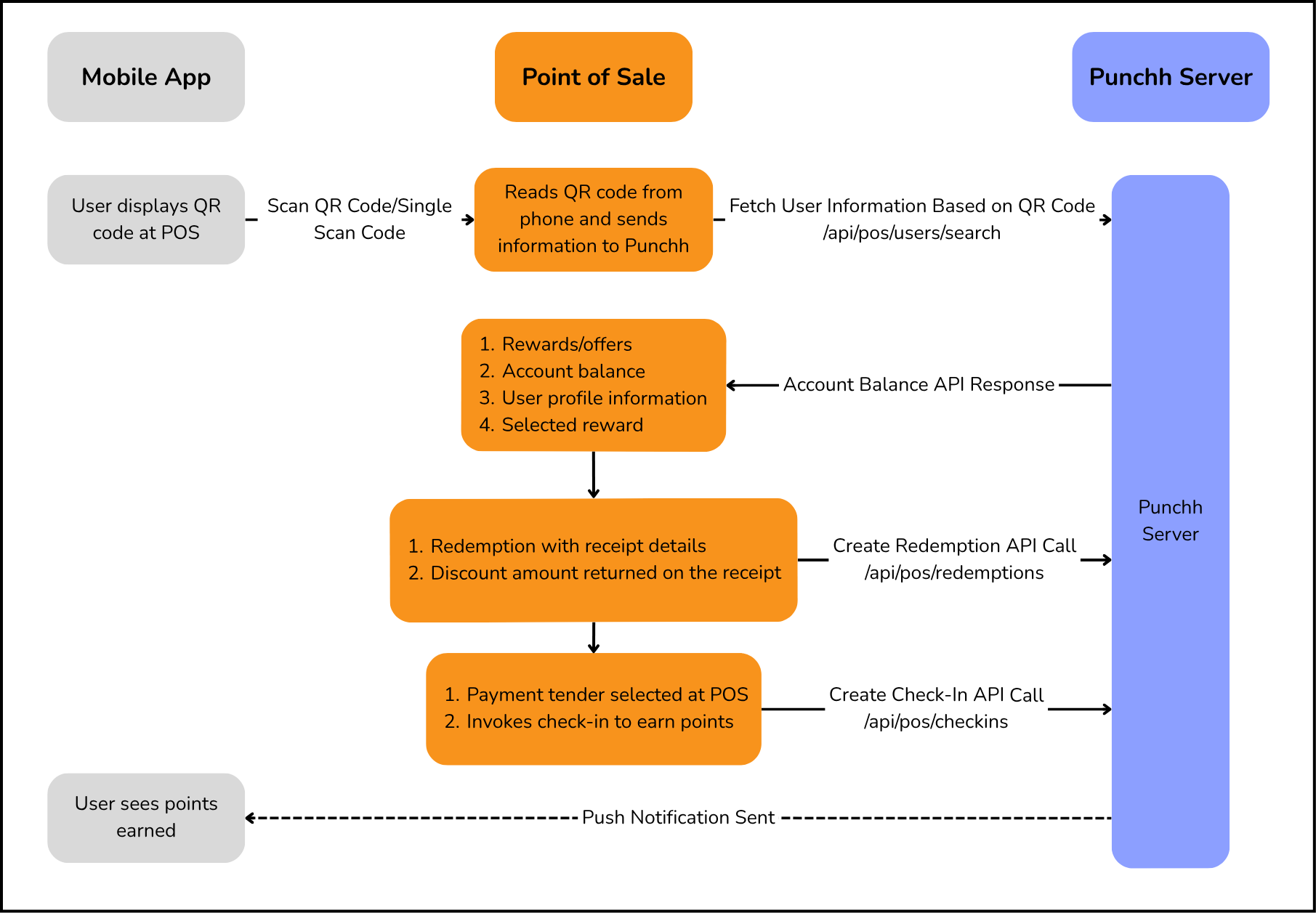
4. Redeem and check in - When payment_mode has no value and at least one of the discount objects has values
Note
Currently, Punchh supports the processing of credit cards and recurring payments. For a gift card, you need to configure the POS to call the respective gift card payment gateway API to process the payment.
Check in and Pay
In the User Look-up and Fetch Balance API response, if the payment_mode parameter has a value and no discount is selected, make payment for items that the user wants to order using the value of the payment_mode parameter:
- If the payment_mode is
GiftCard, use the value of theselected_card_numberparameter for payment. Make a call to the respective gift card payment gateway API to process the payment as Punchh does not support the processing of gift card payments. - If the value of the
payment_modeparameter is CreditCard, passCreditCard, or if the value of thepayment_modeparameter is recurring, pass therecurringvalue of thepayment_typeparameter and the single scan code value in the Create Payment API call to process the payment. - Once the check is closed, send a request to the Create Check-in API.
Check in Only
In the User Look-up and Fetch Balance API response, if the payment_mode parameter is set to null and no discount is selected, send a request to the Create Check-in API.
Redeem, Pay, and Check in
In the User Look-up and Fetch Balance API response, if the payment_mode parameter has a value and one or more discounts are selected, trigger the redemption flow using the value selected in the discount objects to redeem the discount, and make payment for items that the user wants to order using the value of the payment_mode parameter:
- Make the first call to the Possible Redemptions 1.0 API with the
discount_typeand discount ID to validate if the discount can be applied to the order. Next, call the Create Redemption 1.0 API to commit the redemption if redemption can be applied to the order (see Possible Redemptions 1.0 / Create Redemption 1.0). - If the payment_mode is
GiftCard, use the value of theselected_card_numberfor payment. Make a call to the respective gift card payment gateway API to process the payment as Punchh does not support the processing of gift card payments. - If the value of the
payment_modeparameter is CreditCard, passCreditCard, or if the value of thepayment_modeparameter is recurring, pass therecurringvalue in thepayment_typeparameter and the single scan code value in the Create Payment API call to process the payment. - Once the check is closed, send a request to the Create Check-in API.
Redeem and Check in
If the payment_mode parameter is set to null and a discount is selected, make the first call to the Possible Redemptions 1.0 API with the discount_type and discount ID to validate if the discount can be applied to the order. Next, call the Create Redemption 1.0 API to commit the redemption if redemption can be applied to the order (see Possible Redemptions 1.0 / Create Redemption 1.0). Once payment is made, call the Create Check-in API.