| Previous Topic | Next Topic | |
|---|---|---|
| POS Module 4: Show Account Balance After Look-up - Concepts | POS Module 5: Show Offers and Rewards After Look-up - Concepts |
POS API Certification Tutorial - Module 4: Show Account Balance After Look-up - Example Scenarios
Prerequisites
- You must have read the scenario assumptions.
- Review Module 4: Show Account Balance After Look-up - Concepts.
- Review Module 1: Location Configuration and Program Meta - Concepts.
- Review Module 1: Location Configuration and Program Meta - Example Scenarios.
- Review Module 3: User Look-up - Example Scenarios.
General Tasks for Showing Account Balance
1. Use the program meta local copy that you saved on the POS to perform the Program Meta look-up, and note the program_type and points_conversion_type parameters. Note: This step is to verify the correct units to report for the guest balance look-up. The following table can be used to understand what program type is displayed in the response.
2. Perform a user look-up using the User Look-up and Fetch Balance API and obtain the user balance to display at the POS.
3. After looking up the guest account, display the account balance on the POS terminal based on the program type and balances available for the guest.
This is a sample image of a POS screen showing a guest's balance after the user look-up.
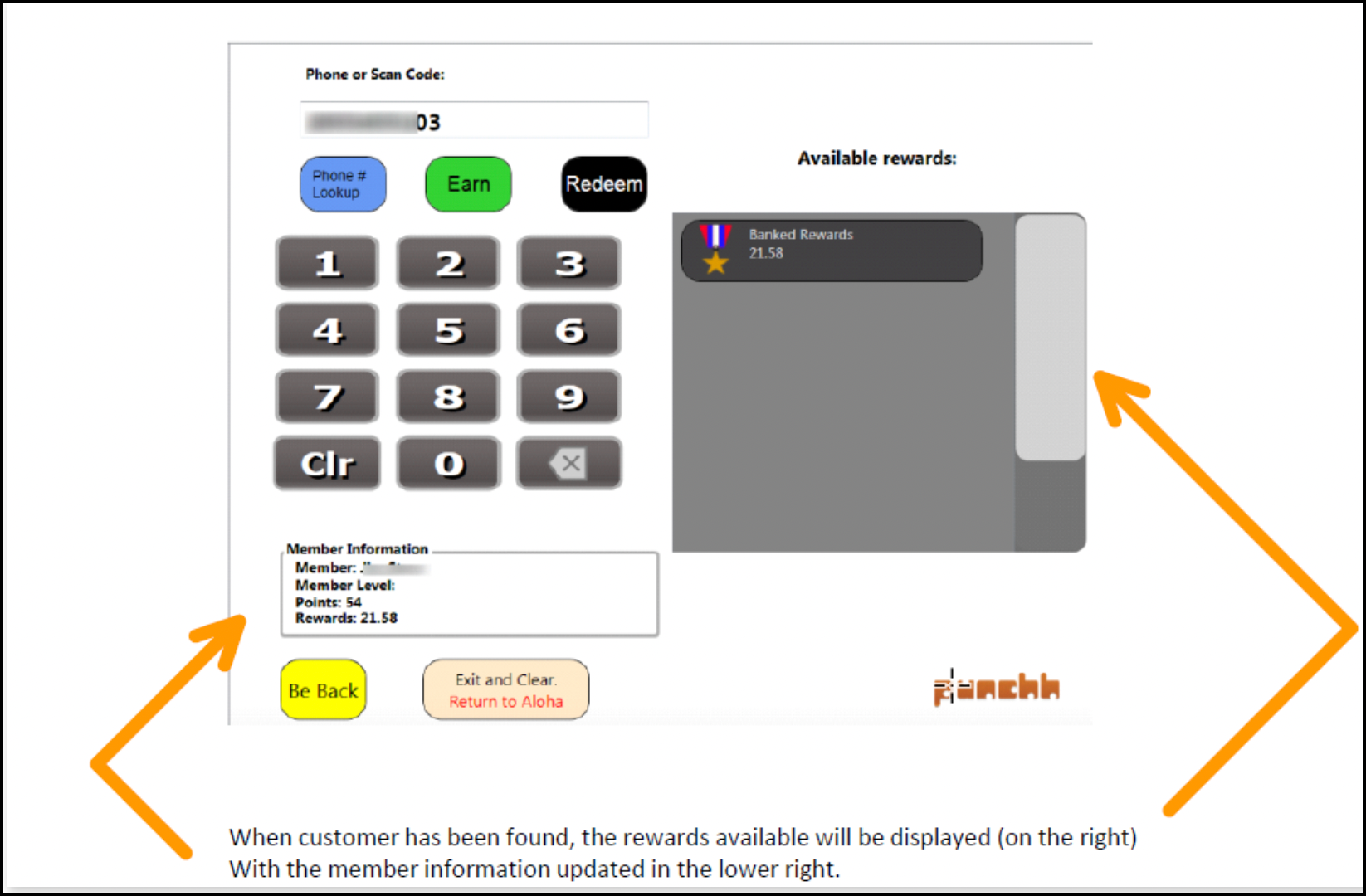
Refer to the following table to determine how to display the balance information on the POS appropriately for each program type. The balance parameters points_balance, net_balance, and banked_rewards are returned in the User Look-up and Fetch Balance API response under the balance object.
| program_type | points_conversion_type | net_balance | points_balance | Balance Display |
|---|---|---|---|---|
| Visit-based | N/A | Number of visits accumulated | N/A | X Visits |
| Points unlock redeemables | staged or none | Current point level. The guest can spend points on redeemables as desired. | N/A | X Points |
| Points | rewards | Current available points | Current point level. Points are automatically deducted and converted to rewards when the guest reaches pre-configured point thresholds. | X Points (based on net_balance) |
| Points | currency | N/A (Refer to the banked_rewards parameter for available currency balance in the user account.) banked_rewards - Current currency amount that the guest can apply to the check. The guest can choose to spend all the currency at once or only a part of it. |
Current point level. After a certain threshold of points is reached, the points get converted to currency. For example, a business can be set to where 10 points convert to $1, and until 10 points are earned by the guest, you will see a tally of the current points earned in this field. When 10 points are reached, the points get deducted and converted into $1, which will show as an increase in the net_balance. | X Dollars (based on banked_rewards value) Y Points (based on points_balance value) |
Possible Scenario
The following scenario is based on the assumptions here.
Story Line
Central Punchh Coffee offers the banked rewards loyalty program, and guests' points are converted to a currency value at predefined point thresholds. Guests get 1 point for every dollar spent, and every 25 points earned by a guest translates into $1 of banked currency available for redemption. Ross has been a loyalty customer of Central Punchh Coffee for quite some time now and wants to know his points balance, along with how much banked currency he has accumulated since he joined the loyalty program. After Rachel rings him up for his usual $4 iced latte, he inquires about the points balance and banked currency in his loyalty account.
Rachel asks Ross for his phone number so that she can perform the user look-up, which reveals that he already has $5 of banked currency available for redemption in his account. She also informs Ross that he has 20 points (from having previously purchased 5 iced lattes at $4 each), just 5 points shy of the 25 points needed to earn $1 of banked currency. Hearing this, Ross adds a $2 chocolate chip cookie to his current order so that he can earn at least 5 points to get $1 of banked currency (4 points from the $4 iced latte and 2 points from the $2 chocolate chip cookie). After this transaction, Ross will have a total of $6 of banked currency in his loyalty account that he can redeem on his next visit.
Code Sample (Direct API Integration)
The following code sample contains the API request and response for the transactions between the POS and Punchh based on this story line. When Rachel looks up Ross's account using his phone number (212-555-4626), the User Look-up and Fetch Balance API call returns the following information about Ross's account:
- First name: Ross
- Last name: Geller
- Phone number: 212-555-4626
- Banked rewards balance: $5
- Points balance: 20
Not all of this information is actually displayed to Rachel on the POS screen. Note: We strongly recommend not showing the guest's personal information on the POS.
| Request Body | Response Body |
|---|---|
| API endpoint name: User Look-up and Fetch Balance GET {server-name}/api/pos/users/search You need to pass one of the following query parameters: email, phone, user_as_qrcode, or card_number N/A - This request does not have a body. For examples of how to make this call using various programming languages, see Module 3: Example Code. |
{ "address_line1": null, "age_verified": false, "anniversary": null, "avatar_remote_url": null, "balance": { "banked_rewards": "5", "expired_membership_level": null, "initial_visits": 0, "membership_level": null, "membership_level_id": null, "net_balance": 0, "net_debits": 0, "pending_points": 0, "points_balance": 20, "signup_anniversary_day": "10/06", "total_credits": 0, "total_debits": 0, "total_point_credits": 0, "total_redeemable_visits": 12, "total_visits": 12, "unredeemed_cards": 0 }, "birthday": null, "city": null, "created_at": "2022-11-06T08:59:18Z", "discount_type": null, "email": "2125554626-619@phone.punchh.com", "email_verified": false, "fb_uid": null, "first_name": "Ross", "gender": null, "id": 61949936, "last_name": "Geller", "phone": "2125554626", "privacy_policy": false, "rewards": [], "selected_card_number": null, "selected_discount_amount": null, "selected_rewards": [], "selected_redeemables": [], "selected_redeemables_cards": [], "selected_coupons": [], "selected_tip_amount": [], "state": null, "updated_at": "2022-11-09T15:22:15Z", "user_digest": "USER_DIGEST_GOES_HERE", "zip_code": null } |