Customer Sign In Flow
Introduction
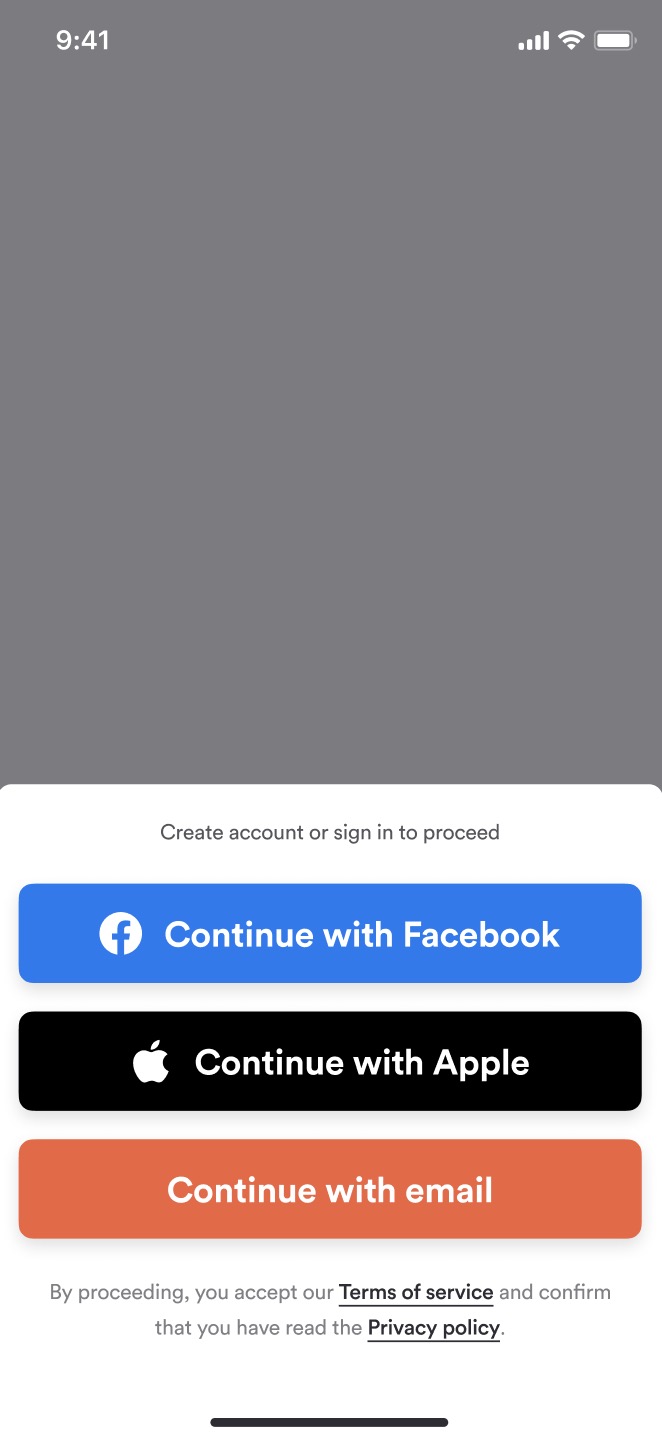
PAR Ordering Ecosystem has two different Sign-in/Sign-up flows:
- Phone number
The Sign-in/Sign-up flow that customers will go through is depending on the Brand's authentication method settings. The brand's authentication method is set on Brand creation and can't be changed later.
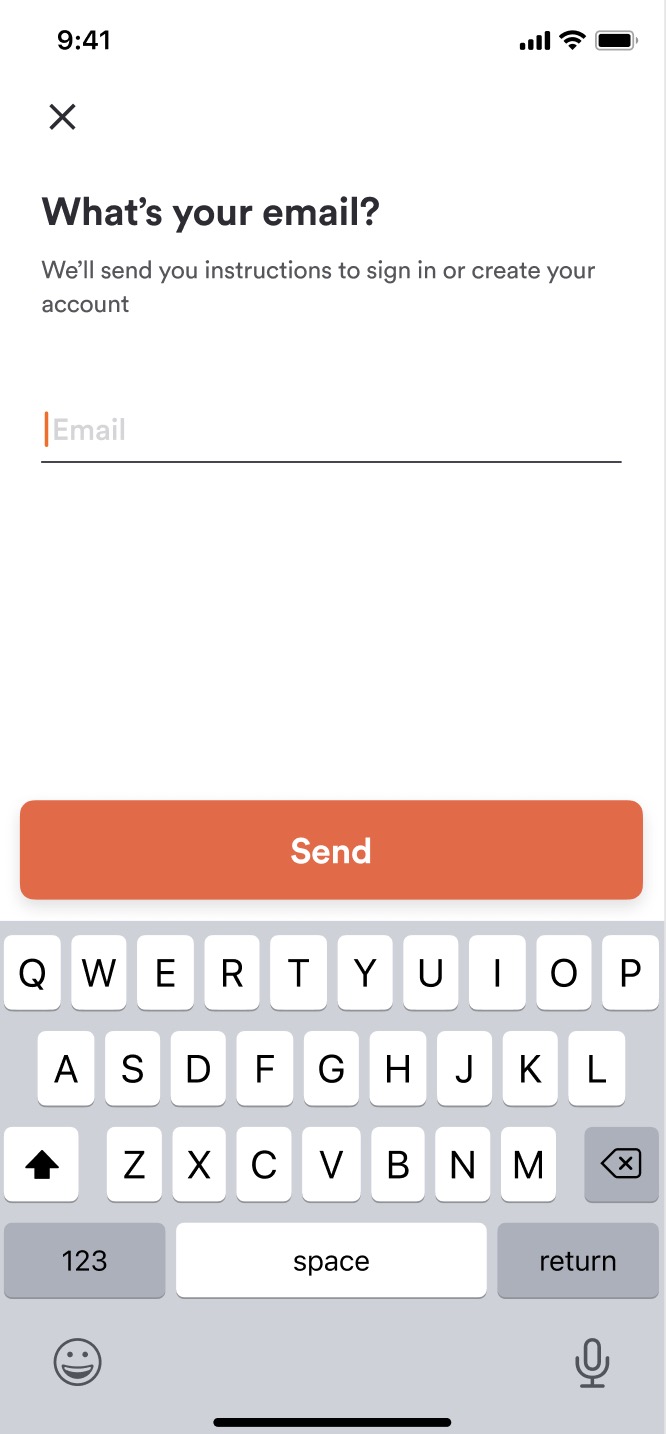
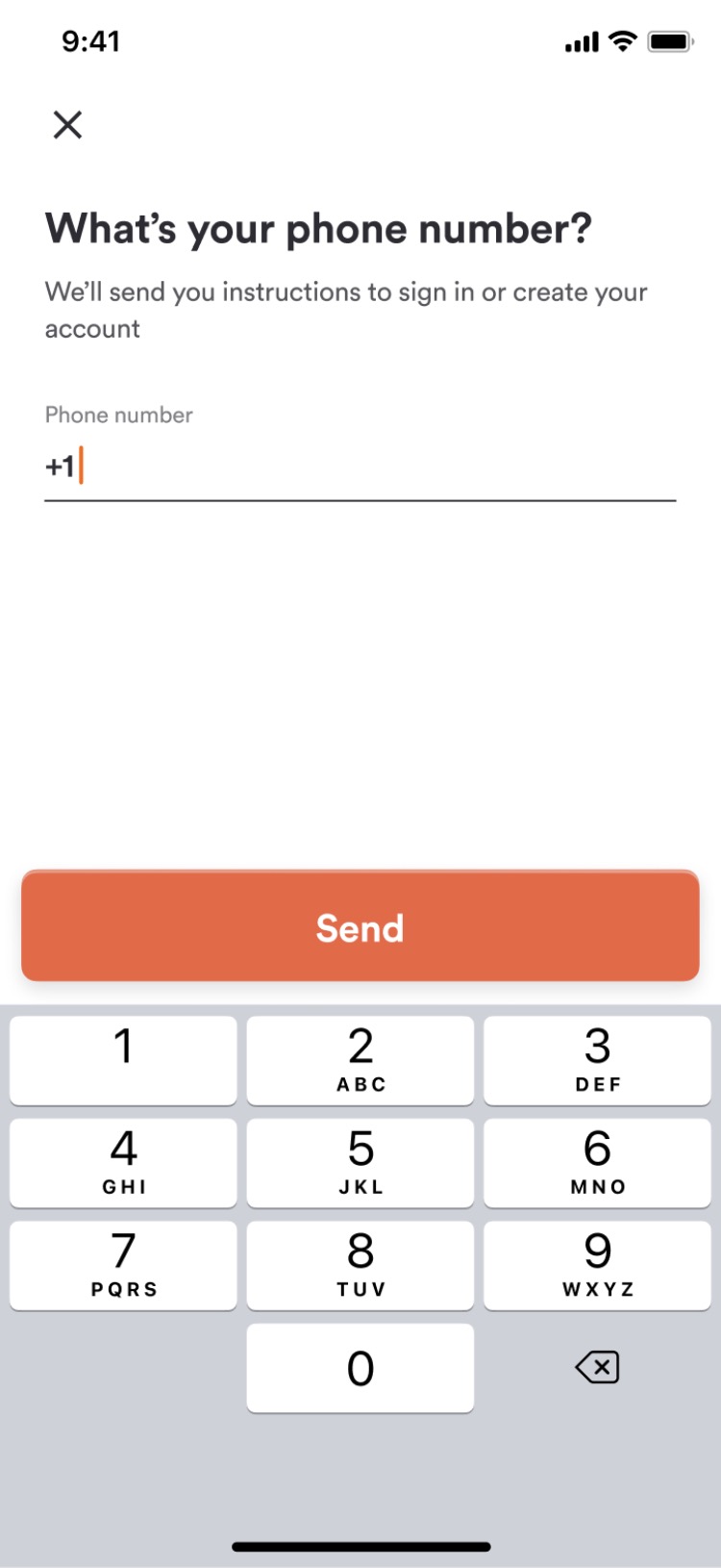
For both flows customer's email is the main customer identifier and that is the reason why the customer email needs to be unique. The main difference between the two flows is that the Email customer auth flow starts with the customer providing their email address and the Phone number customer auth flow starts with the customer providing their phone number.
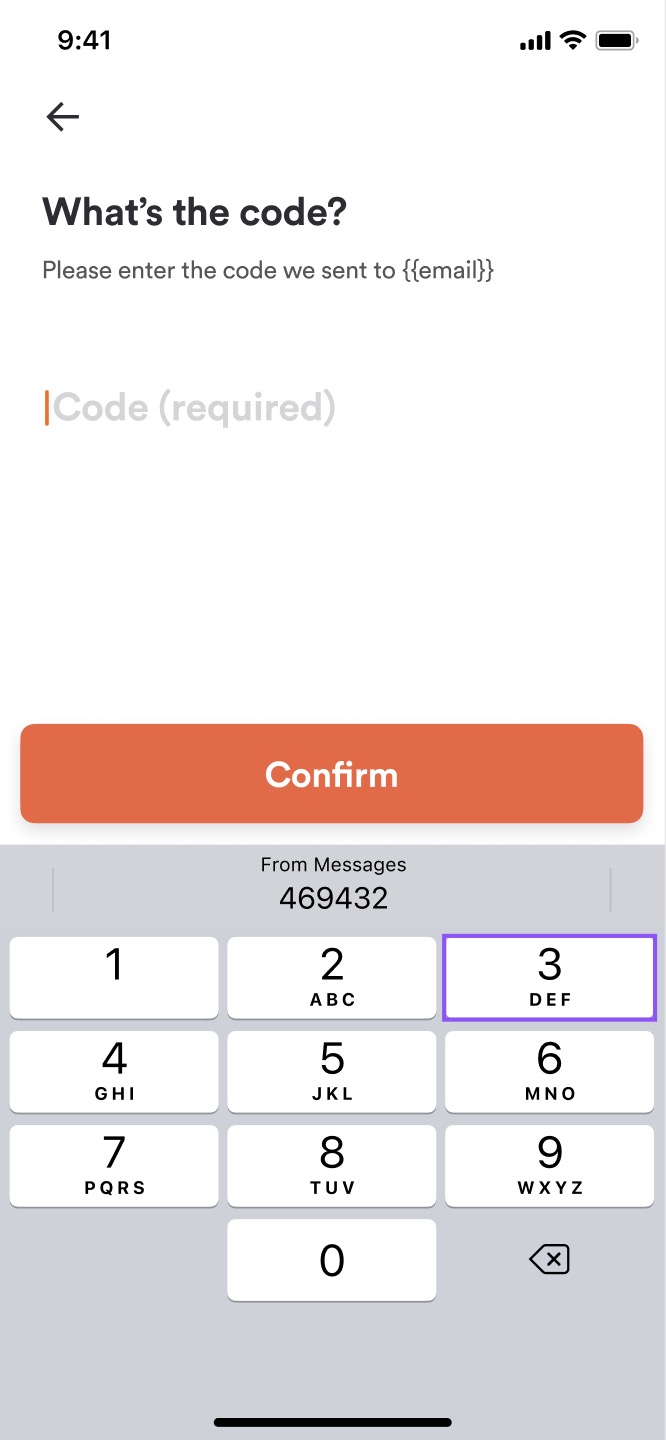
| Choose the Sign In method | Provide the Main Identifier (Email) | Provide the Main Identifier (Phone) | Provide The One time password |
|---|---|---|---|
 |
 |
 |
 |
Check if the customer account already exists in the system
For brands that use Email customer authentication method, to determine if the customer already exists in the system pass the customer email in the body of the following call:
Request
| Attribute | Type | Example Value | Description |
|---|---|---|---|
email |
varchar | "john.doe@gmail.com" |
Customer's email address |
{
  "method": "post",
  "url": "https://api-public-demo.menu.app/api/customers/check-email",
  "headers": {
    "X-Request-ID": "69da3547-204b-4093-a225-54e084c24215",
    "Application": "f3a90488ffee32c3acb6fcd0ca417cf6",
    "Api-Version": "4.78.0",
    "Content-Type": "application/json"
  },
  "body": {
    "email": "john.doe@gmail.com"

  }
}
Response
{
  "status": "OK",
  "code": 200,
  "data": {
    "exists": false,
    "is_social": false
  }
}
| Attribute | Type | Example Value | Description |
|---|---|---|---|
exists |
boolean | true | Provides the information if the email is already used for a registered account. |
is_social |
boolean | false | Provides the information if the email is registered using the social identity provider. |
If the check email call returns the information that the email that the customer provided already exists in the system, the customer should be taken into the Sign-in flow and if the email doesn't exist in the system customer should be taken to the Sign-up flow.
For brands that use Phone number customer authentication method, to determine if the customer already exists in the system, pass the customer's phone number in the body of the following call:
Request
| Attribute | Type | Example Value | Description |
|---|---|---|---|
phone_number |
varchar | "+15852826524" |
Customer's phone number |
{
  "method": "post",
  "url": "https://api-public-demo.menu.app/api/customers/check-phone-number",
  "headers": {
    "X-Request-ID": "69da3547-204b-4093-a225-54e084c24215",
    "Application": "f3a90488ffee32c3acb6fcd0ca417cf6",
    "Api-Version": "4.78.0",
    "Content-Type": "application/json"
  },
  "body": {
    "phone_number": "+15852826524"

  }
}
Response
{
  "status": "OK",
  "code": 200,
  "data": {
    "exists": false,
    "is_social": false
  }
}
| Attribute | Type | Example Value | Description |
|---|---|---|---|
exists |
boolean | Provides the information if the phone number is already used for a registered account. | |
is_social |
boolean | Provides the information if the phone number is registered using the social identity provider. |
If the check email call returns the information that the phone number that the customer provided already exists in the system customer should be taken into the Sign-in flow and if the phone number doesn't exist in the system customer should be taken to the Sign-up flow.
Please note that phone number format validation will check if the phone number is too long or too short, does it starts with a '+', and if it starts with numbers that are not country code for any country and rejects numbers that are not formatted according to those rules.
Sign in for a Brand that uses Email customer authentication method
Before logging the customer in we need to request a One time password that will be sent to the customer's email. This is done by passing the customer's email in the body of the following call:
customers/passwordless-request
This endpoint is throttled. A given email or phone number can request a code 3 times per minute, and there is a looser per-IP cap of 30 per minute. Exceeding either returns
429. Put a short cooldown on your "resend code" button rather than letting the customer tap it repeatedly, and surface a clear message when a429comes back.Some brands also require a
g-recaptcha-responseon this call. Whether it applies depends on the brand configuration, so handle the rejection rather than assuming it is never needed.
Request
| Attribute | Type | Example Value | Description |
|---|---|---|---|
email |
varchar | "john.doe@gmail.com" |
Customer's email address |
{
  "method": "post",
  "url": "https://api-public-demo.menu.app/api/customers/passwordless-request",
  "headers": {
    "X-Request-ID": "69da3547-204b-4093-a225-54e084c24215",
    "Application": "f3a90488ffee32c3acb6fcd0ca417cf6",
    "Api-Version": "4.78.0",
    "Content-Type": "application/json"
  },
  "body": {
    "email": "john.doe@gmail.com"

  }
}
Response
{
  "status": "OK",
  "code": 200
}
You can resend the code to the customer by calling the same route.
To sign the customer in, OTP needs to be passed together with the customer email in the body of the following call:
Request
| Attribute | Type | Example Value | Description |
|---|---|---|---|
passwordless_email |
varchar | "john.doe@gmail.com" |
Customer's email address |
passwordless_code |
varchar | "053631" |
One time password that was sent to customer's email |
{
  "method": "post",
  "url": "https://api-public-demo.menu.app/api/customers/login",
  "headers": {
    "X-Request-ID": "69da3547-204b-4093-a225-54e084c24215",
    "Application": "f3a90488ffee32c3acb6fcd0ca417cf6",
    "Api-Version": "4.78.0",
    "Content-Type": "application/json"
  },
  "body": {
    "passwordless_email": "john.doe@gmail.com",
     "passwordless_code": "053631"

  }
}
Response
{
  "status": "OK",
  "code": 200,
  "data": {
    "customer_account": {
      "id": "0ff757dd-9b8a-4750-89ad-03ff531ae923",
      "type_id": 1,
      "reference_type": "CustomerAccount",
      "first_name": "Jonh",
      "last_name": "Doe",
      "email": "john.doe@gmail.com",
      "phone_number": "",
      "locale": "en-US",
      "state": 1,
      "demographics": [],
      "optin_status_email": 3,
      "optin_status_pn": 3,
      "has_pending_email_change": false,
      "has_pending_phone_number_change": false,
      "is_social": false,
      "social_login": null,
      "updated_at": "2023-08-24 15:33:27",
      "created_at": "2023-08-24 15:33:27"
    },
    "token": {
      "value": "eyJ0eXAiOiJKV1QiLCJhbGciOiJIUzI1NiJ9.eyJzZXRSZWZyZXNoVFRMIjoyNjI4MDAwLCJpc3MiOiJodHRwczovL2FwaS1wdWJsaWMtcGxheWdyb3VuZC5tZW51LmFwcC9hcGkvY3VzdG9tZXJzL2xvZ2luIiwiaWF0IjoxNjkyODkzNTkxLCJleHAiOjE2OTI4OTcxOTEsIm5iZiI6MTY5Mjg5MzU5MSwianRpIjoiT0VsUnNpMXFMYzFaRUkxSCIsInN1YiI6IjUwOTA5NjUiLCJwcnYiOiJjYzMyOTIxYTE1NDgwYTExN2Q5YmJjNzJjMGUxMjU2YTY4NTI0NThiIiwiYXBwbGljYXRpb25faWQiOjIwMTUsInNlc3Npb25faWQiOjI4MjYwfQ.fmHQbNHH4Cd4l1HaWHzavJwGTAImtE2HsC6a3_QUHZc",
      "ttl": 60,
      "refresh_ttl": 2628000,
      "issued_token_type": "access_token",
      "token_type": "Bearer"
    },
    "dlc_access_token": null
  }
}
| Attribute | Type | Example Value | Description |
|---|---|---|---|
locale |
varchar [5] | "en-US" | Customer's location used to show the appropriate translations. |
token |
CustomerAccountToken resource | More information about token refresh here. | |
dlc_access_token |
"en-US" | For brands that have Punchh loyalty integration enabled, contains JWT token resource and for brands using PAR Ordering loyalty integration it's "null". |
After the customer gets logged in we should check if the customer accepted the Terms of Service and Privacy Policy by doing the following call:
{
  "method": "get",
  "url": "https://api-public-demo.menu.app/api/legal-agreement-acceptances/check",
  "headers": {
    "X-Request-ID": "69da3547-204b-4093-a225-54e084c24215",
    "Application": "f3a90488ffee32c3acb6fcd0ca417cf6",
    "Api-Version": "4.78.0",
    "Content-Type": "application/json",
    "Device-UUID": "1287796"
  }

}
Response
{
  "status": "OK",
  "code": 200
}
If the response is false we need to make sure that the customer accepts the Terms of Service and Privacy Policy before we let them continue using the platform:
{
  "method": "post",
  "url": "https://api-public-demo.menu.app/api/legal-agreement-acceptances",
  "headers": {
    "X-Request-ID": "69da3547-204b-4093-a225-54e084c24215",
    "Application": "f3a90488ffee32c3acb6fcd0ca417cf6",
    "Api-Version": "4.78.0",
    "Content-Type": "application/json",
    "Device-UUID": "1287796"
  }

}
Response
{
  "status": "OK",
  "code": 200,
  "data": {
    "legal_agreement_acceptance": {
      "id": "c2635178-1ec0-41d4-9a0b-f85ed7f0659c",
      "device_uuid": "1287796"
    }
  }
}
Sign in for a Brand that uses Phone number customer authentication method
Before logging the customer in we need to request a one-time password that will be sent to the customer's phone number. This is done by passing the customer's phone number in the body of the following call:
customers/passwordless-request
Request
| Attribute | Type | Example Value | Description |
|---|---|---|---|
phone_number |
varchar | "+15852826524" |
Customer's phone number |
{
  "method": "post",
  "url": "https://api-public-demo.menu.app/api/customers/passwordless-request",
  "headers": {
    "X-Request-ID": "69da3547-204b-4093-a225-54e084c24215",
    "Application": "f3a90488ffee32c3acb6fcd0ca417cf6",
    "Api-Version": "4.78.0",
    "Content-Type": "application/json"
  },
  "body": {
    "phone_number": "+15852826524"

  }
}
You can resend the code to the customer by calling the same route.
To sign the customer in, OTP needs to be passed together with the customer phone number in the body of the following call:
Request
| Attribute | Type | Example Value | Description |
|---|---|---|---|
phone_number |
varchar | "+15852826524" |
Customer's phone number |
passwordless_code |
varchar | "053631" |
One time password that was sent to customer's phone number |
{
  "method": "post",
  "url": "https://api-public-demo.menu.app/api/customers/login",
  "headers": {
    "X-Request-ID": "69da3547-204b-4093-a225-54e084c24215",
    "Application": "f3a90488ffee32c3acb6fcd0ca417cf6",
    "Api-Version": "4.78.0",
    "Content-Type": "application/json"
  },
  "body": {
    "phone_number": "+15852826524",
     "passwordless_code": "053631"

  }
}
Response
{
  "status": "OK",
  "code": 200,
  "data": {
    "customer_account": {
      "id": "cbe252fe-3757-4b53-9e3b-c13ee84f65bc",
      "type_id": 1,
      "reference_type": "CustomerAccount",
      "first_name": "John",
      "last_name": "Doe",
      "email": "john.doe@gmail.com",
      "phone_number": "+15852826524",
      "locale": "en",
      "state": 1,
      "demographics": [],
      "optin_status_email": 3,
      "optin_status_pn": 3,
      "has_pending_email_change": false,
      "has_pending_phone_number_change": false,
      "is_social": false,
      "social_login": null,
      "updated_at": "2023-08-03 10:22:42",
      "created_at": "2023-08-01 16:09:10"
    },
    "token": {
      "value": "eyJ0eXAiOiJKV1QiLCJhbGciOiJIUzI1NiJ9.eyJzZXRSZWZyZXNoVFRMIjoyNjI4MDAwLCJpc3MiOiJodHRwczovL2FwaS1wdWJsaWMtcGxheWdyb3VuZC5tZW51LmFwcC9hcGkvY3VzdG9tZXJzL2xvZ2luIiwiaWF0IjoxNjkyOTYwNzQxLCJleHAiOjE2OTI5NjQzNDEsIm5iZiI6MTY5Mjk2MDc0MSwianRpIjoiaEN4MUFERzNPT2RpbnlOMCIsInN1YiI6IjUwOTA1MjciLCJwcnYiOiJjYzMyOTIxYTE1NDgwYTExN2Q5YmJjNzJjMGUxMjU2YTY4NTI0NThiIiwiYXBwbGljYXRpb25faWQiOjIxNDQsInNlc3Npb25faWQiOjI4MjkzfQ.kdhLb6c5QEGxs1j2oqcVJFmxQ3xAAB81-CPaXmaW0FY",
      "ttl": 60,
      "refresh_ttl": 2628000,
      "issued_token_type": "access_token",
      "token_type": "Bearer"
    },
    "dlc_access_token": null
  }
}
| Attribute | Type | Example Value | Description |
|---|---|---|---|
locale |
varchar [5] | "en-US" | Customer's location used to show the appropriate translations. |
token |
CustomerAccountToken resource | More information about token refresh here. | |
dlc_access_token |
"en-US" | For brands that have Punchh loyalty integration enabled, contains JWT token resource and for brands using PAR Ordering loyalty integration it's "null". |
After the customer gets logged in we should check if the customer accepted the Terms of Service and Privacy Policy by doing the following call:
{
  "method": "get",
  "url": "https://api-public-demo.menu.app/api/legal-agreement-acceptances/check",
  "headers": {
    "X-Request-ID": "69da3547-204b-4093-a225-54e084c24215",
    "Application": "f3a90488ffee32c3acb6fcd0ca417cf6",
    "Api-Version": "4.78.0",
    "Content-Type": "application/json",
    "Device-UUID": "1287796"
  }

}
Response
{
  "status": "OK",
  "code": 200
}
If the response is false we need to make sure that customer accepts the Terms of Service and Privacy Policy before we let them continue using the platform:
{
  "method": "post",
  "url": "https://api-public-demo.menu.app/api/legal-agreement-acceptances",
  "headers": {
    "X-Request-ID": "69da3547-204b-4093-a225-54e084c24215",
    "Application": "f3a90488ffee32c3acb6fcd0ca417cf6",
    "Api-Version": "4.78.0",
    "Content-Type": "application/json",
    "Device-UUID": "1287796"
  }

}
Response
{
  "status": "OK",
  "code": 200,
  "data": {
    "legal_agreement_acceptance": {
      "id": "c2635178-1ec0-41d4-9a0b-f85ed7f0659c",
      "device_uuid": "1287796"
    }
  }
}
To keep the customer logged in customer tiken needs to be refreshed. You can find more information about refreshing the customer token here.
Sign Out
To log the customer out use the following route:
Request
| Attribute | Type | Example Value | Description |
|---|---|---|---|
Authorization HTTP header |
string | "Bearer {customer_account_token}" |
JWT Token of Customer Account |
{
  "method": "get",
  "url": "https://api-public-demo.menu.app/api/customers/invalidate-login",
  "headers": {
    "X-Request-ID": "69da3547-204b-4093-a225-54e084c24215",
    "Application": "f3a90488ffee32c3acb6fcd0ca417cf6",
    "Api-Version": "4.78.0",
    "Content-Type": "application/json",
    "Device-UUID": "1287796",
    "Authorization": "Bearer eyJ0eXAiOiJKV1QiLCJhbGciOiJIUzI1NiJ9.eyJzZXRSZWZyZXNoVFRMIjoyNjI4MDAwLCJpc3MiOiJodHRwczovL2FwaS1wdWJsaWMtcGxheWdyb3VuZC5tZW51LmFwcC9hcGkvY3VzdG9tZXJzL2xvZ2luIiwiaWF0IjoxNjkyOTYyNDUxLCJleHAiOjE2OTI5NjYwNTEsIm5iZiI6MTY5Mjk2MjQ1MSwianRpIjoiRk4wY0xJdU5FU0VxNThtYiIsInN1YiI6IjUwOTA1MjciLCJwcnYiOiJjYzMyOTIxYTE1NDgwYTExN2Q5YmJjNzJjMGUxMjU2YTY4NTI0NThiIiwiYXBwbGljYXRpb25faWQiOjIxNDQsInNlc3Npb25faWQiOjI4Mjk5fQ.BW6FiRxXNsCMO1nUs2ec22NGU8y-xsVoAKskQpSrnok"

  }

}
Response
{
  "status": "OK",
  "code": 200
}