Customer Sign-Up Flow
If by checking does the customer account already exist in the system we determine that new customer is accessing the platform, it should be taken into the Sign-up flow.
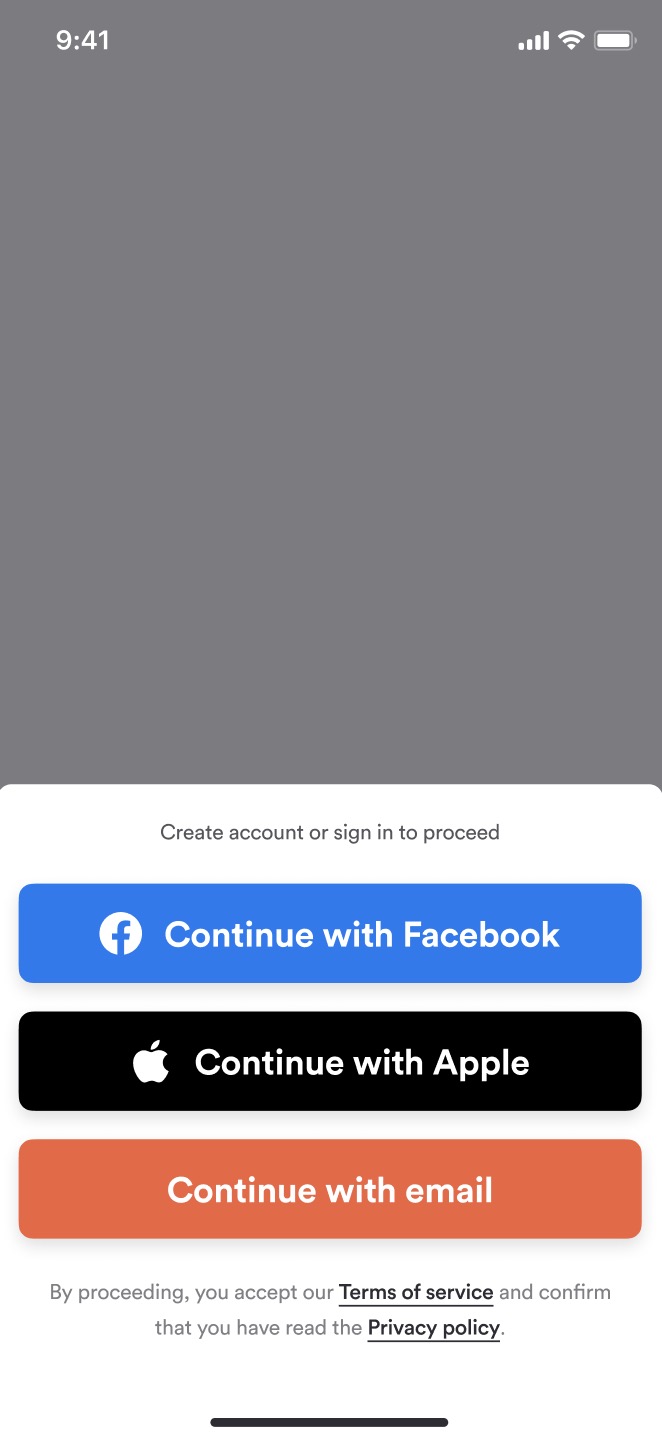
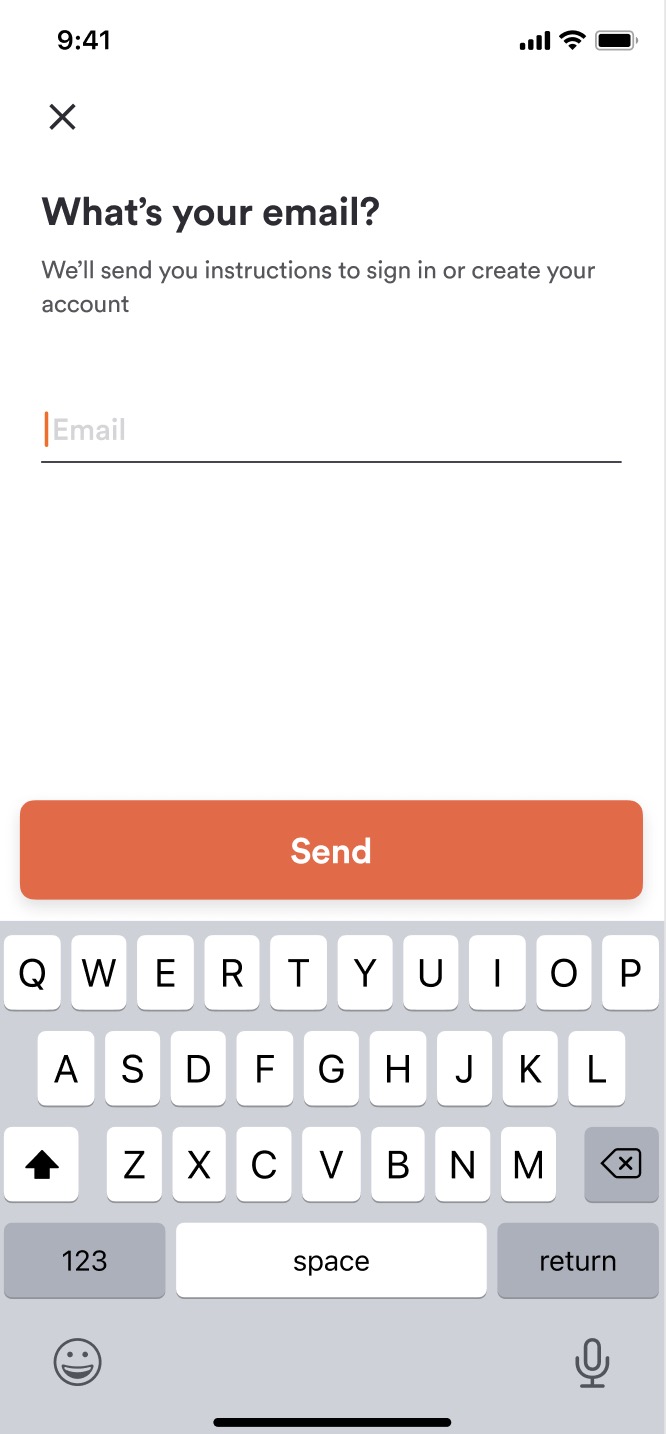
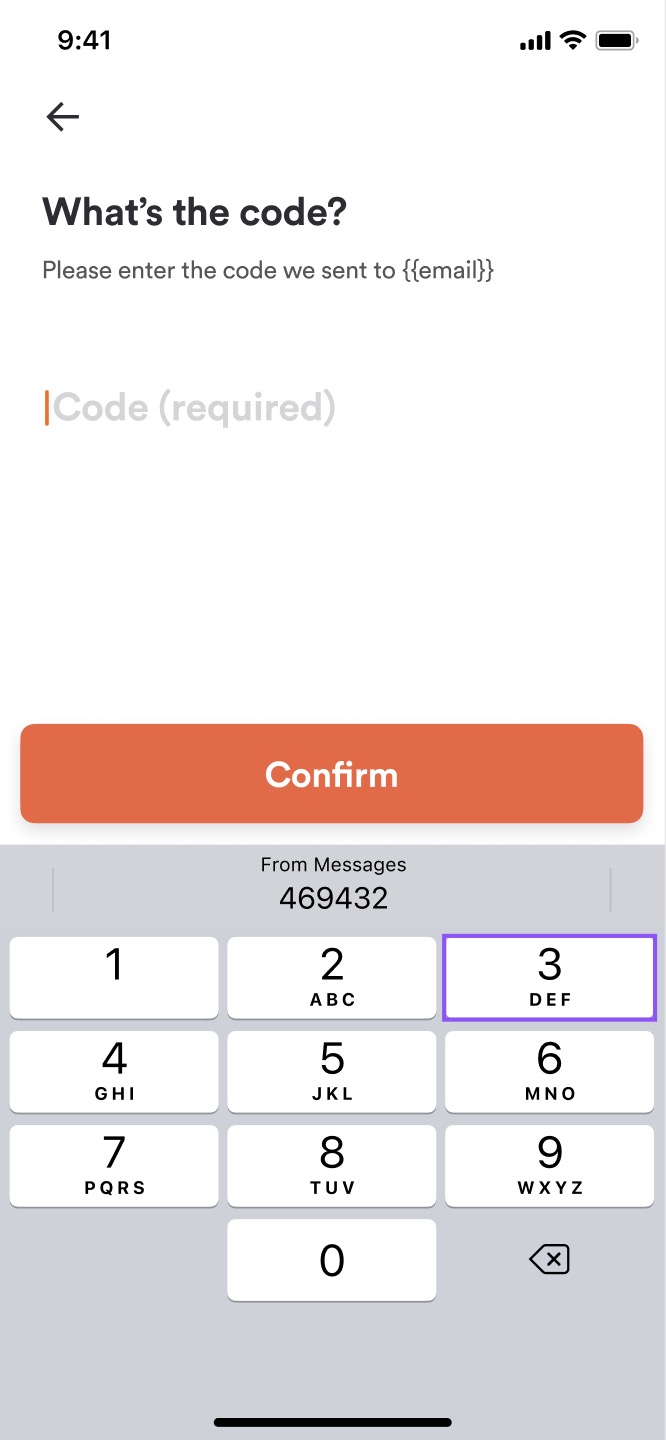
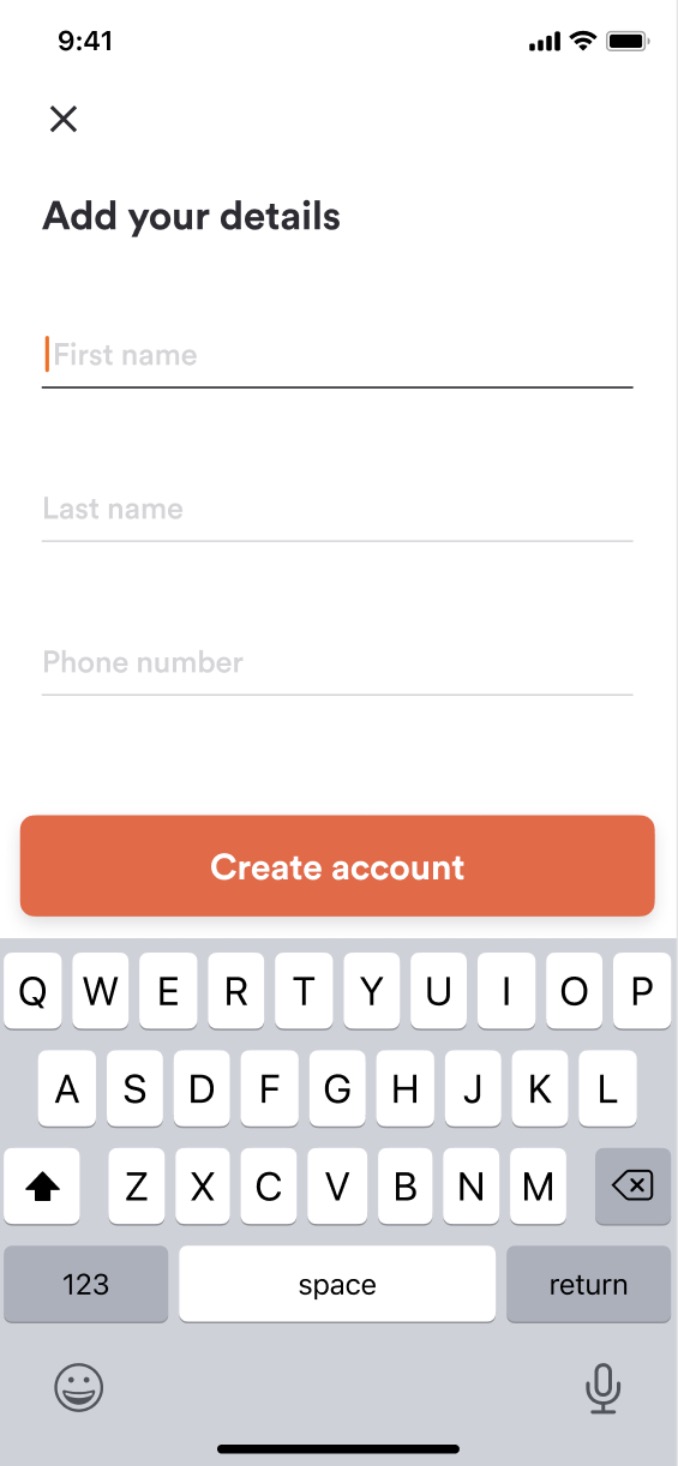
The main difference in the Sign-up flow of brands using email and phone number customer authentication type is the validation of the customer's email or phone number using the one-time password.
With the email authentication type, to be able to register their account customers will need to confirm that they own the provided email address by entering the one-time password that is sent to that email while with the phone number authentication type, the customer’s phone number will be validated in the same way.
| Choose the Sign-In method | Provide the Main Identifier | Provide The One time password | Add Your Details |
|---|---|---|---|
 |
 |
 |
 |
Sign-up in a Brand that uses the Email customer authentication method
Before registering the customer we need to request a One time password that will be sent to the customer's email. This is done by passing the customer's email in the body of the following call:
customers/passwordless-request
Request
| Attribute | Type | Example Value | Description |
|---|---|---|---|
email |
varchar | "john.doe@gmail.com" |
Customer's email address |
{
  "method": "post",
  "url": "https://api-public-demo.menu.app/api/customers/passwordless-request",
  "headers": {
    "X-Request-ID": "69da3547-204b-4093-a225-54e084c24215",
    "Application": "f3a90488ffee32c3acb6fcd0ca417cf6",
    "Api-Version": "4.78.0",
    "Content-Type": "application/json"
  },
  "body": {
    "email": "john.doe@gmail.com"

  }
}
Response
{
  "status": "OK",
  "code": 200
}
After requesting the one-time password we can proceed with registration by passing the customer's email, OTP and required customer data in the body of the register call:
Request
| Attribute | Type | Example Value | Description |
|---|---|---|---|
passwordless_email |
varchar | "john.doe@gmail.com" |
Customer's email address |
passwordless_code |
varchar | "053631" |
One time password that was sent to customer's email |
first_name |
varchar | "John" |
Customer's name |
last_name |
varchar | "Doe" |
Customer's last name |
phone_number |
varchar (optional) | "+15852826524" |
Can be required depending on the Brand's customer authentication type settings |
optin_status_email |
tinyint (optional) | 1 |
How the opt-in for marketing emails is handled depends on the Brand's opt-in settings. More information can be found in the "Opt-in" section of the 'How to view/edit basic information about my Brand' knowledge base article. |
optin_status_sms |
tinyint (optional) | 2 |
Customer's opt-in status for marketing SMS. Values: 1 confirmed, 2 disabled, 3 pending. |
optin_status_pn |
tinyint (optional) | 3 |
Customer's opt-in status for marketing push notifications. Values: 1 confirmed, 2 disabled, 3 pending. |
demographics |
Demographic resource (optional) | Can be required depending on the Brand's customer demographic data settings. | |
password |
varchar | "Let!MeIn8410" |
Can be required depending on the Brand's customer authentication type settings. Password should be required in brands that use the mobile Punchh loyalty application and it's used for the Punchh loyalty account. |
Password needs to comply with the following requirements:
- Between 8 to 25 characters
- At least one number
- At least one capital letter
- At least one lowercase letter
- At least one special character (except &,*, :, ; )
{
  "method": "post",
  "url": "https://api-public-demo.menu.app/api/customers/register",
  "headers": {
    "X-Request-ID": "69da3547-204b-4093-a225-54e084c24215",
    "Application": "f3a90488ffee32c3acb6fcd0ca417cf6",
    "Api-Version": "4.78.0",
    "Content-Type": "application/json"
  },
  "body": {
    "passwordless_email": "john.doe@gmail.com",
     "passwordless_code": "053631",
     "first_name": "Jonh",
     "last_name": "Doe"

  }
}
Response
{
  "status": "OK",
  "code": 200,
  "data": {
    "customer_account": {
      "id": "0ff757dd-9b8a-4750-89ad-03ff531ae923",
      "type_id": 1,
      "reference_type": "CustomerAccount",
      "first_name": "Jonh",
      "last_name": "Doe",
      "email": "john.doe@gmail.com",
      "phone_number": "",
      "locale": "en-US",
      "state": 1,
      "demographics": [],
      "optin_status_email": 3,
      "optin_status_pn": 3,
      "has_pending_email_change": false,
      "has_pending_phone_number_change": false,
      "is_social": false,
      "social_login": null,
      "updated_at": "2023-08-24 15:33:27",
      "created_at": "2023-08-24 15:33:27"
    },
    "token": {
      "value": "eyJ0eXAiOiJKV1QiLCJhbGciOiJIUzI1NiJ9.eyJpc3MiOiJodHRwczovL2FwaS1wdWJsaWMtcGxheWdyb3VuZC5tZW51LmFwcC9hcGkvY3VzdG9tZXJzL3JlZ2lzdGVyIiwiaWF0IjoxNjkyODkxMjA3LCJleHAiOjE2OTI4OTQ4MDcsIm5iZiI6MTY5Mjg5MTIwNywianRpIjoicjhmVE02cE80T3RwQ284dSIsInN1YiI6IjUwOTA5NjUiLCJwcnYiOiJjYzMyOTIxYTE1NDgwYTExN2Q5YmJjNzJjMGUxMjU2YTY4NTI0NThiIiwiYXBwbGljYXRpb25faWQiOjIwMTUsInNlc3Npb25faWQiOjI4MjU5fQ.OXwFMa_ci_6Q35hcYayQEq7_IV2zK5EC_WwaAf_DjQ8",
      "ttl": 60,
      "refresh_ttl": 2628000,
      "issued_token_type": "access_token",
      "token_type": "Bearer"
    },
    "dlc_access_token": null
  }
}
If the brand has the 'Unique phone number' flag enabled in the Email customer authentication method settings
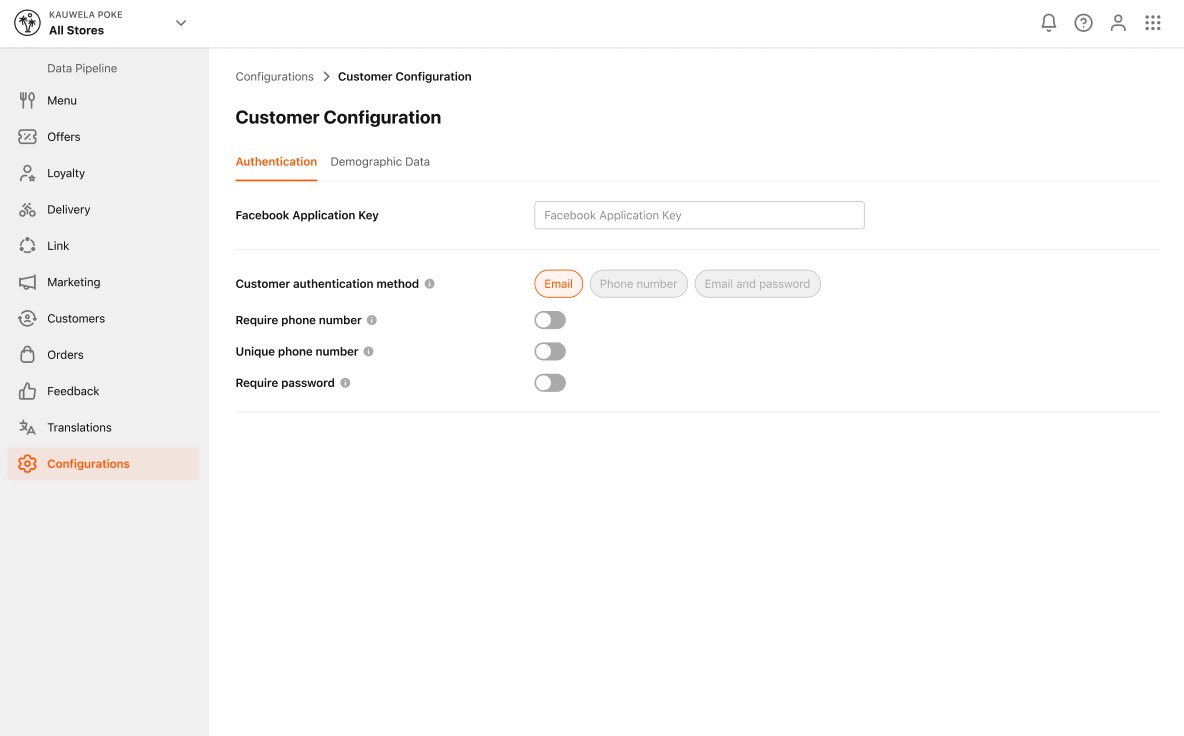
before sending the registration request, we need to check if the phone number which customer provided is unique by passing it in the body of the following call:
Request
| Attribute | Type | Example Value | Description |
|---|---|---|---|
phone_number |
varchar | "+15852826524" |
Customer's phone number |
{
  "method": "post",
  "url": "https://api-public-demo.menu.app/api/customers/check-phone-number",
  "headers": {
    "X-Request-ID": "69da3547-204b-4093-a225-54e084c24215",
    "Application": "f3a90488ffee32c3acb6fcd0ca417cf6",
    "Api-Version": "4.78.0",
    "Content-Type": "application/json"
  },
  "body": {
    "phone_number": "+15852826524"

  }
}
Response
{
  "status": "OK",
  "code": 200,
  "data": {
    "exists": false,
    "is_social": false
  }
}
After completing the customer account registration we need to make sure that the customer accepts the Terms of Service and Privacy Policy before we let them continue using the platform:
{
  "method": "post",
  "url": "https://api-public-demo.menu.app/api/legal-agreement-acceptances",
  "headers": {
    "X-Request-ID": "69da3547-204b-4093-a225-54e084c24215",
    "Application": "f3a90488ffee32c3acb6fcd0ca417cf6",
    "Api-Version": "4.78.0",
    "Content-Type": "application/json",
    "Device-UUID": "1287796"
  }

}
Response
{
  "status": "OK",
  "code": 200,
  "data": {
    "legal_agreement_acceptance": {
      "id": "c2635178-1ec0-41d4-9a0b-f85ed7f0659c",
      "device_uuid": "1287796"
    }
  }
}
Sign-up in a Brand that uses the Phone number customer authentication method
Before registering the customer we need to request a One time password that will be sent to the customer's phone number. This is done by passing the customer's phone number in the body of the following call:
customers/passwordless-request
Request
| Attribute | Type | Example Value | Description |
|---|---|---|---|
phone_number |
varchar | "+15852826524" |
Customer's phone number |
{
  "method": "post",
  "url": "https://api-public-demo.menu.app/api/customers/passwordless-request",
  "headers": {
    "X-Request-ID": "69da3547-204b-4093-a225-54e084c24215",
    "Application": "f3a90488ffee32c3acb6fcd0ca417cf6",
    "Api-Version": "4.78.0",
    "Content-Type": "application/json"
  },
  "body": {
    "phone_number": "+15852826524"

  }
}
Response
{
  "status": "OK",
  "code": 200
}
You can resend the code to the customer by calling the same route.
After requesting the one-time password we can proceed with registration by passing the customer's phone number, OTP and required customer data in the body of the register call:
Request
| Attribute | Type | Example Value | Description |
|---|---|---|---|
passwordless_email |
varchar | "john.doe@gmail.com" |
Customer's email address |
passwordless_code |
varchar | "053631" |
One time password that was sent to customer's email |
first_name |
varchar | "John" |
Customer's name |
last_name |
varchar | "Doe" |
Customer's last name |
phone_number |
varchar | "+15852826524" |
Customer's phone number. Always required in Brands that use Phone number customer auth method. |
optin_status_email |
tinyint (optional) | 1 |
How the opt-in for marketing emails is handled depends on the Brand's opt-in settings. More information can be found in the "Opt-in" section of the 'How to view/edit basic information about my Brand' knowledge base article. |
optin_status_sms |
tinyint (optional) | 2 |
Customer's opt-in status for marketing SMS. Values: 1 confirmed, 2 disabled, 3 pending. |
optin_status_pn |
tinyint (optional) | 3 |
Customer's opt-in status for marketing push notifications. Values: 1 confirmed, 2 disabled, 3 pending. |
demographics |
Demographic resource (optional) | Can be required depending on the Brand's customer demographic data settings. |
{
  "method": "post",
  "url": "https://api-public-demo.menu.app/api/customers/register",
  "headers": {
    "X-Request-ID": "69da3547-204b-4093-a225-54e084c24215",
    "Application": "f3a90488ffee32c3acb6fcd0ca417cf6",
    "Api-Version": "4.78.0",
    "Content-Type": "application/json"
  },
  "body": {
    "phone_number": "+15852826524",
    "passwordless_email": "john.doe@gmail.com",
     "passwordless_code": "053631",
     "first_name": "Jonh",
     "last_name": "Doe"

  }
}
Response
{
  "status": "OK",
  "code": 200,
  "data": {
    "customer_account": {
      "id": "8100bab1-267e-41ae-8592-c229253b0129",
      "type_id": 1,
      "reference_type": "CustomerAccount",
      "first_name": "Jonh",
      "last_name": "Doe",
      "email": "john.doe@gmail.com",
      "phone_number": "+15852826524",
      "locale": "en-US",
      "state": 1,
      "demographics": [],
      "optin_status_email": 3,
      "optin_status_pn": 3,
      "has_pending_email_change": false,
      "has_pending_phone_number_change": false,
      "is_social": false,
      "social_login": null,
      "updated_at": "2023-08-25 12:10:33",
      "created_at": "2023-08-25 12:10:33"
    },
    "token": {
      "value": "eyJ0eXAiOiJKV1QiLCJhbGciOiJIUzI1NiJ9.eyJpc3MiOiJodHRwczovL2FwaS1wdWJsaWMtcGxheWdyb3VuZC5tZW51LmFwcC9hcGkvY3VzdG9tZXJzL3JlZ2lzdGVyIiwiaWF0IjoxNjkyOTY1NDMzLCJleHAiOjE2OTI5NjkwMzMsIm5iZiI6MTY5Mjk2NTQzMywianRpIjoiSDg3bHlxZUIwZFZRYnRBRiIsInN1YiI6IjUwOTA5NzYiLCJwcnYiOiJjYzMyOTIxYTE1NDgwYTExN2Q5YmJjNzJjMGUxMjU2YTY4NTI0NThiIiwiYXBwbGljYXRpb25faWQiOjIxNDQsInNlc3Npb25faWQiOjI4MzE0fQ.1LSunIWUapPQTySrXXBzwsufyP9EAXmGQvEHRfp0tqk",
      "ttl": 60,
      "refresh_ttl": 2628000,
      "issued_token_type": "access_token",
      "token_type": "Bearer"
    },
    "dlc_access_token": null
  }
}
Although the customer email is not validated in case when the brand is using the Phone number customer authentication we still need to make sure that the provided email is unique in the system before sending the registration request. That can be checked by passing the customer's email in the body of the following call:
Request
| Attribute | Type | Example Value | Description |
|---|---|---|---|
email |
varchar | "john.doe@gmail.com" |
Customer's email address |
{
  "method": "post",
  "url": "https://api-public-demo.menu.app/api/customers/check-email",
  "headers": {
    "X-Request-ID": "69da3547-204b-4093-a225-54e084c24215",
    "Application": "f3a90488ffee32c3acb6fcd0ca417cf6",
    "Api-Version": "4.78.0",
    "Content-Type": "application/json"
  },
  "body": {
    "email": "john.doe@gmail.com"

  }
}
Response
{
  "status": "OK",
  "code": 200,
  "data": {
    "exists": false,
    "is_social": false
  }
}
| Attribute | Type | Example Value | Description |
|---|---|---|---|
exists |
boolean | true | Provides the information if the email is already used for a registered account. |
is_social |
boolean | false | Provides the information if the email is registered using the social identity provider. |
After completing the customer account registration we need to make sure that the customer accepts the Terms of Service and Privacy Policy before we let them continue using the platform:
{
  "method": "post",
  "url": "https://api-public-demo.menu.app/api/legal-agreement-acceptances",
  "headers": {
    "X-Request-ID": "69da3547-204b-4093-a225-54e084c24215",
    "Application": "f3a90488ffee32c3acb6fcd0ca417cf6",
    "Api-Version": "4.78.0",
    "Content-Type": "application/json",
    "Device-UUID": "1287796"
  }

}
Response
{
  "status": "OK",
  "code": 200,
  "data": {
    "legal_agreement_acceptance": {
      "id": "c2635178-1ec0-41d4-9a0b-f85ed7f0659c",
      "device_uuid": "1287796"
    }
  }
}