PAR OPS Insights & Delivery Developer Guide
Overview
PAR OPS Insights and Delivery (formerly Delaget) is a part of PAR OPS that gathers data from various sources and aggregates it into a central data storage. It has interfaces to enable applications to manage workforce data about workers, time cards, and transactions at every location of every organization.
Intended Audience
This developer guide is intended for software developers with third-party software vendors. It provides information on how to use the PAR OPS Insights & Delivery APIs to drive workforce-management applications for restaurants.
The audience needs to understand the full use cases of Insights & Delivery.
Getting Started
To get started with Insights & Delivery, the following is a useful course of action:
-
Learn the key use cases and key concepts described in this document. These concepts and use cases are useful to understand when studying the scenarios.
-
Acquire the prerequisites, such as an Insights & Delivery test environment configured with seed data. Your PAR representative will provide these for you.
-
Study the API endpoint documentation in Appendix A and the scenarios codified in these documents. In particular, take note of the HTTP method, URLs, HTTP request headers, HTTP body, and HTTP responses.
-
Study the Insights & Delivery data model diagram described in this document. Study the relationships between the various data entities in the key concepts. Study the use cases and the data model a few times, as the data model informs learning the use cases and use cases inform learning the data model.
-
Build your project plan on how to effectively and efficiently build your integration with Insights & Delivery.
Key Business Use Cases
The following sections outline a few key use cases that highlight the feature capabilities of Insights & Delivery. The use cases are all about reading data from Insights & Delivery. The data is first acquired when the PAR OPS Insights & Delivery system is configured, and loads data from a POS system, a workforce-management system, and other systems by ETL (extract, transform, load) processes outside the scope of this document.
Use Case 1 - Initialize Integration
In this scenario, the application must initialize the data of the integration by uploading the data of all of the organizations for which it manages workforce data. This use case will be run infrequently -- only when new organizations are added to the data set or if organization data changes.
Action Sequence
These are the steps to initialize the integration.
-
Call the List Organizations API to get a list of organizations and the locations at each organization and the tax rates for each location.
-
Save the organizations, locations, and tax rates into the database of the integration.
-
For each organization in the previous step, call the Get Organization Data API, providing the organization's
organization_codeidentifier acquired from the previous step. Each response will return a list of locations, and for each location it returns a list of workers and a list of tax rates. -
Save and update the organizations, tax rates, locations, and workers into the database of the integration.
At this point, the integration is ready to run subsequent use cases to run its workforce-management operations.
Use Case 2 - Update Location Data
In this scenario, the integration must update the data of the integration by uploading the data of all of the organizations for which it manages workforce data. This use case will be run infrequently, only when new organizations are added to the data set.
Action Sequence
These are the steps to update location data in the integration.
-
From the organizations table in the integration database, acquire an
organization_codefor the organization that needs an update of location data. -
For the organization in the previous step, call the Get Organization Data API, providing the organization's
organization_codeidentifier acquired from the previous step. Each response will return a list of locations, and for each location it returns a list of workers and a list of tax rates. -
Save and update the organizations, tax rates, locations, and workers into the database of the integration.
The integration database now contains the workers at each location. At this point, the integration is ready to run subsequent use cases to run its workforce-management operations.
Use Case 3 - Update Worker Data
In this scenario, the integration must update the worker data of the integration by uploading the worker data of all of the organizations for which it manages workforce data. This use case will be run often, especially just before a pay cycle, or just after the workforce changes.
Action Sequence
These are the steps to update worker data in the integration.
-
From the organizations table in the integration database, acquire an
organization_codefor the organization that needs an update of location data. -
For the organization in the previous step, call the Get Worker Data API, providing the organization's
organization_codeidentifier acquired from the previous step. The response will return a list of locations, and for each location it returns a list of workers and a list of tax rates. -
Save and update the organizations, tax rates, locations, and workers into the database of the integration.
The integration database now contains the workers at each location. At this point, the integration is ready to run subsequent use cases to run its workforce-management operations.
Use Case 4 - Update Location and Worker Performance Data
In this scenario, the integration must update the worker performance data of the integration by uploading the worker data of all of the organizations for which it manages workforce data. This use case will be run often, especially just before a pay cycle, or just after the workforce changes.
Action Sequence
These are the steps to update worker data in the integration.
-
From the organizations table in the integration database, acquire an
organization_codefor the organization that needs an update of location data. For each location in the organization, acquire thelocation_idof that location. -
For each location the organization in the previous step, call the List Location Transactions API, providing the organization's
organization_codeidentifier and the location'slocation_idacquired from the previous step, and the date of the transactions. Each response will return a list of retail transactions for that location, including a list of line items for each transaction. -
Save transactions and line items into the database of the integration.
The integration database now contains the worker performance data for each location. At this point, the integration is ready to run subsequent use cases to run its workforce performance reporting operations.
Use Case 5 - Update Payroll Data
In this scenario, the integration must update the worker payroll data of the integration by uploading the worker time card data of all locations each organization for which it manages payroll. This use case will be run often, especially just before a pay cycle, or just after the workforce changes.
Action Sequence
These are the steps to update worker data in the integration.
-
From the organizations table in the integration database, acquire an
organization_codefor the organization that needs an update of location data, and for each location in the organization, acquire thelocation_idof that location. Also get a list of dates for which time cards are needed. -
For each date and each location in the organization in the previous step, call the Get Labor Data API, providing the organization's
organization_codeidentifier and the location'slocation_idacquired from the previous step, and the date of the transactions. Each response will return a list of retail time cards for each worker for that location. -
Save the time card data acquired from the previous step in the time card data in the integration database for each worker in each location in each organization.
-
Call the List Pay Differentials API with the
organization_codefrom the first step to acquire a list of pay differential records for that organization. -
Save the pay differential records from the previous step under the organization in the integration database.
The integration database now contains the worker payroll data for each location. At this point, the integration is ready to run its workforce payroll operations.
Use Case 6 - Get Location Summary
In this scenario, the integration must update the worker performance data of the integration by uploading the worker data of all of the organizations for which it manages workforce data. This use case will be run often, especially when location performance is being reviewed.
Action Sequence
These are the steps to update worker data in the integration.
-
From the organizations table in the integration database, acquire an
organization_codefor the organization that needs an update of location data, and for each location in the organization, acquire thelocation_idof that location. -
For each location and organization in the previous step, call the Get Location Summary API, providing the organization's
organization_codeidentifier and the location'slocation_idacquired from the previous step, and the date of the summary. Each response will return a location summary for that location. -
Save location summary under locations in the integration database.
The integration database now contains the worker performance data for each location. At this point, the integration is ready to run location performance reporting operations.
Key Concepts
Implementing PAR OPS Insights & Delivery into a system depends on understanding the key concepts in the information model. If you understand these key concepts, and how they relate to each other as described below, it will be easier to understand the key use cases that will enable you to build an integration with PAR OPS Insights & Delivery.
Managed Entities
This list describes the various types of data entities in Insights & Delivery, available to users of the APIs.
- Organization - This contains data about an organization, and each organization has a unique
codeto identify it. This code becomes theorganization_codeused as an argument to many API calls. - Location - This contains data about a location, and each location has a unique
location_idto identify it. This code becomes thelocation_idused as an argument to many API calls. A location belongs to one organization. - Tax Rate - This contains data about a tax rate, and each location has a unique
codeto identify it. A tax rate belongs to one location. - Worker - This contains data about a worker, and each worker has a unique
client_worker_identificationto uniquely identify a worker. A worker belongs to a location. - Retail Transaction - This contains data about a retail transaction, and each retail transaction has a unique
identifierto identify it. A retail transaction belongs to a worker and a location. - Line Item - This contains data about a line item, and each line item has an
idto uniquely identify it within the transaction (line_item.idandtransaction.identifiertogether uniquely identify a line item record). A line item belongs to a transaction. - Time Card - This contains data about a worker's time card, and each time card has an
idto uniquely identify it. A time card belongs to a worker. - Location Summary - This is a summary of performance for a specific location on a specific date.
- Pay Differential - This contains data about a pay differential identified by its
clock_in,clock_out,job_code, andlocation_number. This pay differential tells the payroll system when there was a difference of pay ofdifferential_rateduring the time period bounded byclock_inandclock_out. A pay differential belongs to a location (via itslocation_numberattribute) and to an organization.
Data Model
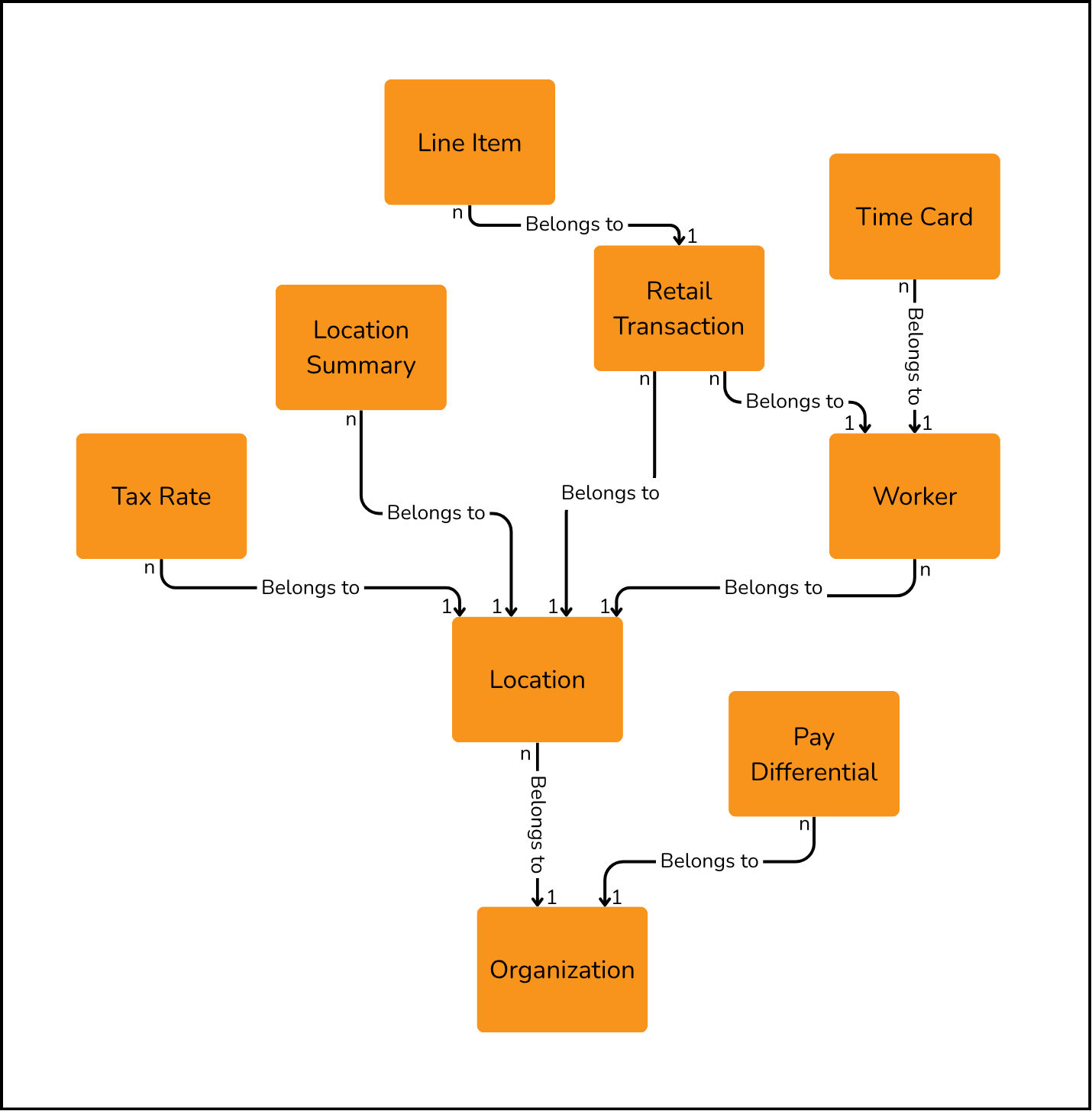
The following diagram illustrates how the various data entities in the PAR OPS Insights & Delivery data model depend on each other. (The dependency goes in the direction of the arrow; e.g., the Location depends on or belongs to an Organization) A couple of notes about the diagram:
-
The “belongs to” relationships go in the direction of the arrow; e.g., a Location belongs to an Organization. These relationships must be recorded and managed in an integration that uses Insights & Delivery APIs.
-
The numbers at the ends of the solid arrow show the cardinality of the relationship; e.g., there can be n worker entities that belong to 1 location.
Prerequisites
In order to develop an integration with Insights & Delivery APIs, you will need the following environments set up:
-
A tenant in PAR OPS on a production stack. This tenant is identified by a token, which is called
YOUR_SECRET_TOKENin the API documentation, and this token is required in theApiKeyheader of each Insights & Delivery API call to authenticate and authorize the API call. Your PAR representative can provide you this key. -
The base URL used to call PAR OPS Insights & Delivery APIs is required for all API calls, and is also provided by your PAR representative.
Please ask your PAR representative to ensure that your test environment has these things configured. The PAR OPS Insights & Delivery Platform hosts these APIs.
Appendix A: API Endpoints
Here is a list of APIs that are relevant to Insights & Delivery: