Tip
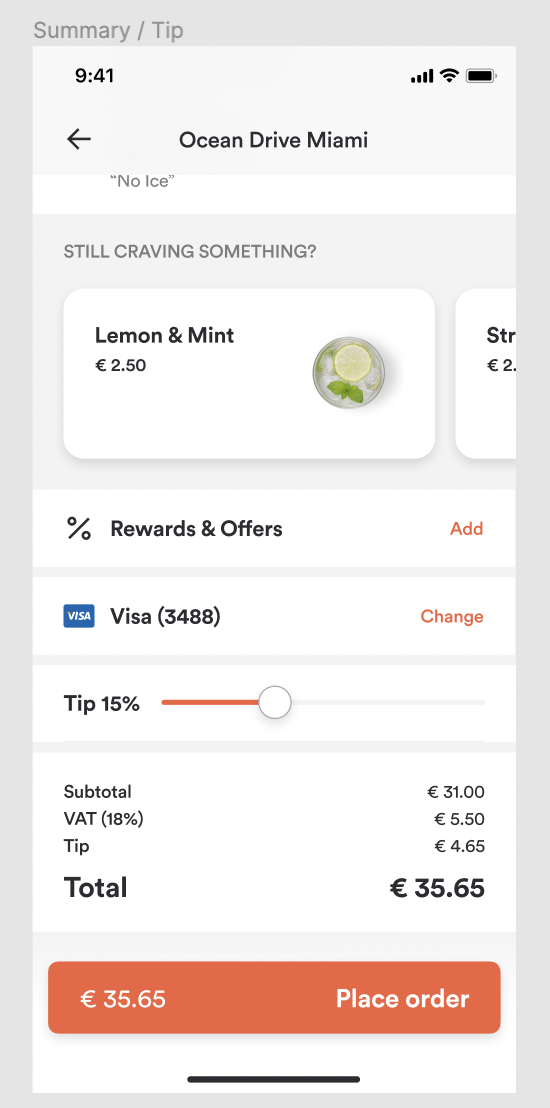
This guide shows you how to let a customer add a tip to their order.
Before proceeding, you should have implemented:
Find out what to offer
Tipping is configured per order type, so a store might invite a tip on delivery but not on takeout. Fetch the order types enabled for the venue and their configuration with POST /api/directory/search?view=search, and use it to decide what to show: a default tip to preselect, and a maximum.
If the maximum tip is 0%, tipping is disabled for that order type — do not show the control at all.
Request
{
  "method": "post",
  "url": "https://api-public-demo.menu.app/api/directory/search?view=search",
  "headers": {
    "X-Request-ID": "c10b4a70-6274-490d-80a0-03e7bb826937",
    "Application": "f3a90488ffee32c3acb6fcd0ca417cf6",
    "Api-Version": "4.78.0",
    "Accept": "application/json",
    "Content-Type": "application/json",
    "Device-UUID": "b6f0a5f2-2f1e-4a3c-9a1e-2c4c9f0d7f11",
    "X-QL-Enabled": true
  }
}
Put the tip on the cart
The tip lives on the cart, as cart.tip. It has two fields and both are required on every cart update, whether or not the customer has tipped:
type—1for a fixed amount,2for a percentage.amount— the amount in minor units whentypeis1, or the percentage whentypeis2.
If the customer has not tipped, send {"amount": 0, "type": 1}. Omitting cart.tip entirely will fail validation, which is one of the most common mistakes when first building against the cart.
Request
{
  "method": "put",
  "url": "https://api-public-demo.menu.app/api/cart/{cart_id}",
  "headers": {
    "X-Request-ID": "69da3547-204b-4093-a225-54e084c24215",
    "Application": "f3a90488ffee32c3acb6fcd0ca417cf6",
    "Api-Version": "4.78.0",
    "Content-Type": "application/json"
  },
  "body": {
    "metadata": {
      "venue_id": "a9d6d0c8-1689-4114-b1ec-6da9c33f0384",
      "order_type": {
        "id": 6,
        "pickup_asap": true
      }
    },
    "cart": {
      "products": [
        {
          "price_id": "9a4e25be-9c32-4b69-81b7-19a4f3595406",
          "quantity": 1,
          "comment": "",
          "product_groups": []
        }
      ],
      "discounts": [],
      "tip": {
        "amount": 15,
        "type": 2
      }
    }
  }
}
That example leaves a 15% tip. To leave a fixed £5.00 instead, send {"amount": 500, "type": 1} — amounts are always in minor units, as described in API Basics.
Show the customer what they will pay
You do not need to work out the tip yourself. The cart response recalculates everything, and the tip appears in summary alongside the subtotal, taxes and fees. Show the customer the totals from the most recent cart response rather than adding the tip on the client, so what they see always matches what will be charged.
Because the tip is part of the cart, changing it is just another cart update — the customer can adjust it as many times as they like before checkout, and each response comes back with the new total.
A note on percentages
When type is 2, the percentage is applied by us, so the resulting cash value changes if the customer then adds or removes items. If your UI shows the tip as a cash figure, re-read it from summary after every cart change rather than caching it.
Check out, pay and place the order
Nothing tip-specific happens after this. The tip is already on the cart, so continue with checkout, payment and order creation as described in Server Side Cart. The amount you pass to payment initialization should be the cart total including the tip, taken from the checkout response.